
MINECRAFTBIBLE
Loading...

AquaBreeder expands Minecraft fishing with custom fish, rod progression, breeding, FishDex, storage, aquariums, and a selling system.
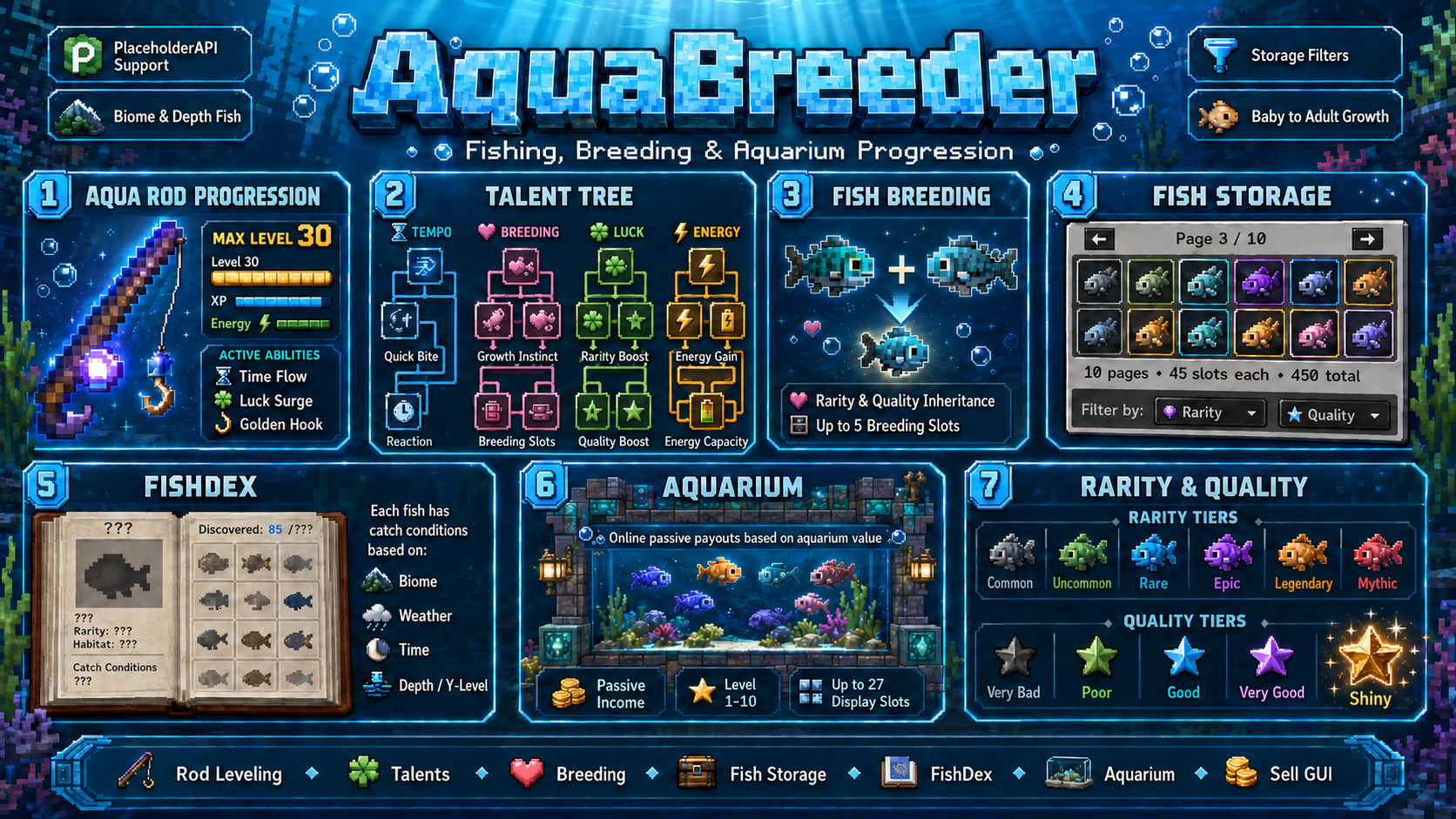
AquaBreeder turns Minecraft fishing into a real progression system.
Instead of only waiting for a bite and receiving a random item, players can catch unique fish, win an interactive minigame, level their Aqua Rod, unlock talents, breed better fish, build a collection, fill their aquarium, and sell valuable catches through a safe economy system.
Fishing becomes more than a small side activity.
It becomes something players can actually work on.
Some fish are useful starter material.
Some are perfect for breeding.
Some are rare lucky catches.
And some are the kind of fish players will want to keep, display, and be proud of.
The fishing minigame is one of the main highlights of AquaBreeder.
Players do not just cast the rod and instantly receive a custom fish. They have to react at the right moment and win the minigame to secure the catch.

This makes fishing feel much more active.
Rare catches feel better because the player actually had to win them.
The minigame gives fishing a bit of tension without making it complicated. It is simple to understand, but it makes every special catch feel more rewarding.
The gameplay loop is easy to understand, but gives players long-term goals.
Players start with an Aqua Rod, catch baby fish, grow them into adults, breed matching species, collect or sell their fish, and progress their rod through XP, talents, energy, and active abilities.
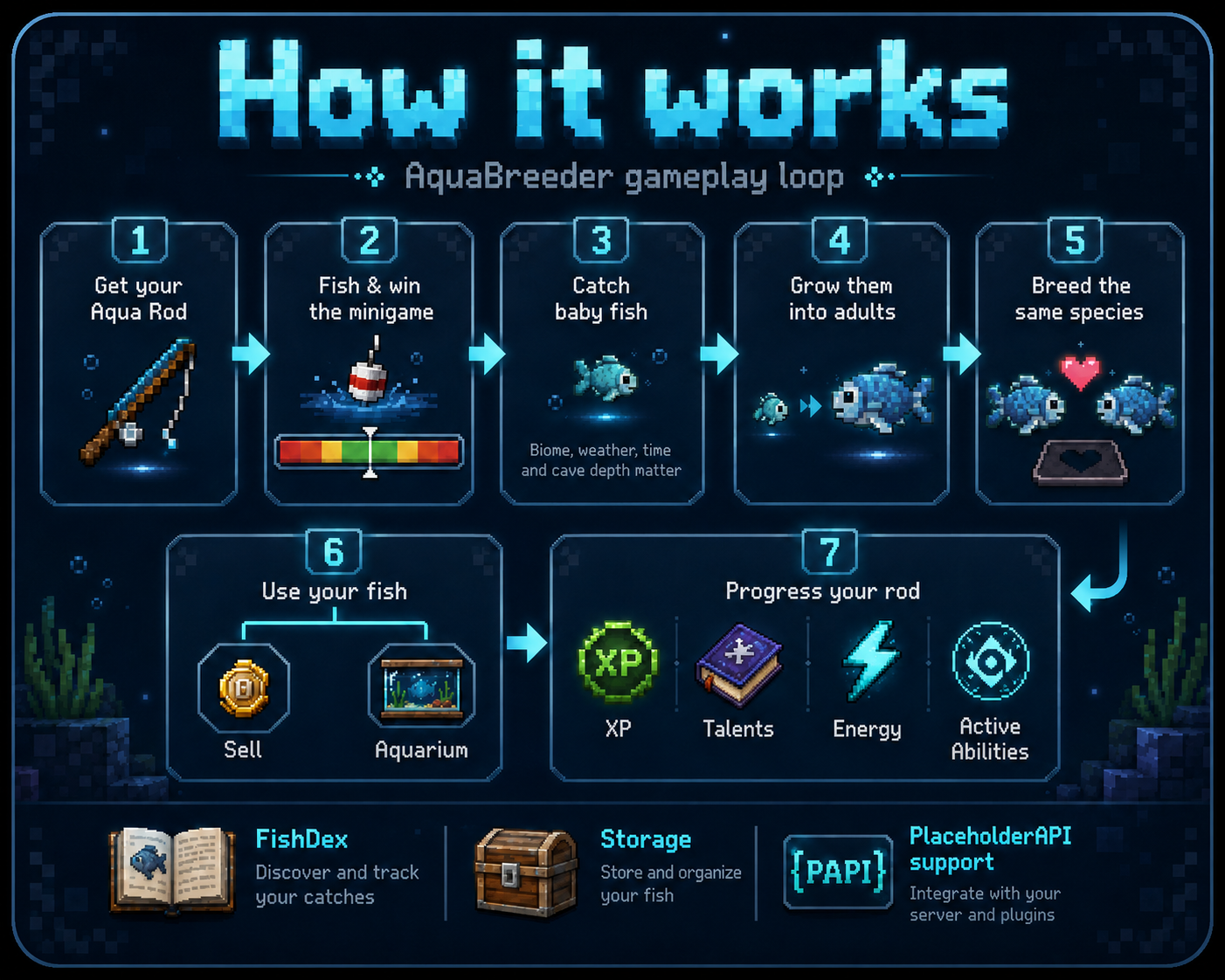
AquaBreeder is built around progression.
Fishing gives players material, breeding improves the results, and the aquarium gives them a reason to keep their best fish instead of selling everything instantly.
AquaBreeder adds custom fish with their own species, rarity, quality, value, and growth state.
Fish can have:
Every fish is more than just a renamed item.
AquaBreeder stores important fish data internally, so real custom fish can be checked properly and fake copied items are not treated like valid AquaBreeder fish.
This helps keep the economy safer and makes every valuable fish feel more meaningful.
Breeding is one of the most important parts of AquaBreeder.
Fishing gives players starter fish, useful breeding material, and the chance for lucky catches.
But breeding is the main way to work toward stronger, rarer, and more valuable fish over time.
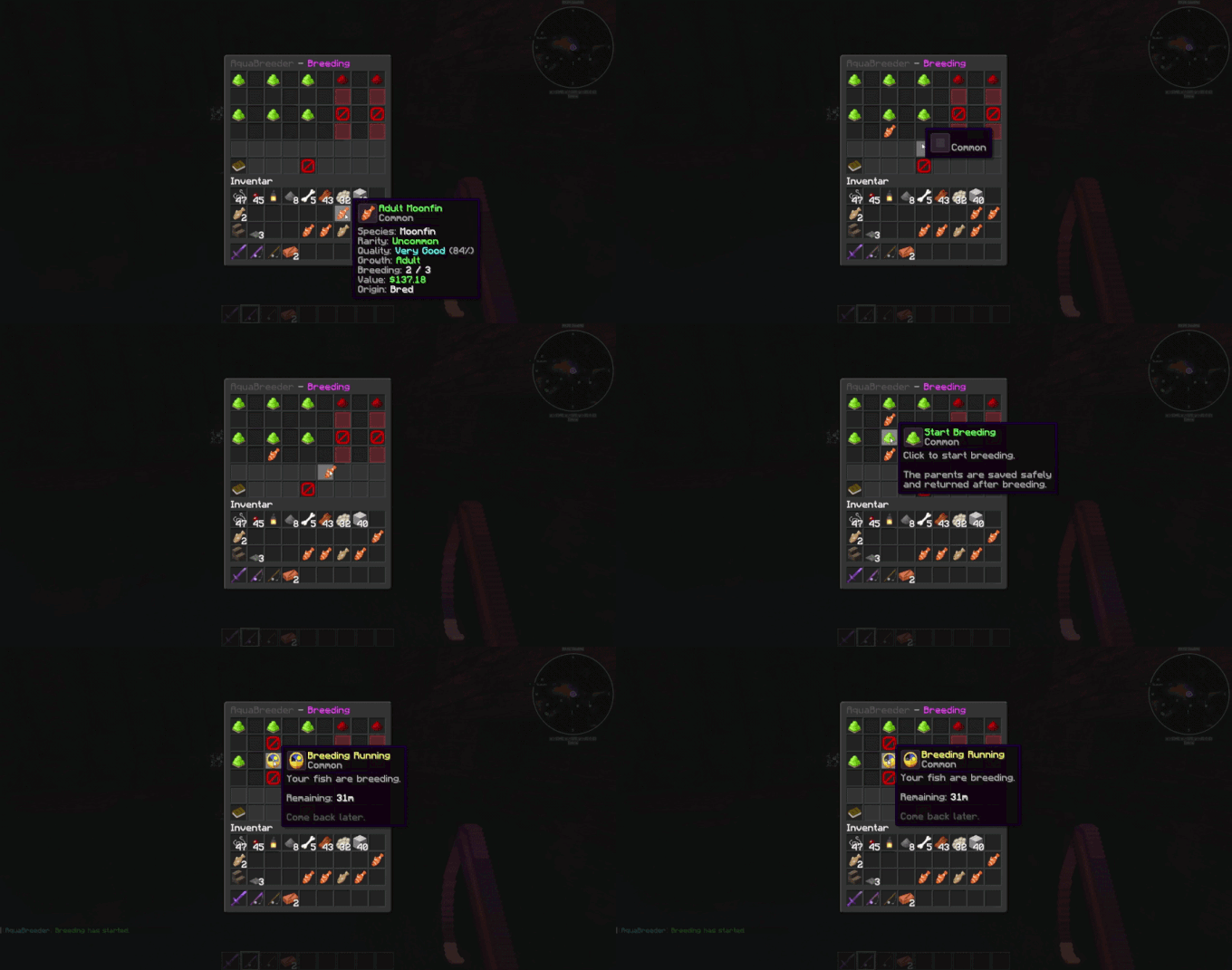
Players combine compatible fish of the same species and try to create better offspring.
This gives the plugin a real long-term goal.
Instead of only hoping for one perfect catch, players can build progress step by step.
The aquarium is where players can display their favorite and most valuable fish.
It works as a collection, prestige, and progression feature. Players can keep their best fish, show off rare catches, and build a personal trophy collection.

The aquarium can also be used as a passive income system.
Server owners can configure payout intervals where online players receive money based on the total value of the fish displayed in their aquarium. This makes valuable collections feel even more rewarding, while still giving server owners control over the economy balance.
The payout system can be adjusted through the configuration, so every server can decide how often payouts happen and how strong the passive income should be.
Custom fish are unique items and do not simply stack like normal Minecraft items.
That is why AquaBreeder includes fish storage.
Players can store and organize their collection without filling their whole inventory.
Storage is useful for:
This makes the whole system much easier to play long-term.
Selling fish is handled through a dedicated GUI.
Players place their fish into the sell window, check the value, and confirm the sale. This feels cleaner than command-only selling and gives players a clear overview before they sell anything.
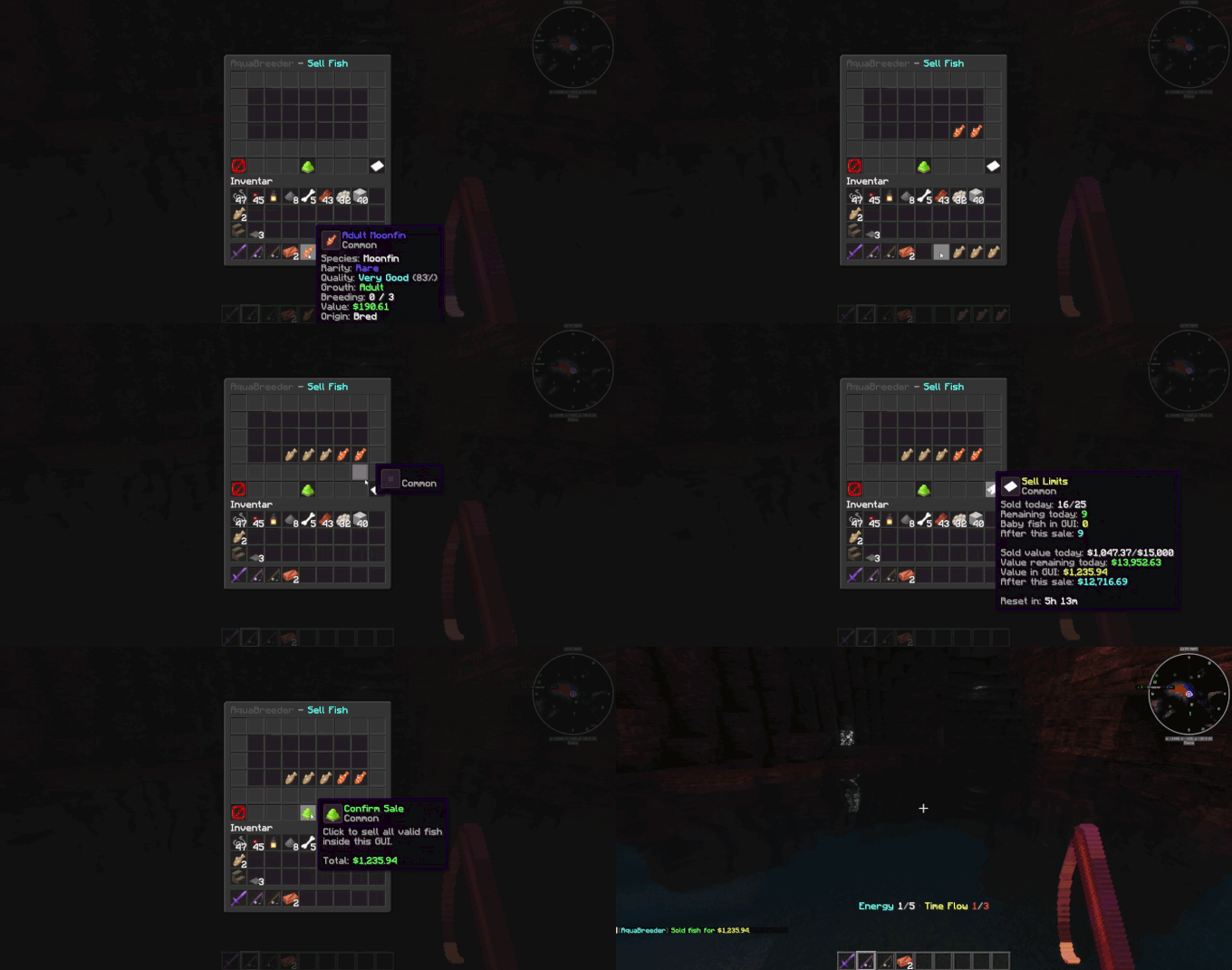
The sell system validates fish internally and is designed to prevent simple money glitches from renamed or copied items.
Server owners can control the economy through configuration, including how much value fish can generate and how selling should behave.
The FishDex lets players discover and track fish species.
It gives AquaBreeder a real collection feeling. Players can work toward finding new fish, completing their discoveries, and learning which species exist.
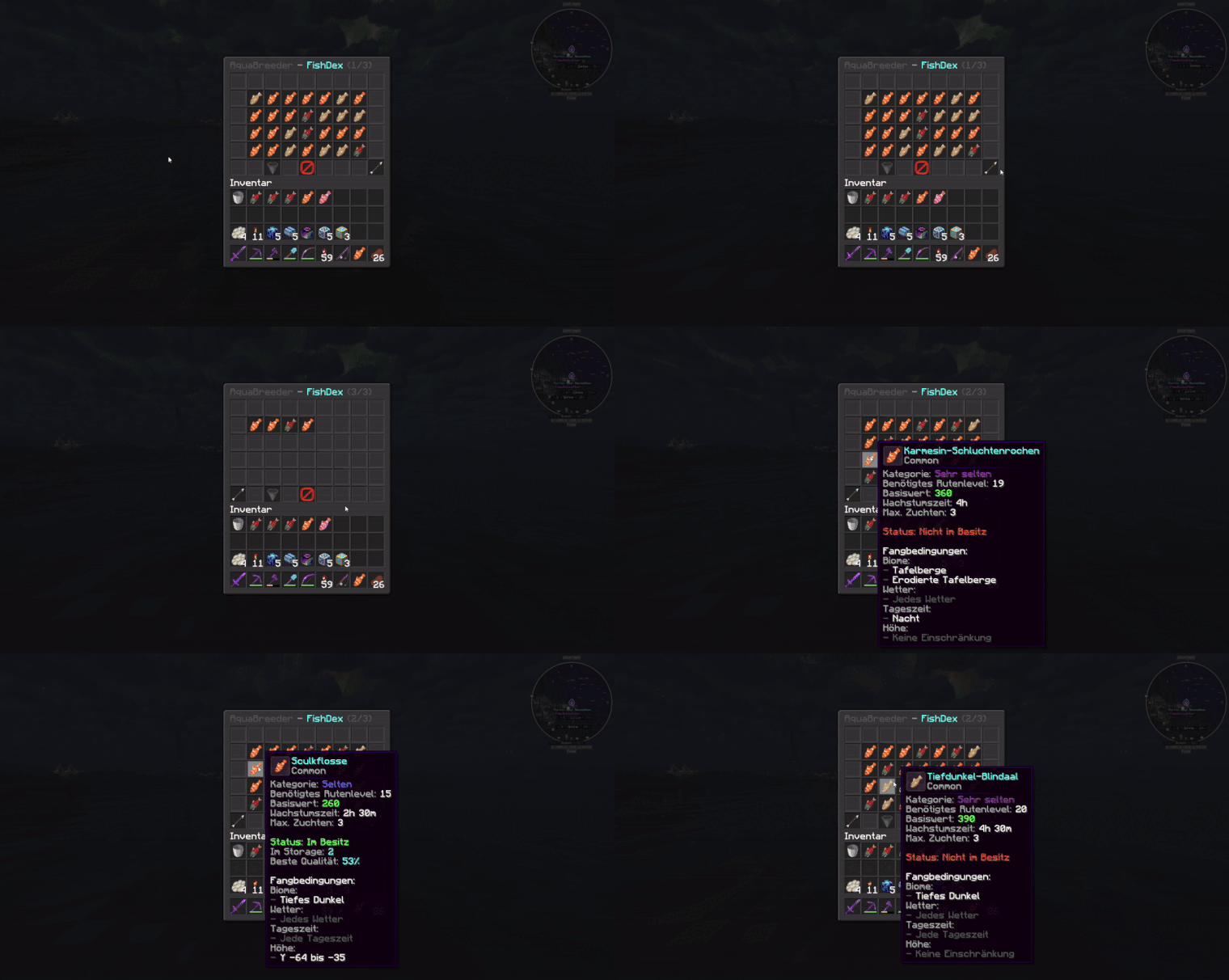
The FishDex adds another goal besides money and breeding.
Players can collect, compare, and track what they have already found.
AquaBreeder includes player commands, admin commands, and permissions for server owners who want more control.
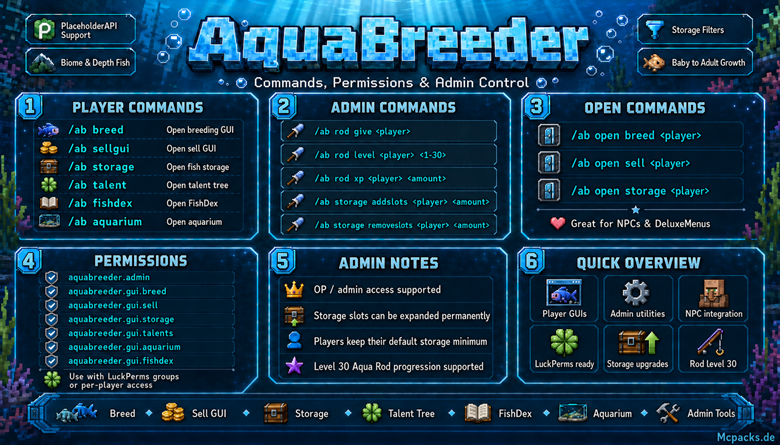
Commands can be used to open GUIs, manage player access, give rods, handle admin actions, and connect AquaBreeder with NPCs or menu systems.
This makes it easier to build server setups where players interact with AquaBreeder through NPCs, menus, or command-based workflows.
AquaBreeder can be connected with common server systems.

Supported integrations include:
Jobs Reborn support is useful for servers that already reward players for fishing.
AquaBreeder can be configured so players do not receive normal Jobs Reborn fishing money from AquaBreeder fishing, if you want the AquaBreeder economy to stay separate and balanced.
This gives server owners more control and makes it easier to connect AquaBreeder with existing menus, jobs, NPCs, and economy systems.
AquaBreeder provides placeholders that can be used with PlaceholderAPI-compatible plugins.
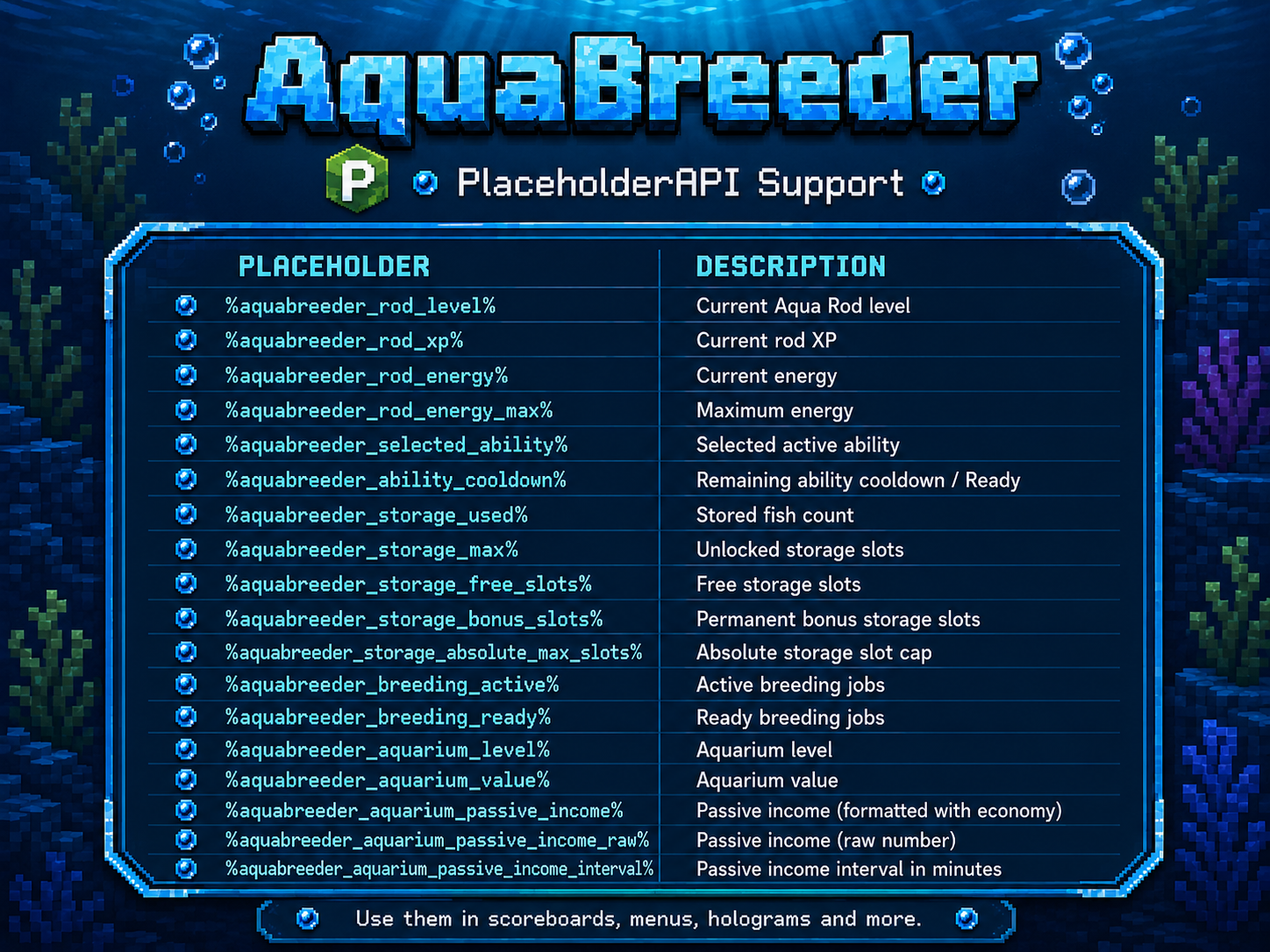
Placeholders are useful for menus, scoreboards, NPC displays, player stats, rod progress, fish information, and other server systems.
They help bring AquaBreeder data into the rest of your server setup.
Need help with setup, commands, permissions, placeholders, or the full AquaBreeder system?
Click the image below to open the AquaBreeder Wiki:

AquaBreeder is made for servers that want fishing to feel like a real feature.
Players get something to work on every time they fish:
The goal is simple:
Fishing should feel rewarding, active, and worth coming back to.
AquaBreeder gives players a reason to fish, collect, breed, compare, improve, and show off what they have built.