Logo
MINECRAFTBIBLE
Items
Items

All game items

Blocks
Blocks

Building blocks

Mobs
Mobs

Creatures & monsters

Biomes
Biomes

World biomes

Structures
Structures

Generated structures

Recipes
Recipes

Crafting guides

Advancements
Advancements

Achievements

Loot Tables
Loot Tables

Drop rates

Tags
Tags

Item groupings

All Versions
View all data →
Capes
Cape ArchiveNEW

Browse rare Minecon capes, OptiFine capes, and custom capes from players worldwide

Browse

Player Database
Player DatabasePopular

Search any player

Skin Browser
Skin Browser

Browse & download skins

Cape Gallery
Cape GalleryNEW

Minecon & OptiFine capes

Seed Vault
Seed Vault

Curated seeds

Learn

Guides
GuidesNew

Tutorials & tips

Blog
Blog

News & updates

Community

Community Hub
Community HubHub

Posts, discussions & more

All Versions
View community →
Seed Analyzer
Seed Analyzer

World seed analysis

Loot Explorer
Loot Explorer

Drop rates

Crafting Calculator
Crafting Calculator

Material planning

Enchant Calculator
Enchant Calculator

Probability math

Redstone Lab
Redstone Lab

Signal timing

Trading Profit
Trading Profit

Villager ROI

All Versions
View all tools →
Mods
Mods

Browse all mods

Plugins
Plugins

Server plugins

Resource Packs
Resource Packs

Textures & sounds

Shaders
Shaders

Visual enhancements

Datapacks
Datapacks

World logic

Scanner
Mod Intelligence

Scan & analyze any mod

All Versions
View all mods →
Loading...
IntroductionIntroductionVersion HistoryVersion HistoryGuidesGuidesBlog & NewsBlog & News
ItemsItemsBlocksBlocksMobsMobsRecipesRecipesBiomesBiomesStructuresStructuresAdvancementsAdvancementsLoot TablesLoot TablesTagsTags
ModsModsPluginsPluginsResource PacksResource PacksShadersShadersDatapacksDatapacks

MinecraftBible

The Ultimate Wiki

Logo
MINECRAFTBIBLE

The ultimate Minecraft reference. Every item, block, mob, and recipe documented with precision.

Community

  • Skin Browser
  • Cape Gallery
  • Seed Vault
  • Blog
  • Guides

Database

  • Items
  • Blocks
  • Mobs
  • Recipes
  • Biomes
  • Structures

Tools

  • Seed Analyzer
  • Mod Intelligence
  • Crafting Calculator
  • Enchant Calculator

Mods & Packs

  • Mods
  • Plugins
  • Resource Packs
  • Shaders
  • Datapacks

Site & Legal

  • About
  • Authors
  • Editorial Policy
  • Corrections
  • Contact
  • Privacy Policy
  • Terms of Service
  • DMCA
  • Sitemap

© 2026 MinecraftBible. Not affiliated with Mojang or Microsoft.

PrivacyTermsContact
AntiMonster Zones
PluginCC-BY-NC-ND-4.0

AntiMonster Zones

This plugin allows you to remove specific mobs using a flexible whitelist/blacklist zone system. It works across all three dimensions and lets you define highly customizable zones to precisely protect areas like spawns from mobs/monsters.

56
Downloads
1
Followers
3 months ago
Updated
📦
1
Versions
managementmobsoptimizationbukkitpaperspigot
Download Latestv5.0View on Modrinth

📖About AntiMonster Zones

AntiMonster – Zone based AntiMob plugin

AntiMonster is a lightweight and reliable bukkit/spigot/paper plugin that lets you create custom protection zones where unwanted mobs are automatically removed. Each zone has its own center, radius, type and detailed allow/unallow rules, giving you full control over what can spawn or remain inside the area.

You can block only monsters, remove all mobs except players and tamed animals, or create completely empty zones that stay peaceful. Tags like #animal, #monster, #boat, #minecart and more make configuration fast and flexible. Zones can be created directly in‑game, edited at any time, and are saved automatically.

Mobs inside a zone are removed instantly and safely using Bukkit’s built‑in

Entity#remove()

method. This means they disappear without drops, damage effects or lag. All zones can be created and edited directly in‑game, and anyone with OP permissions can fully manage them at any time.

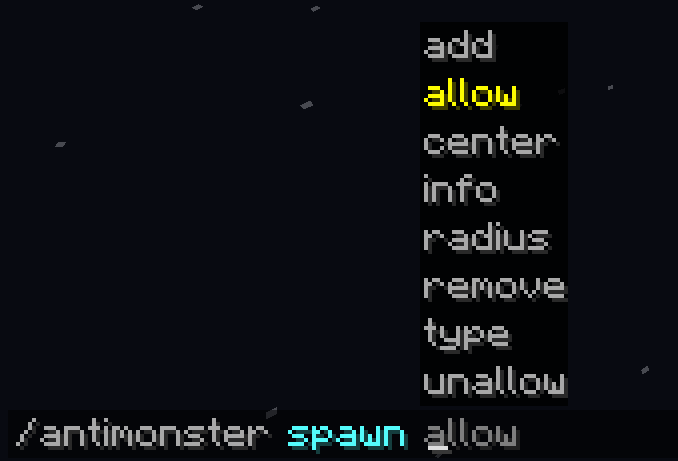
To edit a zone use these commands:

  • /antimonster list | lists all zones
  • /antimonster add | creates a new zone
  • /antimonster remove | deletes the zone
  • /antimonster info | shows zone info
  • /antimonster type <monster/mob/empty> | sets zone type
  • /antimonster radius | changes radius
  • /antimonster center | sets zone center
  • /antimonster allow <entity/tag> | allows entity
  • /antimonster unallow <entity/tag> | blocks entity

The plugin was developed for Minecraft 1.21.11, successfully tested on 1.21.8, and will most likely work on all 1.21.x versions due to stable API behavior.

👥 Team & Contributors

xzeroxx0
xzeroxx0Owner

⚙️ Compatibility

Environment
🖥️ Server-side
Loaders
bukkitpaperspigot
Minecraft Versions
1.211.21.11.21.21.21.31.21.41.21.51.21.61.21.7+4 more

🔗 Links

Modrinth Page