AntiOP - Advanced Admin Protection System
Secure Your Server, Empower Your Admins
Supports Minecraft versions 1.20 - 1.21.4
Need help? Join our Discord: discord.gg/ChaLiuCore
English Description
Core Features
Advanced Notification System
- Real-time whitelist notifications
- Detailed command attempt logs
- Immediate security breach alerts
- NEW! Discord Webhook integration
- Player name & IP tracking
Comprehensive Protection
- RCON Firewall: Block potentially harmful RCON commands
- LuckPerms Guard: Prevent * permission abuse via RCON
- Plugman Shield: Stop unauthorized plugin manipulation
- Continuous Monitoring: Constant vigilance against OP and * permission changes
- Smart Notifications: Keep admins informed of all security events
New Features!
- Enhanced History System: Track and review all security events
- GUI Interface: Easy access to history logs in-game
- Pagination: Smooth navigation through extensive logs
- RCON Command Logging: Monitor all RCON commands for enhanced security
- Automatic Data Cleanup: Old entries are removed after 14 days
- Multi-language Support: Available in Thai and English
History System Guide
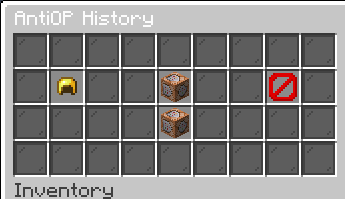
The History System provides easy access to security logs through an in-game GUI interface. Access it using /historyantiop.
Main Menu Options:
- Golden Helmet: View OP grant history
- Command Block: View command attempt logs
- Barrier: View verification failures
- Command Block (Bottom): View RCON command history
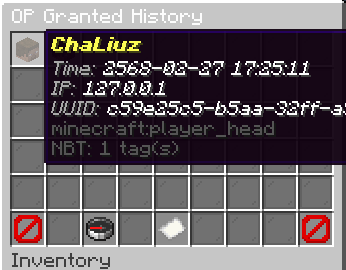
Detailed History View:
Each entry shows:
- Player name
- Timestamp
- IP address (except for RCON logs)
- UUID (except for RCON logs)
- Command used (for command attempts)
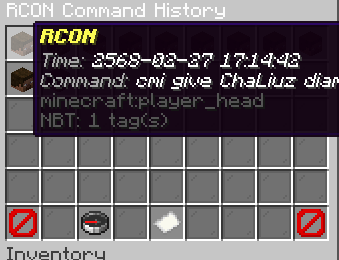
Navigation:
- Use Back and Next buttons to browse pages
- Click Compass to return to main menu
- Entries older than 14 days are automatically removed
Temporary Permission System
The Temporary Permission System allows server administrators to grant temporary elevated permissions to trusted players without giving them full OP status. This feature enhances server security while providing flexibility in managing player permissions.
Key Features:
- Grant temporary permissions to players listed in the temp-permission-whitelist
- Temporary permissions are automatically revoked when the player leaves the server
- Configurable permissions in config.yml under the temp-permission section
- Seamless integration with the existing /verify command
- Real-time notifications for admins when temporary permissions are granted or revoked
How it works:
- Add trusted players to the temp-permission-whitelist in config.yml
- Configure the desired temporary permissions in the temp-permission section of config.yml
- When a whitelisted player uses the /verify command with the correct password, they receive 1. the configured temporary permissions
- These permissions remain active until the player logs out or the server restarts
- Admins are notified when temporary permissions are granted or revoked
This system provides a secure way to give trusted players elevated access for specific tasks without compromising overall server security.
Configuration Example:
discord_webhook_url: "https://discord.com/api/webhooks/1234567890/your_webhook_url_here"

password: "oXaGH@pE#zR6"
language: "en" # "th"   "en"
whitelist:
  - "playername1"
  - "playername2"
  - "playername3"

temp-permission-whitelist:
  - "tempplayer1"
  - "tempplayer2"
  - "tempplayer3"

temp-permission:
  - "test.fly"
  - "test.gamemode"

rcon_command_blocking:
  enabled: true
  blocked_commands:
    - "op"
    - "deop"
คำอธิบายภาษาไทย
คุณสมบัติหลัก
ระบบแจ้งเตือนขั้นสูง
- แจ้งเตือนผู้เล่นใน whitelist แบบเรียลไทม์
- บันทึกรายละเอียดการพยายามใช้คำสั่ง
- แจ้งเตือนการละเมิดความปลอดภัยทันที
- ใหม่! รองรับการแจ้งเตือนผ่าน Discord Webhook
- ติดตามชื่อผู้เล่นและ IP address
การป้องกันแบบครอบคลุม
- ไฟร์วอลล์ RCON: บล็อกคำสั่ง RCON ที่อาจเป็นอันตราย
- การป้องกัน LuckPerms: ป้องกันการใช้สิทธิ์ * ในทางที่ผิดผ่าน RCON
- การป้องกัน Plugman: หยุดการจัดการปลั๊กอินโดยไม่ได้รับอนุญาต
- การตรวจสอบต่อเนื่อง: เฝ้าระวังการเปลี่ยนแปลงสถานะ OP และสิทธิ์ * ตลอดเวลา
- การแจ้งเตือนอัจฉริยะ: แจ้งผู้ดูแลระบบเกี่ยวกับเหตุการณ์ด้านความปลอดภัยทั้งหมด
คุณสมบัติใหม่!
- ระบบประวัติที่ปรับปรุงใหม่: ติดตามและตรวจสอบเหตุการณ์ด้านความปลอดภัยทั้งหมด
- อินเตอร์เฟซ GUI: เข้าถึงบันทึกประวัติในเกมได้ง่าย
- ระบบแบ่งหน้า: นำทางผ่านบันทึกจำนวนมากได้อย่างราบรื่น
- การบันทึกคำสั่ง RCON: ตรวจสอบคำสั่ง RCON ทั้งหมดเพื่อความปลอดภัยที่เพิ่มขึ้น
- การล้างข้อมูลอัตโนมัติ: ลบรายการเก่าหลังจาก 14 วัน
- รองรับหลายภาษา: มีให้ใช้ทั้งภาษาไทยและภาษาอังกฤษ
คู่มือระบบประวัติ
ระบบประวัติช่วยให้เข้าถึงบันทึกความปลอดภัยผ่าน GUI ในเกม เข้าถึงได้โดยใช้คำสั่ง /historyantiop
ตัวเลือกในเมนูหลัก:
- หมวกทอง: ดูประวัติการให้สิทธิ์ OP
- Command Block: ดูบันทึกการพยายามใช้คำสั่ง
- Barrier: ดูการยืนยันตัวตนที่ล้มเหลว
- Command Block (ล่าง): ดูประวัติคำสั่ง RCON
มุมมองประวัติโดยละเอียด:
แต่ละรายการแสดง:
- ชื่อผู้เล่น
- เวลา
- IP address (ยกเว้นบันทึก RCON)
- UUID (ยกเว้นบันทึก RCON)
- คำสั่งที่ใช้ (สำหรับการพยายามใช้คำสั่ง)
การนำทาง:
- ใช้ปุ่ม ย้อนกลับ และ ถัดไป เพื่อเรียกดูหน้าต่างๆ
- คลิกปุ่ม เข็มทิศ เพื่อกลับไปยังเมนูหลัก
- รายการที่เก่ากว่า 14 วันจะถูกลบโดยอัตโนมัติ
ระบบสิทธิ์ชั่วคราว
ระบบสิทธิ์ชั่วคราวช่วยให้ผู้ดูแลเซิร์ฟเวอร์สามารถให้สิทธิ์พิเศษชั่วคราวแก่ผู้เล่นที่ไว้ใจได้ โดยไม่ต้องให้สถานะ OP เต็มรูปแบบ คุณสมบัตินี้ช่วยเพิ่มความปลอดภัยให้กับเซิร์ฟเวอร์ในขณะที่ให้ความยืดหยุ่นในการจัดการสิทธิ์ของผู้เล่น
คุณสมบัติหลัก:
- ให้สิทธิ์ชั่วคราวแก่ผู้เล่นที่อยู่ใน temp-permission-whitelist
- สิทธิ์ชั่วคราวจะถูกเพิกถอนโดยอัตโนมัติเมื่อผู้เล่นออกจากเซิร์ฟเวอร์
- กำหนดค่าสิทธิ์ได้ใน config.yml ภายใต้ส่วน temp-permission
- ผสานรวมกับคำสั่ง /verify ที่มีอยู่แล้วอย่างลงตัว
- แจ้งเตือนผู้ดูแลระบบแบบเรียลไทม์เมื่อมีการให้หรือเพิกถอนสิทธิ์ชั่วคราว
วิธีการทำงาน:
- เพิ่มผู้เล่นที่ไว้ใจลงใน temp-permission-whitelist ใน config.yml
- กำหนดค่าสิทธิ์ชั่วคราวที่ต้องการในส่วน temp-permission ของ config.yml
- เมื่อผู้เล่นที่อยู่ในรายชื่อใช้คำสั่ง /verify พร้อมรหัสผ่านที่ถูกต้อง พวกเขาจะได้รับสิทธิ์ชั่วคราวตามที่กำหนดไว้
- สิทธิ์เหล่านี้จะยังคงใช้งานได้จนกว่าผู้เล่นจะออกจากเซิร์ฟเวอร์หรือเซิร์ฟเวอร์รีสตาร์ท
- ผู้ดูแลระบบจะได้รับการแจ้งเตือนเมื่อมีการให้หรือเพิกถอนสิทธิ์ชั่วคราว
ระบบนี้ช่วยให้สามารถให้สิทธิ์การเข้าถึงพิเศษแก่ผู้เล่นที่ไว้ใจได้สำหรับงานเฉพาะ โดยไม่ส่งผลกระทบต่อความปลอดภัยโดยรวมของเซิร์ฟเวอร์
ตัวอย่างการตั้งค่า:
discord_webhook_url: "https://discord.com/api/webhooks/1234567890/your_webhook_url_here"

password: "oXaGH@pE#zR6"
language: "en" # "th"   "en"
whitelist:
  - "playername1"
  - "playername2"
  - "playername3"

temp-permission-whitelist:
  - "tempplayer1"
  - "tempplayer2"
  - "tempplayer3"

temp-permission:
  - "test.fly"
  - "test.gamemode"

rcon_command_blocking:
  enabled: true
  blocked_commands:
    - "op"
    - "deop"