


Aloewera
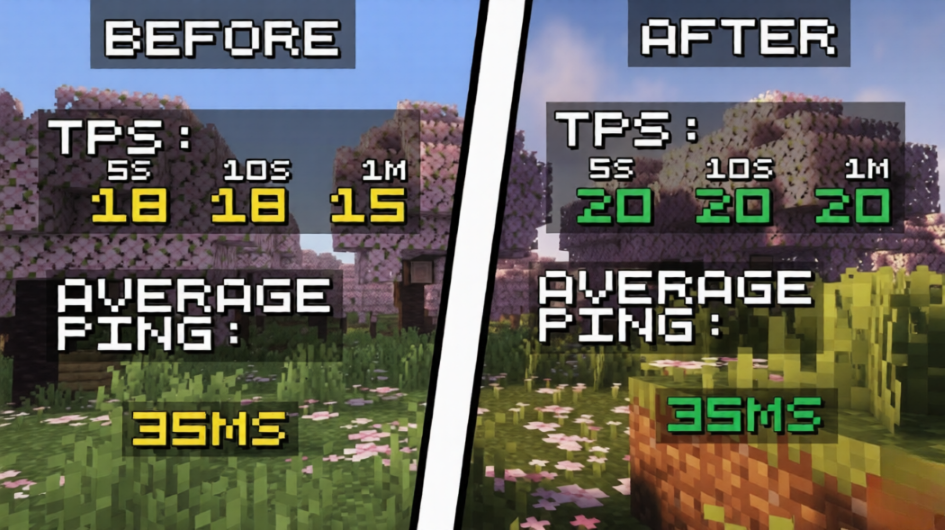
The best Minecraft server-side plugin for performance boost and usage! Can top your scores by 3 times 🔥
📖About Aloewera
Aloewera - The Ultimate Server Optimization Plugin 🔥
Overview
Aloewera is a high-performance optimization plugin for Paper and Purpur servers, designed to improve TPS stability, reduce lag, and automatically adapt to changing server conditions.
Unlike traditional optimization plugins that rely on fixed limits and static configurations, Aloewera continuously monitors server performance and dynamically adjusts its optimization systems based on real-time TPS and player latency. This allows servers to maintain smooth gameplay even during periods of high activity.
Whether you're running a small community server or a large public network, Aloewera helps reduce unnecessary server load while preserving the player experience.
Features
⚡ Dynamic Performance Optimization
Aloewera automatically adjusts its optimization strength based on:
- Current server TPS
- Average player ping
- Overall server load
When performance drops, optimization becomes more aggressive. When performance is stable, restrictions are reduced to maximize gameplay quality.
Commands
/aloewera clear - Clears all of the items on the ground
/aloewera optimize - Runs a full server optimization check and optimizes everything it can to match the server's TPS counts. (Limit: Mob spawning, Item despawning, Rendering and Overall adaptive optimization)
/aloewera tps - Shows server current TPS count, 20 second TPS count and 1 minute TPS count. Average ping and Player count.
Intelligent Mob Management
Reduce server lag caused by excessive entity counts.
- Controls mob spawning during heavy load
- Prevents unnecessary entity buildup
- Maintains healthier server performance
Automatic Item Cleanup
Keep your worlds free from excessive dropped items.
- Timed item clearing system
- Reduces memory usage
- Helps prevent lag spikes caused by entity accumulation
Real-Time Adaptive System
Unlike plugins with fixed optimization settings, Aloewera continuously evaluates server conditions and adjusts itself automatically.
No constant manual tweaking required.
Lightweight Design
Built with performance in mind.
- Low resource usage
- Minimal impact on server memory
- Designed specifically for modern Paper and Purpur servers
Compatibility
Supported Platforms
- Paper
- Purpur
Supported Minecraft Versions
- 1.20+
- 1.21+
Experimental versions
- BETA: 26 releases
Why Choose Aloewera?
Many optimization plugins use fixed values that may be too aggressive during normal gameplay or not aggressive enough during lag spikes.
Aloewera solves this by using adaptive optimization that responds to actual server conditions in real time, helping maintain consistent TPS while minimizing the impact on gameplay.
Benefits include:
- Improved TPS stability
- Reduced lag spikes
- Lower entity-related server load
- Better performance during peak player counts
- Automatic optimization without complex setup
Installation
- Download the latest release.
- Place the plugin into your server's
/pluginsfolder. - Restart your server.
- Aloewera will automatically begin monitoring and optimizing server performance.
No complicated setup required.
Performance Notes
The exact performance improvements achieved with Aloewera will vary depending on:
- Server hardware
- Player count
- Existing plugins
- World activity
- Entity density
Servers with large numbers of mobs, dropped items, or active players will typically see the most noticeable improvements.
Support
Found a bug or have a suggestion?
Please report issues through our discord server: https://discord.gg/ghmjwJX7GS
*Note that we offer support only on the 1.21 - 1.21.11 versions of our plugin!