Logo
MINECRAFTBIBLE
Items
Items

All game items

Blocks
Blocks

Building blocks

Mobs
Mobs

Creatures & monsters

Biomes
Biomes

World biomes

Structures
Structures

Generated structures

Recipes
Recipes

Crafting guides

Advancements
Advancements

Achievements

Loot Tables
Loot Tables

Drop rates

Tags
Tags

Item groupings

All Versions
View all data →
Capes
Cape ArchiveNEW

Browse rare Minecon capes, OptiFine capes, and custom capes from players worldwide

Browse

Player Database
Player DatabasePopular

Search any player

Skin Browser
Skin Browser

Browse & download skins

Cape Gallery
Cape GalleryNEW

Minecon & OptiFine capes

Seed Vault
Seed Vault

Curated seeds

Learn

Guides
GuidesNew

Tutorials & tips

Blog
Blog

News & updates

Community

Community Hub
Community HubHub

Posts, discussions & more

All Versions
View community →
Seed Analyzer
Seed Analyzer

World seed analysis

Loot Explorer
Loot Explorer

Drop rates

Crafting Calculator
Crafting Calculator

Material planning

Enchant Calculator
Enchant Calculator

Probability math

Redstone Lab
Redstone Lab

Signal timing

Trading Profit
Trading Profit

Villager ROI

All Versions
View all tools →
Mods
Mods

Browse all mods

Plugins
Plugins

Server plugins

Resource Packs
Resource Packs

Textures & sounds

Shaders
Shaders

Visual enhancements

Datapacks
Datapacks

World logic

Scanner
Mod Intelligence

Scan & analyze any mod

All Versions
View all mods →
Loading...
IntroductionIntroductionVersion HistoryVersion HistoryGuidesGuidesBlog & NewsBlog & News
ItemsItemsBlocksBlocksMobsMobsRecipesRecipesBiomesBiomesStructuresStructuresAdvancementsAdvancementsLoot TablesLoot TablesTagsTags
ModsModsPluginsPluginsResource PacksResource PacksShadersShadersDatapacksDatapacks

MinecraftBible

The Ultimate Wiki

Logo
MINECRAFTBIBLE

The ultimate Minecraft reference. Every item, block, mob, and recipe documented with precision.

Community

  • Skin Browser
  • Cape Gallery
  • Seed Vault
  • Blog
  • Guides

Database

  • Items
  • Blocks
  • Mobs
  • Recipes
  • Biomes
  • Structures

Tools

  • Seed Analyzer
  • Mod Intelligence
  • Crafting Calculator
  • Enchant Calculator

Mods & Packs

  • Mods
  • Plugins
  • Resource Packs
  • Shaders
  • Datapacks

Site & Legal

  • About
  • Authors
  • Editorial Policy
  • Corrections
  • Contact
  • Privacy Policy
  • Terms of Service
  • DMCA
  • Sitemap

© 2026 MinecraftBible. Not affiliated with Mojang or Microsoft.

PrivacyTermsContact
aHomes
PluginMIT

aHomes

aHomes is a comprehensive home management plugin for Minecraft servers.

47
Downloads
0
Followers
2 months ago
Updated
📦
1
Versions
managementtransportationutilitybukkitfoliapaperpurpurspigot
Download Latestv1.1.6View on Modrinth

📖About aHomes

aHomes - Feature-Rich Home Management Plugin

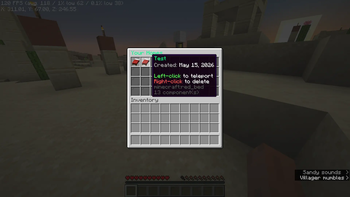
aHomes is a powerful and modern home plugin for Minecraft servers. Create named homes, browse them with a beautiful GUI, customize warmups & cooldowns, share homes with friends, and enjoy full Folia support.


Features

  • Named Homes — Create unlimited (or rank-limited) homes with custom names
  • Beautiful GUI — Sleek inventory interface to view, favorite, and teleport to your homes
  • Custom Warmups — Configurable countdown with action bar progress
  • Cooldowns — Prevent teleport spam with per-player or global cooldowns
  • Combat Protection — Block teleporting while in combat (configurable)
  • Home Sharing — Allow friends to teleport to your shared homes
  • Per-Player Settings — Players can toggle sounds, action bar, GUI mode, coordinates, request popups, etc.
  • Admin Tools — Powerful /homeadmin command for full management
  • Flexible Limits — Permission-based home limits (ahomes.limit.1, ahomes.limit.5, ahomes.limit.unlimited, etc.)
  • World Control — Disable homes in specific worlds
  • Hex Colors — Full &#RRGGBB hex color support in messages and GUI

Fully compatible with Paper, Purpur, and Folia — Optimized for the latest threaded region system.


Commands

Command Description
/sethome [name] Save current location as a home
/home [name] Teleport to one of your homes
/homes Open the beautiful homes GUI
/delhome <name> Delete a home
/homesettings Open personal settings menu
/homeadmin <sub> <player> [home] Admin management command

Permissions

  • ahomes.use — Basic usage (default: true)
  • ahomes.limit.X — Set maximum number of homes (e.g. 1, 3, 5, 10, unlimited)
  • ahomes.admin — Access to admin commands
  • ahomes.bypass.warmup — Bypass warmup
  • ahomes.bypass.cooldown — Bypass cooldown
  • ahomes.bypass.combat — Bypass combat protection

Why choose aHomes?

  • Modern & clean codebase
  • Excellent Folia/Paper performance
  • Highly configurable
  • Player-friendly GUI + settings
  • Strong admin control

Perfect for Survival, SMP, and Network servers.

👥 Team & Contributors

anantapunmagar
anantapunmagarOwner

⚙️ Compatibility

Environment
🖥️ Server-side
Loaders
bukkitfoliapaperpurpurspigot
Minecraft Versions
1.211.21.11.21.21.21.31.21.41.21.51.21.61.21.7+7 more

🔗 Links

Modrinth Page