Logo
MINECRAFTBIBLE
Items
Items

All game items

Blocks
Blocks

Building blocks

Mobs
Mobs

Creatures & monsters

Biomes
Biomes

World biomes

Structures
Structures

Generated structures

Recipes
Recipes

Crafting guides

Advancements
Advancements

Achievements

Loot Tables
Loot Tables

Drop rates

Tags
Tags

Item groupings

All Versions
View all data →
Capes
Cape ArchiveNEW

Browse rare Minecon capes, OptiFine capes, and custom capes from players worldwide

Browse

Player Database
Player DatabasePopular

Search any player

Skin Browser
Skin Browser

Browse & download skins

Cape Gallery
Cape GalleryNEW

Minecon & OptiFine capes

Seed Vault
Seed Vault

Curated seeds

Learn

Guides
GuidesNew

Tutorials & tips

Blog
Blog

News & updates

Community

Community Hub
Community HubHub

Posts, discussions & more

All Versions
View community →
Seed Analyzer
Seed Analyzer

World seed analysis

Loot Explorer
Loot Explorer

Drop rates

Crafting Calculator
Crafting Calculator

Material planning

Enchant Calculator
Enchant Calculator

Probability math

Redstone Lab
Redstone Lab

Signal timing

Trading Profit
Trading Profit

Villager ROI

All Versions
View all tools →
Mods
Mods

Browse all mods

Plugins
Plugins

Server plugins

Resource Packs
Resource Packs

Textures & sounds

Shaders
Shaders

Visual enhancements

Datapacks
Datapacks

World logic

Scanner
Mod Intelligence

Scan & analyze any mod

All Versions
View all mods →
Loading...
IntroductionIntroductionVersion HistoryVersion HistoryGuidesGuidesBlog & NewsBlog & News
ItemsItemsBlocksBlocksMobsMobsRecipesRecipesBiomesBiomesStructuresStructuresAdvancementsAdvancementsLoot TablesLoot TablesTagsTags
ModsModsPluginsPluginsResource PacksResource PacksShadersShadersDatapacksDatapacks

MinecraftBible

The Ultimate Wiki

Logo
MINECRAFTBIBLE

The ultimate Minecraft reference. Every item, block, mob, and recipe documented with precision.

Community

  • Skin Browser
  • Cape Gallery
  • Seed Vault
  • Blog
  • Guides

Database

  • Items
  • Blocks
  • Mobs
  • Recipes
  • Biomes
  • Structures

Tools

  • Seed Analyzer
  • Mod Intelligence
  • Crafting Calculator
  • Enchant Calculator

Mods & Packs

  • Mods
  • Plugins
  • Resource Packs
  • Shaders
  • Datapacks

Site & Legal

  • About
  • Authors
  • Editorial Policy
  • Corrections
  • Contact
  • Privacy Policy
  • Terms of Service
  • DMCA
  • Sitemap

© 2026 MinecraftBible. Not affiliated with Mojang or Microsoft.

PrivacyTermsContact
AFSDeathKeeper
PluginLicenseRef-All-Rights-Reserved

AFSDeathKeeper

Overview AFSDeathKeeper is a Paper plugin designed to make player death recovery safer, cleaner and more immersive. Instead of losing everything when a player dies, the plugin creates a temporary protected death tomb that stores the player's items. If th

19
Downloads
0
Followers
3 months ago
Updated
📦
1
Versions
paper
Download Latestv2.3.0View on Modrinth

📖About AFSDeathKeeper

AFSDeathKeeper

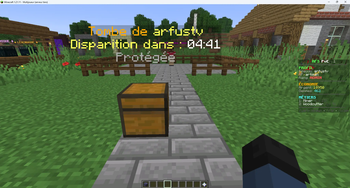
AFSDeathKeeper is a Paper plugin designed to make player death recovery safer, cleaner, and more immersive.

Instead of losing everything on death, players leave behind a temporary protected tomb that stores their items. If the tomb expires, the inventory can still remain saved and be restored later through a configurable recovery system, including NPC-based recovery for a more immersive survival experience.

AFSDeathKeeper is built for servers that want more than a basic death chest plugin. It adds protected tombs, hologram timers, persistent storage, optional economy integration, and optional region checks.


Main Features

  • Temporary death tombs on player death
  • Owner-protected tomb access
  • Hologram timer above the tomb
  • Tomb expiration system
  • Persistent inventory saving after expiration
  • NPC-based recovery system
  • Optional economy cost for restoration
  • Optional WorldGuard compatibility
  • SQLite support
  • Restart-safe persistence
  • Anti-empty grave protection
  • Utility / menu item filtering
  • Safer and cleaner survival gameplay flow

How It Works

  1. A player dies
  2. A protected temporary tomb is created
  3. Only the owner can access the tomb
  4. A hologram timer shows the remaining lifetime
  5. If the player returns in time, everything is restored normally
  6. If the tomb expires, the saved inventory can still remain available
  7. The player can recover the expired inventory later through the configured restore system

Why Use AFSDeathKeeper

AFSDeathKeeper is not just another death chest plugin.

It is designed to provide a more complete death recovery flow for survival servers by combining:

  • temporary tombs
  • owner protection
  • hologram timers
  • expiration logic
  • persistent saved inventories
  • immersive NPC restoration
  • optional economy sinks
  • optional WorldGuard integration

The goal is simple: make death less frustrating without making it exploitable.


Compatibility

Server Software:
Paper 1.21.11

Java:
Java 21

Database:
SQLite

Optional Hooks / Integrations:

  • Vault
  • EssentialsX
  • FancyNPCs
  • WorldGuard
  • PlaceholderAPI

Anti-Abuse / Safety

  • No empty tomb creation
  • Utility / menu items can be ignored
  • NPC restoration can use the same filters as tomb creation
  • Expired inventories remain controlled by the plugin
  • Restart persistence is supported
  • Optional economy requirement for restoration
  • Optional protected-region checks for safer tomb placement

Commands

/gardiendesames
/afsdeathkeeper reload
/afsdeathkeeper admin

👥 Team & Contributors

arfus
arfusOwner

⚙️ Compatibility

Environment
🖥️ Server-side
Loaders
paper
Minecraft Versions
1.211.21.11.21.21.21.31.21.41.21.51.21.61.21.7+4 more

🔗 Links

Modrinth Page