
MINECRAFTBIBLE
Loading...


Treasure Hunt plugin for the entire server.
Create engaging treasure hunts with customizable collections, rewards, and requirements!
⚠️ IMPORTANT: Please report every bug on our Discord to make the plugin as good as possible!
🚫 DO NOT REPORT BUGS AS RATINGS!
💬 Need help? Join our Discord Server for support and updates!
📸 More pictures available in the Modrinth Gallery
All placeholders can be viewed on the GitHub Wiki
config-version: 4.0

storage:
  # Options: SQLITE, MYSQL, YAML
  type: SQLITE

  # MySQL Configuration (Only needed if type is MYSQL)
  mysql:
    host: localhost
    port: 3306
    database: advancedhunt
    username: root
    password: password

# Supported languages are en, de, bn, vi
language: en

command:
  # Defines the main command and its aliases for the plugin.
  # The first value is used as the primary command, all following values (separated by "|") are registered as aliases.
  name: advancedhunt|ah|ahunt|treasure|treasures

  # Enable Brigadier command integration for enhanced command completion.
  # Brigadier provides native Minecraft command suggestions and validation.
  # Disable this if you experience command-related issues or prefer legacy completion.
  brigadier-integration: false

rewards:
  # Commands matching these regex patterns will be blocked from being added or executed.
  # Use ^ to match the start and $ to match the end of the command.
  # Matches are case-insensitive.
  command-blacklist:
    - "^([^:]+:)?execute\\b"
    - "^([^:]+:)?op\\b"
    - "^([^:]+:)?deop\\b"
    - "^([^:]+:)?kill\\b"
    - "^([^:]+:)?summon\\b"
    - "^([^:]+:)?setblock\\b"
    - "^([^:]+:)?fill\\b"
    - "^([^:]+:)?reload\\b"
    - "^([^:]+:)?rl\\b"
    - "^([^:]+:)?stop\\b"
    - "^([^:]+:)?restart\\b"
    - "^([^:]+:)?kick\\b"
    - "^([^:]+:)?whitelist\\b"
    - "^([^:]+:)?ban\\b"
    - "^([^:]+:)?ban-ip\\b"
    - "^([^:]+:)?pardon\\b"
    - "^([^:]+:)?pardon-ip\\b"
    - "^([^:]+:)?pex\\b"
    - "^([^:]+:)?lp\\b"
    - "^([^:]+:)?luckperms\\b"
    - "^([^:]+:)?perm\\b"
    - "^([^:]+:)?perms\\b"
    - "^([^:]+:)?permission\\b"
    - "^([^:]+:)?permissions\\b"
  # If true, blacklisted commands will also be blocked from executing.
  # If false, they will only be blocked when an admin tries to add them via the GUI.
  block-execution: true

particle-settings:
  enabled: true
  view-distance: 32
  # Particles for treasures not found by the current player
  not-found:
    enabled: true
    particle: CRIT
    count: 3
    speed: 0.01
    offset:
      x: 0.3
      y: 0.3
      z: 0.3
  # Particles for treasures already found by the current player
  found-by-player:
    enabled: true
    particle: HAPPY_VILLAGER
    count: 2
    speed: 0.03
    offset:
      x: 0.3
      y: 0.2
      z: 0.3
  # Particles for treasures found by another player in single-player-find collections
  found-by-others:
    enabled: false # Disabled by default for performance
    particle: WAX_OFF
    count: 2
    speed: 0.3
    offset:
      x: 0.3
      y: 0.2
      z: 0.3

# Shows an action bar when the placer is in range of a treasure
proximity-settings:
  enabled: true
  range: 10

leaderboard:
  # Maximum number of entries to display in the GUI leaderboard (per collection)
  display-limit: 100
  # How often to refresh the leaderboard cache in seconds (default: 300 = 5 minutes)
  cache-refresh-interval: 300

hint:
  # Enable/disable the hint feature
  enabled: true
  # Cooldown in seconds before player can request another hint
  cooldown-seconds: 300
  # Maximum distance in blocks to search for treasures
  proximity-range: 50
  # Apply cooldown if the player fails the minigame?
  apply-cooldown-on-fail: true
  # Apply cooldown to operators
  apply-cooldown-to-operators: false
  # Which coordinate to reveal: X, Z, or RANDOM (only X or Z)
  reveal-coordinate: RANDOM

  # Minigame settings for hints
  minigames:
    # Global setting to enable/disable minigames entirely
    enabled: true
    # Which minigame to use for hints (REACTION, MEMORY, or RANDOM)
    type: RANDOM

    # Settings for the Reaction minigame
    reaction:
      enabled: true
      # Number of correct clicks required to win
      required-clicks: 15
      # Time in ticks (20 ticks = 1 second) before the target moves and counts as a miss
      update-time: 20

    # Settings for the Memory (Simon) minigame
    memory:
      enabled: true
      # Number of rounds to complete to win
      rounds: 5
      # Time in ticks to show each color during the sequence display
      display-time: 20

# Updates the plugin automatically when a new version comes out
updater:
  # Update for AdvancedHunt plugin
  enabled: true

  # Update for dependency plugin
  dependencies:
    PacketEvents: false
    NBT-API: false
    PlaceholderAPI: false

sounds:
  enabled: true
  treasure-found:
    enabled: true
    sound: ENTITY_PLAYER_LEVELUP
    volume: 1.0
    pitch: 1.5
  collection-completed:
    enabled: true
    sound: UI_TOAST_CHALLENGE_COMPLETE
    volume: 1.0
    pitch: 1.0
  treasure-placed:
    enabled: true
    sound: BLOCK_NOTE_BLOCK_PLING
    volume: 1.0
    pitch: 2.0
  treasure-broken:
    enabled: true
    sound: BLOCK_NOTE_BLOCK_SNARE
    volume: 0.6
    pitch: 0.8
  treasure-already-found:
    enabled: true
    sound: BLOCK_NOTE_BLOCK_BASS
    volume: 0.7
    pitch: 0.5
  treasure-claimed-by-other:
    enabled: true
    sound: ENTITY_ENDERMAN_TELEPORT
    volume: 0.6
    pitch: 0.8
  block-protected:
    enabled: true
    sound: ENTITY_VILLAGER_NO
    volume: 0.8
    pitch: 1.0
  place-mode-break-denied:
    enabled: true
    sound: ITEM_SHIELD_BLOCK
    volume: 0.4
    pitch: 0.9
  place-mode-collect-denied:
    enabled: true
    sound: BLOCK_NOTE_BLOCK_BASS
    volume: 1.0
    pitch: 1.0
  collection_unavailable:
    enabled: true
    sound: BLOCK_BEACON_DEACTIVATE
    volume: 1.0
    pitch: 1.0


fireworks:
  # Enable or disable all custom fireworks
  enabled: true
  # Should the firework be silent (no launch/explosion sound)
  silent: false
  power:
    # Minimum flight power (1 = low, 3 = very high)
    min: 1
    # Maximum flight power
    max: 2
  effects:
    # Enable flickering effect
    flicker: true
    # Enable trail behind the firework
    trail: true
    # Possible firework effect types (used if random-type = true)
    # Available: BALL, BALL_LARGE, STAR, BURST, CREEPER
    # Will pick a random one
    types:
      - BALL
      - BALL_LARGE
      - STAR
      - BURST
      - CREEPER

  colors:
    # Main firework colors
    # Available colors:
    # AQUA, BLACK, BLUE, FUCHSIA, GRAY, GREEN, LIME, MAROON,
    # NAVY, OLIVE, ORANGE, PURPLE, RED, SILVER, TEAL, WHITE, YELLOW
    # Will pick a random one
    list:
      - AQUA
      - BLUE
      - PURPLE
      - RED
      - ORANGE
      - YELLOW
      - LIME
      - WHITE

  fade-colors:
    # Enable fade colors after explosion
    enabled: true
    # Colors used for fading
    list:
      - WHITE
      - SILVER
      - GRAY


# Settings for data migration
# These settings are ONLY used when running '/ah migrate mysql'
# They define the TARGET database where data will be moved TO.
migration:
  target:
    host: "localhost"
    port: 3306
    database: "advancedhunt_target"
    username: "root"
    password: "password"
If you'd like to support the developers, please consider donating to FamaLlama - a community-run server for neurodivergents that is completely non-profit and struggling to raise money to keep running.
Thanks to everyone who supports the community! 🙏
If you like AdvancedHunt and want to support its future development, consider donating:
💸 Donate via Ko-fi
⭐ Leave a 5-Star Review on SpigotMC
Every bit of support helps us continue creating new updates and features ❤️
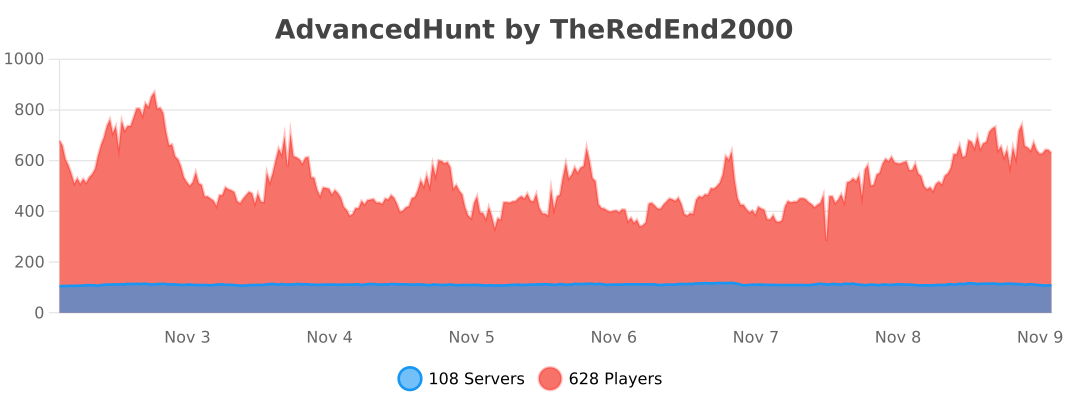
View all plugin statistics at bStats
⚠️ ATTENTION: This resource is for private use only.
Made with ❤️ for the Minecraft community