Logo
MINECRAFTBIBLE
Items
Items

All game items

Blocks
Blocks

Building blocks

Mobs
Mobs

Creatures & monsters

Biomes
Biomes

World biomes

Structures
Structures

Generated structures

Recipes
Recipes

Crafting guides

Advancements
Advancements

Achievements

Loot Tables
Loot Tables

Drop rates

Tags
Tags

Item groupings

All Versions
View all data →
Capes
Cape ArchiveNEW

Browse rare Minecon capes, OptiFine capes, and custom capes from players worldwide

Browse

Player Database
Player DatabasePopular

Search any player

Skin Browser
Skin Browser

Browse & download skins

Cape Gallery
Cape GalleryNEW

Minecon & OptiFine capes

Seed Vault
Seed Vault

Curated seeds

Learn

Guides
GuidesNew

Tutorials & tips

Blog
Blog

News & updates

Community

Community Hub
Community HubHub

Posts, discussions & more

All Versions
View community →
Seed Analyzer
Seed Analyzer

World seed analysis

Loot Explorer
Loot Explorer

Drop rates

Crafting Calculator
Crafting Calculator

Material planning

Enchant Calculator
Enchant Calculator

Probability math

Redstone Lab
Redstone Lab

Signal timing

Trading Profit
Trading Profit

Villager ROI

All Versions
View all tools →
Mods
Mods

Browse all mods

Plugins
Plugins

Server plugins

Resource Packs
Resource Packs

Textures & sounds

Shaders
Shaders

Visual enhancements

Datapacks
Datapacks

World logic

Scanner
Mod Intelligence

Scan & analyze any mod

All Versions
View all mods →
Loading...
IntroductionIntroductionVersion HistoryVersion HistoryGuidesGuidesBlog & NewsBlog & News
ItemsItemsBlocksBlocksMobsMobsRecipesRecipesBiomesBiomesStructuresStructuresAdvancementsAdvancementsLoot TablesLoot TablesTagsTags
ModsModsPluginsPluginsResource PacksResource PacksShadersShadersDatapacksDatapacks

MinecraftBible

The Ultimate Wiki

Logo
MINECRAFTBIBLE

The ultimate Minecraft reference. Every item, block, mob, and recipe documented with precision.

Community

  • Player Database
  • Skin Browser
  • Cape Gallery
  • Community Hub
  • Seed Vault

Database

  • Items
  • Blocks
  • Mobs
  • Recipes
  • Biomes
  • Structures

Tools

  • Seed Analyzer
  • Mod Intelligence
  • Crafting Calculator
  • Enchant Calculator

Mods & Packs

  • Mods
  • Plugins
  • Resource Packs
  • Shaders
  • Datapacks

© 2026 MinecraftBible. Not affiliated with Mojang or Microsoft.

PrivacyTermsContact
Advanced Resource Packs
PluginLicenseRef-All-Rights-Reserved

Advanced Resource Packs

A plugin that allows players on your server to be able to download texture packs configured with one command

193
Downloads
4
Followers
1 years ago
Updated
📦
1
Versions
game-mechanicsmanagementutilitybukkitpaperspigot
Download Latestv1.4View on Modrinth

📖About Advanced Resource Packs

Advanced Resource Packs

Commands:

/Openpacks: a menu that shows you the texture packs in items or blocks, when you click on one of them and if it is configured previously in the config.yml, a resourcepack will be applied, and to remove it you have to open the menu again and click on the one you have chosen previously.

Example of how to configure in config.yml:

The texture packs in the config.yml come empty by default so that whoever wants to use it can configure it to their liking, block, name, and link.

1:

name: ‘Resource pack 1’ (here is the name that will appear in the menu)

url: ‘link’ (Here is the link to the resourcepack)

icon: ‘GRASS_BLOCK’ (Here goes the ID of the block or item that you want the resourcepack to have in the menu)

and to add a new texture pack if you have already used the 6 that are by default, copy and paste a new one changing the number and the rest.

7:

name: ‘Resource Pack 7’

url: ‘link’ 

icon: ‘GOLDEN_APPPLE’

Tutorial:

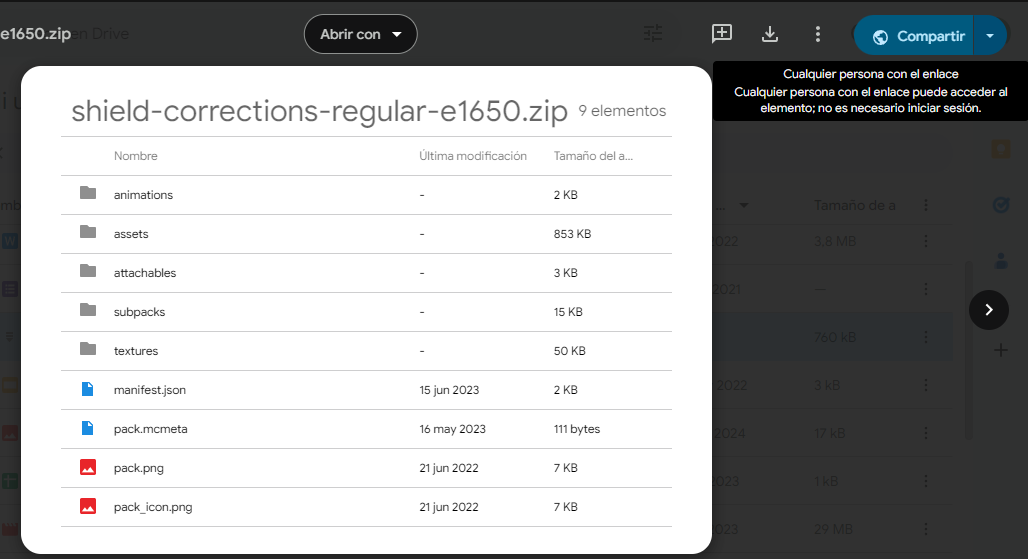
Step 1: Go to Google Drive and upload the texture pack you want in .zip format.

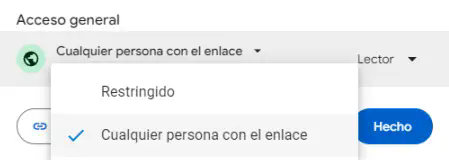
2° Step: Enter the file > Share > Change the privacy settings to ‘Anyone with this link’.
Paso 2

Paso 3

3° Step: Copy the link that gives you an example of the one in the picture: https://drive.google.com/file/d/1R_DtnoJhdxkPx34YBTcl2Gon0ghetTKO/view?usp=sharing

4° Step: get the ID of the previous link that would be ‘1R_DtnoJhdxkPx34YBTcl2Gon0ghetTKO’, to get the ID is to look at the ID of numbers and letters that comes out after file/d/ and there follows the ID that is until /view

5° Step: With this format here:

https://drive.google.com/uc?export=download&id=ID_FILE_ID

Replace ID_FILE_ID by the ID of your download link, in the case of this example it would be ‘1R_DtnoJhdxkPx34YBTcl2Gon0ghetTKO’ and it would look like this:

https://drive.google.com/uc?export=download&id=1R_DtnoJhdxkPx34YBTcl2Gon0ghetTKO

Now this link is the one to put in the config.yml.

Note: it is also useful to put links that take you DIRECT to a download, that is to say you put the link in your browser and it downloads without the need of a ‘download’ button if it is like this it is totally useful to avoid using the long process of Google Drive.

👥 Team & Contributors

iMrAgus
iMrAgusOwner

⚙️ Compatibility

Environment
🖥️ Server-side
Loaders
bukkitpaperspigot
Minecraft Versions
1.191.201.20.11.20.21.20.31.20.41.21

🔗 Links

Modrinth Page