Logo
MINECRAFTBIBLE
Items
Items

All game items

Blocks
Blocks

Building blocks

Mobs
Mobs

Creatures & monsters

Biomes
Biomes

World biomes

Structures
Structures

Generated structures

Recipes
Recipes

Crafting guides

Advancements
Advancements

Achievements

Loot Tables
Loot Tables

Drop rates

Tags
Tags

Item groupings

All Versions
View all data →
Capes
Cape ArchiveNEW

Browse rare Minecon capes, OptiFine capes, and custom capes from players worldwide

Browse

Player Database
Player DatabasePopular

Search any player

Skin Browser
Skin Browser

Browse & download skins

Cape Gallery
Cape GalleryNEW

Minecon & OptiFine capes

Seed Vault
Seed Vault

Curated seeds

Learn

Guides
GuidesNew

Tutorials & tips

Blog
Blog

News & updates

Community

Community Hub
Community HubHub

Posts, discussions & more

All Versions
View community →
Seed Analyzer
Seed Analyzer

World seed analysis

Loot Explorer
Loot Explorer

Drop rates

Crafting Calculator
Crafting Calculator

Material planning

Enchant Calculator
Enchant Calculator

Probability math

Redstone Lab
Redstone Lab

Signal timing

Trading Profit
Trading Profit

Villager ROI

All Versions
View all tools →
Mods
Mods

Browse all mods

Plugins
Plugins

Server plugins

Resource Packs
Resource Packs

Textures & sounds

Shaders
Shaders

Visual enhancements

Datapacks
Datapacks

World logic

Scanner
Mod Intelligence

Scan & analyze any mod

All Versions
View all mods →
Loading...
IntroductionIntroductionVersion HistoryVersion HistoryGuidesGuidesBlog & NewsBlog & News
ItemsItemsBlocksBlocksMobsMobsRecipesRecipesBiomesBiomesStructuresStructuresAdvancementsAdvancementsLoot TablesLoot TablesTagsTags
ModsModsPluginsPluginsResource PacksResource PacksShadersShadersDatapacksDatapacks

MinecraftBible

The Ultimate Wiki

Logo
MINECRAFTBIBLE

The ultimate Minecraft reference. Every item, block, mob, and recipe documented with precision.

Community

  • Player Database
  • Skin Browser
  • Cape Gallery
  • Community Hub
  • Seed Vault

Database

  • Items
  • Blocks
  • Mobs
  • Recipes
  • Biomes
  • Structures

Tools

  • Seed Analyzer
  • Mod Intelligence
  • Crafting Calculator
  • Enchant Calculator

Mods & Packs

  • Mods
  • Plugins
  • Resource Packs
  • Shaders
  • Datapacks

© 2026 MinecraftBible. Not affiliated with Mojang or Microsoft.

PrivacyTermsContact
AdminWatchdog
PluginLicenseRef-PROPRIETARY-LICENSE

AdminWatchdog

AdminWatchdog lets you monitor what staff members do on your server. When an admin runs a command, changes gamemode, or takes items from creative mode, the plugin sends a message to your Discord channel. This helps server owners keep track of staff activit

126
Downloads
3
Followers
2 months ago
Updated
📦
4
Versions
managementsocialutilitybukkitpaperpurpurspigot
Download Latestv1.3View on Modrinth

📖About AdminWatchdog

AdminWatchdog

Keep track of what your admins are doing and get notified on Discord


What is AdminWatchdog?

AdminWatchdog lets you monitor what staff members do on your server. When an admin runs a command, changes gamemode, or takes items from creative mode, the plugin sends a message to your Discord channel. This helps server owners keep track of staff activity and catch any misuse.

What it does

  • Sends Discord messages when admins run commands
  • Tracks when players switch gamemodes
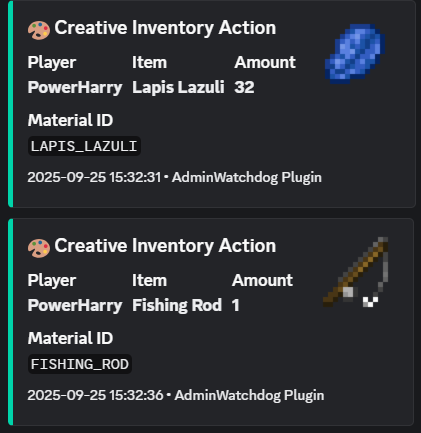
  • Logs items taken from creative inventory
  • Lets you set up custom alerts for specific commands
  • Only monitors people you want to monitor
  • Lets trusted admins bypass monitoring

Screenshots

Discord Messages

Creative Inventory Tracking

When someone takes items from creative mode, you get a nice Discord message showing exactly what they took:
Replace this with a description

Command Alerts

image

Custom Alerts

Set up special messages for important commands:

image

Gamemode Changes

image

Features

Discord Alerts

  • Get instant notifications in your Discord server
  • Nice looking messages with item pictures
  • Ping specific roles for important commands
  • Works with any Discord channel using webhooks

What Gets Monitored

  • Commands run by admins
  • Commands run from console
  • Gamemode changes
  • Items taken from creative inventory

Who Gets Monitored

You choose who to monitor:

  • Only OPs
  • Only players with certain permissions
  • Or everyone

You can also give trusted admins a bypass permission so they don't get logged.

Custom Command Alerts

Set up special alerts for commands you care about. You can even match specific command patterns:

  • ban - matches any ban command
  • lp user - matches LuckPerms user commands
  • lp user * permission set * - matches only when someone sets a permission

This lets you get pinged only for the important stuff, like when someone grants a dangerous permission.

How to Install

  1. Download the plugin from the Downloads tab
  2. Put the JAR file in your server's plugins folder
  3. Restart your server
  4. Edit plugins/AdminWatchdog/config.yml
  5. Add your Discord webhook URL
  6. Run /adminwatchdog reload

Setting Up Discord

  1. In Discord, go to your channel settings
  2. Click "Integrations" then "Webhooks"
  3. Create a new webhook
  4. Copy the webhook URL
  5. Paste it in your config.yml

Configuration

Basic Setup

discord:
  webhook-url: "YOUR_WEBHOOK_URL_HERE"
  enabled: true

Custom Alerts

Set up alerts for specific commands:

custom-responses:
  enabled: true
  
  # Alert when someone uses /ban
  ban: "**BAN** - %player% banned someone at %time%"
  
  # Alert and ping a role when someone uses /op
  op: "**CRITICAL** - %player% used OP! <@&YOUR_ROLE_ID> at %time%"
  
  # Alert for specific LuckPerms commands
  "lp user * permission set *": "**PERMISSION** - %player% set permission: %command%"

What the placeholders mean

  • %player% - The player who ran the command
  • %sender% - For console commands
  • %command% - The full command they typed
  • %time% - When it happened

Mentioning roles in Discord

To ping a role, you need the role ID. In Discord, type \@RoleName to get the ID, then use it like <@&123456789> in your config.

Commands

Command What it does
/adminwatchdog or /aw Shows plugin info
/adminwatchdog version Shows version number
/adminwatchdog reload Reloads the config
/adminwatchdog update Checks for updates

Permissions

Permission What it does Who has it
adminwatchdog.reload Lets you reload config OPs only
adminwatchdog.monitor Makes you get monitored OPs only
adminwatchdog.bypass.commands Stops your commands being logged Nobody
adminwatchdog.bypass.creative Stops creative inventory being logged Nobody
adminwatchdog.bypass.customresponses Stops custom alerts for you Nobody
adminwatchdog.bypass.gamemode Stops gamemode changes being logged Nobody

How to stop being monitored

Give yourself one of the bypass permissions. For example, if you don't want custom responses pinging you:

/lp user YourName permission set adminwatchdog.bypass.customresponses true

Need Help?

  1. Check if someone already asked about your problem in Issues
  2. Join the Discord server
  3. Open a new issue on GitHub

Requirements

  • Paper or Spigot server (Paper recommended)
  • Minecraft 1.20 or newer
  • Java 21 or newer

License

This plugin has a proprietary license. You can use it on your server, but you cannot modify the code or redistribute it.


Made by TejasLamba2006

GitHub | Discord

👥 Team & Contributors

TejasLamba2006
TejasLamba2006Owner

⚙️ Compatibility

Environment
🖥️ Server-side
Loaders
bukkitpaperpurpurspigot
Minecraft Versions
1.211.21.11.21.21.21.31.21.41.21.51.21.61.21.7+4 more

🔗 Links

Modrinth Page
