Logo
MINECRAFTBIBLE
Items
Items

All game items

Blocks
Blocks

Building blocks

Mobs
Mobs

Creatures & monsters

Biomes
Biomes

World biomes

Structures
Structures

Generated structures

Recipes
Recipes

Crafting guides

Advancements
Advancements

Achievements

Loot Tables
Loot Tables

Drop rates

Tags
Tags

Item groupings

All Versions
View all data →
Capes
Cape ArchiveNEW

Browse rare Minecon capes, OptiFine capes, and custom capes from players worldwide

Browse

Player Database
Player DatabasePopular

Search any player

Skin Browser
Skin Browser

Browse & download skins

Cape Gallery
Cape GalleryNEW

Minecon & OptiFine capes

Seed Vault
Seed Vault

Curated seeds

Learn

Guides
GuidesNew

Tutorials & tips

Blog
Blog

News & updates

Community

Community Hub
Community HubHub

Posts, discussions & more

All Versions
View community →
Seed Analyzer
Seed Analyzer

World seed analysis

Loot Explorer
Loot Explorer

Drop rates

Crafting Calculator
Crafting Calculator

Material planning

Enchant Calculator
Enchant Calculator

Probability math

Redstone Lab
Redstone Lab

Signal timing

Trading Profit
Trading Profit

Villager ROI

All Versions
View all tools →
Mods
Mods

Browse all mods

Plugins
Plugins

Server plugins

Resource Packs
Resource Packs

Textures & sounds

Shaders
Shaders

Visual enhancements

Datapacks
Datapacks

World logic

Scanner
Mod Intelligence

Scan & analyze any mod

All Versions
View all mods →
Loading...
IntroductionIntroductionVersion HistoryVersion HistoryGuidesGuidesBlog & NewsBlog & News
ItemsItemsBlocksBlocksMobsMobsRecipesRecipesBiomesBiomesStructuresStructuresAdvancementsAdvancementsLoot TablesLoot TablesTagsTags
ModsModsPluginsPluginsResource PacksResource PacksShadersShadersDatapacksDatapacks

MinecraftBible

The Ultimate Wiki

Logo
MINECRAFTBIBLE

The ultimate Minecraft reference. Every item, block, mob, and recipe documented with precision.

Community

  • Skin Browser
  • Cape Gallery
  • Seed Vault
  • Blog
  • Guides

Database

  • Items
  • Blocks
  • Mobs
  • Recipes
  • Biomes
  • Structures

Tools

  • Seed Analyzer
  • Mod Intelligence
  • Crafting Calculator
  • Enchant Calculator

Mods & Packs

  • Mods
  • Plugins
  • Resource Packs
  • Shaders
  • Datapacks

Site & Legal

  • About
  • Authors
  • Editorial Policy
  • Corrections
  • Contact
  • Privacy Policy
  • Terms of Service
  • DMCA
  • Sitemap

© 2026 MinecraftBible. Not affiliated with Mojang or Microsoft.

PrivacyTermsContact
Wynncraft Dynamic Weather
ModLGPL-3.0-or-later

Wynncraft Dynamic Weather

A client-side Wynncraft mod that implements a dynamic weather engine

59.4K
Downloads
40
Followers
4 months ago
Updated
📦
4
Versions
adventuregame-mechanicsutilityfabric
Download Latestv1.2.0-1.21.11View on Modrinth

📖About Wynncraft Dynamic Weather

Wynncraft Dynamic Weather

A fully client-side weather mod made specifically for Wynncraft.

Features

Random weather occurrences!

Rain, thunder, snow, and sandstorms can all occur randomly throughout Wynn. Regions like Nemract and Galleon's Graveyard experience significantly more rain. The Nesaak and Lusuco tundra recieve regular snowfall and blizzards. The Almuj desert faces dust and sandstorms. Smog creeps into the Silent Expanse. Over a dozen regions have unique weather chances and hazards.

Preview

Preview Gif
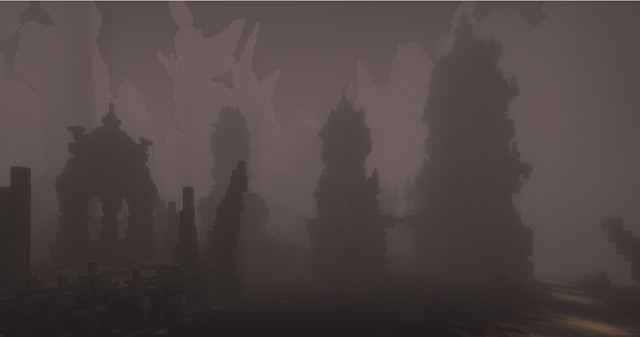
Silent Expanse

Technical

The mod can be broken down into a few different key features:

Command

/wynnweather clear/rain/thunder

This command allows the user to force a particular weather mode. If set to rain/thunder, the game will remain in this state until it is turned off. While set to clear the default weather engine is active.

Weather Engine

Each tick a calculation is made to determine if weather will start. In most areas, this calculation comes out to ~20% chance per in-game day. This varies from region to region however, for example Nemract has a ~75% chance per day.

Weather Overrides

By default, Nesaak would not snow and most of Almuj would not have sandstorms. The mod overrides these areas to make sure the correct particles are displayed. In some regions like the Volcanic Isles and Molten Heights no rain will fall.

Dependencies

This mod requires:
Fabric API
Cloth Config API
Barriers Don't Block Rain
The following mod is highly recommended:
Particle Rain
I recommend disabling rain particles and enabling render vanilla weather in the Particle Rain config.
Note: Without Particle Rain, sandstorms will not render in Almuj.
If you do not wish to use Particle Rain, edit this mods config and enable "Render Vanilla Snow". It prevents vanilla snow particles from rendering by default.

Note

This mod is very fresh! Please report bugs you notice, as it is difficult to debug a mod that takes nearly 2 hours to activate in some areas. Feedback is also welcome!
A note on modpacks: Feel free to implement this mod into your modpacks! This mod was developed for use in my modpack, so check that out too as soon as its available :)

👥 Team & Contributors

quikjay
quikjayOwner

⚙️ Compatibility

Environment
💻 Client-side
Loaders
fabric
Minecraft Versions
1.21.11

🔗 Links

Modrinth Page