Logo
MINECRAFTBIBLE
Items
Items

All game items

Blocks
Blocks

Building blocks

Mobs
Mobs

Creatures & monsters

Biomes
Biomes

World biomes

Structures
Structures

Generated structures

Recipes
Recipes

Crafting guides

Advancements
Advancements

Achievements

Loot Tables
Loot Tables

Drop rates

Tags
Tags

Item groupings

All Versions
View all data →
Capes
Cape ArchiveNEW

Browse rare Minecon capes, OptiFine capes, and custom capes from players worldwide

Browse

Player Database
Player DatabasePopular

Search any player

Skin Browser
Skin Browser

Browse & download skins

Cape Gallery
Cape GalleryNEW

Minecon & OptiFine capes

Seed Vault
Seed Vault

Curated seeds

Learn

Guides
GuidesNew

Tutorials & tips

Blog
Blog

News & updates

Community

Community Hub
Community HubHub

Posts, discussions & more

All Versions
View community →
Seed Analyzer
Seed Analyzer

World seed analysis

Loot Explorer
Loot Explorer

Drop rates

Crafting Calculator
Crafting Calculator

Material planning

Enchant Calculator
Enchant Calculator

Probability math

Redstone Lab
Redstone Lab

Signal timing

Trading Profit
Trading Profit

Villager ROI

All Versions
View all tools →
Mods
Mods

Browse all mods

Plugins
Plugins

Server plugins

Resource Packs
Resource Packs

Textures & sounds

Shaders
Shaders

Visual enhancements

Datapacks
Datapacks

World logic

Scanner
Mod Intelligence

Scan & analyze any mod

All Versions
View all mods →
Loading...
IntroductionIntroductionVersion HistoryVersion HistoryGuidesGuidesBlog & NewsBlog & News
ItemsItemsBlocksBlocksMobsMobsRecipesRecipesBiomesBiomesStructuresStructuresAdvancementsAdvancementsLoot TablesLoot TablesTagsTags
ModsModsPluginsPluginsResource PacksResource PacksShadersShadersDatapacksDatapacks

MinecraftBible

The Ultimate Wiki

Logo
MINECRAFTBIBLE

The ultimate Minecraft reference. Every item, block, mob, and recipe documented with precision.

Community

  • Skin Browser
  • Cape Gallery
  • Seed Vault
  • Blog
  • Guides

Database

  • Items
  • Blocks
  • Mobs
  • Recipes
  • Biomes
  • Structures

Tools

  • Seed Analyzer
  • Mod Intelligence
  • Crafting Calculator
  • Enchant Calculator

Mods & Packs

  • Mods
  • Plugins
  • Resource Packs
  • Shaders
  • Datapacks

Site & Legal

  • About
  • Authors
  • Editorial Policy
  • Corrections
  • Contact
  • Privacy Policy
  • Terms of Service
  • DMCA
  • Sitemap

© 2026 MinecraftBible. Not affiliated with Mojang or Microsoft.

PrivacyTermsContact
World First Join Message
ModLicenseRef-All-Rights-Reserved

World First Join Message

World First Join Message is a customizable mod that displays a unique welcome message when a player joins for the first time.

1.0K
Downloads
5
Followers
6 months ago
Updated
📦
14
Versions
librarysocialutilityfabricforgeneoforge
Download Latestv1.11.5View on Modrinth

📖About World First Join Message

World_First_Join_Message is a lightweight yet powerful Minecraft mod that adds a unique and personalized twist to your server and modpack. With this mod, you can display a custom message whenever a new player joins your world for the very first time. Perfect for creating a welcoming environment on multiplayer servers ,modpack or adding a touch of flair to single-player adventures.

Features:

  • Customizable Messages: Set unique first-time join messages with full color and style formatting.
  • Player Recognition: Displays the first-join message only once per player.
  • Server-Wide Appeal: Great for community servers to welcome new members with a personalized touch.
  • Lightweight & Compatible: Designed to work seamlessly with other mods and plugins.

Make every player's first join an unforgettable experience with World_First_Join_Message!

Let your imagination run wild with creative welcomes and make your server stand out from the rest. Download now and give your players the warm greeting they deserve!


Installation and Configuration Instructions for World_First_Join_Message

Install the Mod:

  1. Download the mod from CurseForge and place it into the mods folder of your Minecraft directory.

Launch Minecraft:

  1. Start Minecraft with the mod installed.

  2. The mod will be loaded, and its settings can be adjusted in-game.

Accessing In-Game Configuration:

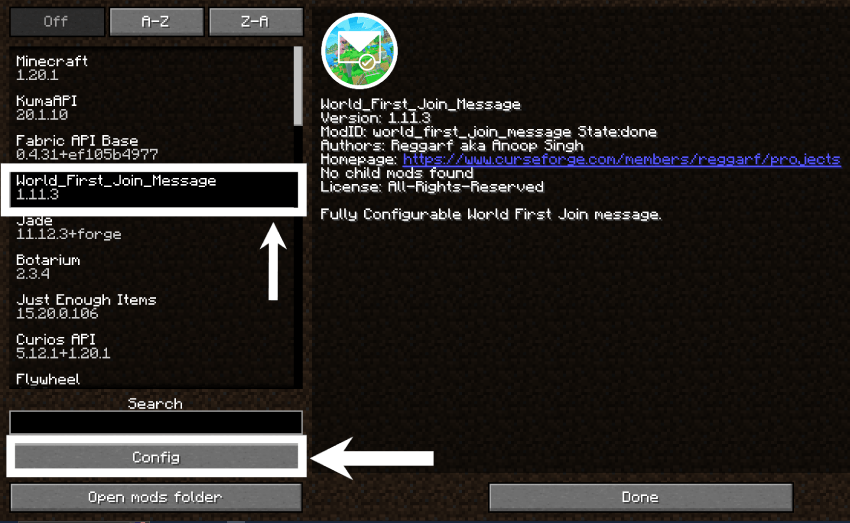
  1. Open Minecraft and go to the Mods menu.

  2. Locate World First Join Message and click on Configure (if using ModMenu or Forge's built-in config GUI).
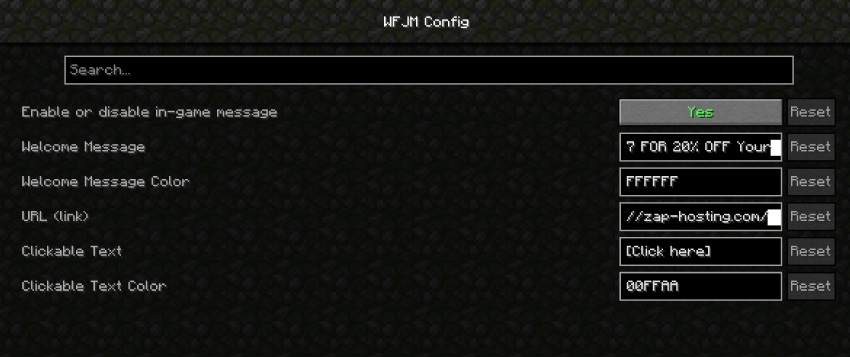
  3. Customize the following settings:

Now, all configurations can be managed directly from the game without manually editing any files! 🚀

[welcome_message]
    #Enable or disable the welcome message
    enabled = true
    #The message to be displayed when a player joins the game for the first time
    text = "THANKS TO OUR SPONSORS, ZAP-HOSTING! Support Reggarf And Save BIG - 
             USE CODE Reggarf-1047 FOR 20% OFF Your ORDER!"
    #The RGB color code for the welcome message.
    #Examples: 'FF0000' for red, '00FF00' for green, '0000FF' for blue
    #'FFFF00' for yellow, 'FF00FF' for magenta, '00FFFF' for cyan
    color = "FFFFFF"
    #The URL to be opened when the player clicks the link
    url = "https://zap-hosting.com/reggarf"
    #The RGB color code for the clickable text '[Click here]',
    #Examples: 'FF0000' for red, '00FF00' for green, '0000FF' for blue
    #'FFFF00' for yellow, 'FF00FF' for magenta, '00FFFF' for cyan, 'FFFFFF' for white
    clickableColor = "00FFAA"

Your server or modpack is now ready to welcome new players with a custom, vibrant message! 


👥 Team & Contributors

Reggarf
ReggarfOwner

⚙️ Compatibility

Environment
✅ Client & Server
Loaders
fabricforgeneoforge
Minecraft Versions
1.21.61.21.71.21.81.21.91.21.101.21.11

🔗 Links

Modrinth Page