


Elton's Wind meter for PMW
Anemometers and equipment for ProtoManly's weather
📖About Elton's Wind meter for PMW
Intent of the addon

This mod adds equipment for measuring wind speeds in ProtoManly's weather (https://modrinth.com/mod/protomanlys-weather). The mod currently adds:
- A Young propeller type anemometer

- A Young propeller type heavy duty anemometer

- A Davis cup type anemometer

- A tornado probe (anchor type), with probe reading handheld monitor

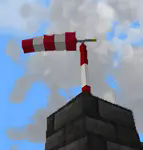
- A wind sock

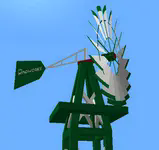
- A garden decoration small replica wind pump
- A wind turbine

A metal wind vane
A wind chime that emitts sounds
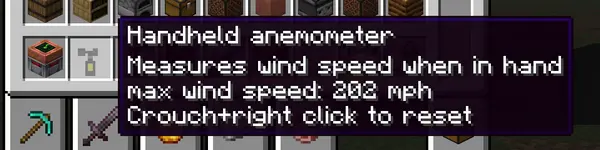
A handheld anemometer

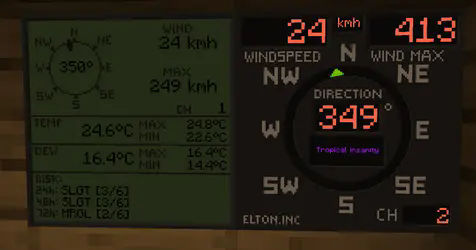
- Displays for reading wind values

The mod will not work without PM weather.
Setting up the channels
To setup a channel on anemometers, shift+right click the anemometer. No item should be held by either left or right hand at the time. That includes shields
To setup a channel on display, right click the display. Anemometer and display must have same channel to communicate.
Channel 0 is non transmitting and is used for debugging. If anemometer channel could not be set, try setting it to 0 and then back to desired channel.
There are currently 100 available channels.
Right clicking anemometer will display it's channels that server and client see. This number must always be equal. The feature now remains in the mod for debugging.
Anemometer GUI will display "Channel could not be set because placement is invalid" This is the case:
- if anemometer is placed under a block,
- if anemometer is in any other dimension than overworld,
- for about 1 sec after it's being placed down, so immediately placing it and setting channel won't work, just wait a sec and then enter channel setup.
Redstone output
For setting up the redstone output, it is quite same as setting the channels. You put in the wind speed at which the display should output the redstone signal. It is not possible to set less that 4 mph due to histeresis (to prevent spam). Because the system is based on mph, other units might not be able to be set at increments of 1. This mostly applies to kmh.
Redstone output is only on wind displays.
Useful commands
Use /windmeter commands to find out which channels are occupied, which are free or get anemometer location by channel number. Sometimes, the channels might bug out, use command clear channel [channel number] to clean up the broken channel. This will not remove the channel from anemometer itself. The anemometer locating and channel clearing command require operator permissions.
Resetting the wind max and temperature max on display
To reset max values on display, shift+right click the display when not holding any items.
Some gameplay info
Block strengths
Wind strengths for anemometers are about:
- 219 mph for Young,
- 194 mph for Davis,
- 229 mph for tornado probes
- NaN mph for heavy duty Young.
- heavy duty anemometer can be destroyed by shift-left clicking on it with any vanilla pickaxe
These will be readjusted when/if wind engine block picking gets an update
Wind sock
Wind sock requires it's dedicated pole to be placed on.
- wind sock tears off somewhere in between 130 - 170 mph and must be re-placed to fix it.
- the pole has a wind strength of 206 mph.
- the pole can be stacked to any height.
Garden windmill
Garden windmill requires it's dedicated tower to be placed on.
- windmill has furling tail brake mechanism (just for fun)
- windmill will be damaged by winds above 110 mph and must be re-placed to fix it.
- the upper tower part will permanently bend under strong winds in same direction as the winds.
- the tower pick up strength is 206 mph.
- windmill pick up strength is 164 mph.
- the tower can be stacked to any height.
Small wind turbine
- turbine has furling tail brake mechanism and will reduce output power at extreme wind speeds
- turbine will be damaged by winds above 110 mph and must be re-placed to fix it.
- turbine pick up strength is 164 mph.
- carbon fibre turbine pick up strength is 180 mph.
- wooden wind turbine puck up strength is 154 mph.
- the power output is from below, so connect the cables there.
- Carbon fibre turbine is most efficient and has no brakes so it will output more power.
Handheld anemometer
Handheld anemometer measures the windspeeds while in main hand. It will record and save maximum wind speeds per-item. If you have heavy tick lag, current wind speeds will vary from maximum due to maximum speeds being read from server side. The maximum speed is always the correct one and also the one that does the block destruction, so more relevant. To avoid delay and lag, the current speed is read on client side.
Measurement units
Pre update 0.0.19t: Wind and weather display obey the PM weather config and will switch between metric or imperial based on that.
After update 0.0.19t: Wind meter uses it's separate config to select desired wind speed and temperature units separately, allowing mixed imperial/metric.
The display will currently not record speed if not chunk loaded. Tornado passing over should make it record because the tornadoes load chunks. However, the tornado must pass over the chunk that display is in. Example: Your base has a display in the shelter and anemometer on roof. If tornado passes over your base it should record the event.
Weather display shows more data but refreshes slower and caps at 999 kmh. Due to calling the readings for risks it is not recommended to place down too many of them.
Tornado probes
Tornado probes record atmospheric data for 5 minutes (configurable) after being placed down. They currently record max wind, max temp, min temp, max dew point and min dew point. After 5 minutes, they stop recording and reward can be dropped upon shift+right-clicking the probe if measured winds were high enough (only after it's done recording). Breaking the probe won't drop any items. Rewards are: iron ingots, gold ingots, diamonds, emeralds, netherite scraps and a netherite ingot. Probes drop experience based on wind speeds they measured and exposure time. Current data is shown by right-clicking the probe, maximum data is shown by shift-right clicking the probe. A probe monitor can be used to right click and connect to the probe while it's recording. It ticks in inventory, saves max wind and allows for remote wind reading.
Crafting
All items and blocks are craftable in survival mode. I suggest using JEI or other recipe viewers to see the recipes.
QOL options
Versions after 0.0.19t have some configurable options.
Wind display text and numbers can be set to any color, but it has to be input as a base 10 number. Use online calculator converter to change the hexadecimal color number to base 10 number and paste that in the config. Example color 0xff6347 (16) -> 16737095 (10). You only convert the ff6347 part (without 0x or #).
Wind displays can also use dynamic colors that will change based on wind speed from blue to purple. Configuration is only available for wind display and not weather display.
The wind sock tearing off in high winds and garden windmill bending can now be turned off in config. This is server sided. The blockstrength for tornado picking up is not affected by this.
Natural spawning
No mods currently add natural spawning.
Some issues that might occur
- Redstone output on wind displays might get stuck
- Anemometers might disconnect (have their channel set to 0), might happen if a waypoint is placed on anemometer
- The channel list not syncing between SERVER and CLIENT
- Desynced issue can be mostly solved by quitting and rejoining the game. If the problem persists, the command for clearing up the channel must be used and anemometer reconnected. If all else fails, delete the "anemometers.dat" file in your saved world folder directory.
Do not redistribute a modified jar file.