


📖About Webcam
Webcam
Mod and plugin that allows players to broadcast their webcams
Downloads
⚠️ Warning
This plugin requires special setup on server to work.
If you are a server administrator, please read the section Setup on server first
Features
- High-quality webcam broadcasting
- H.264 video codec
- Video transmission via UDP using custom protocol
- AES encryption
- Bitrate control
- Video resolution control
- Different display shapes
- Display size and position configuration
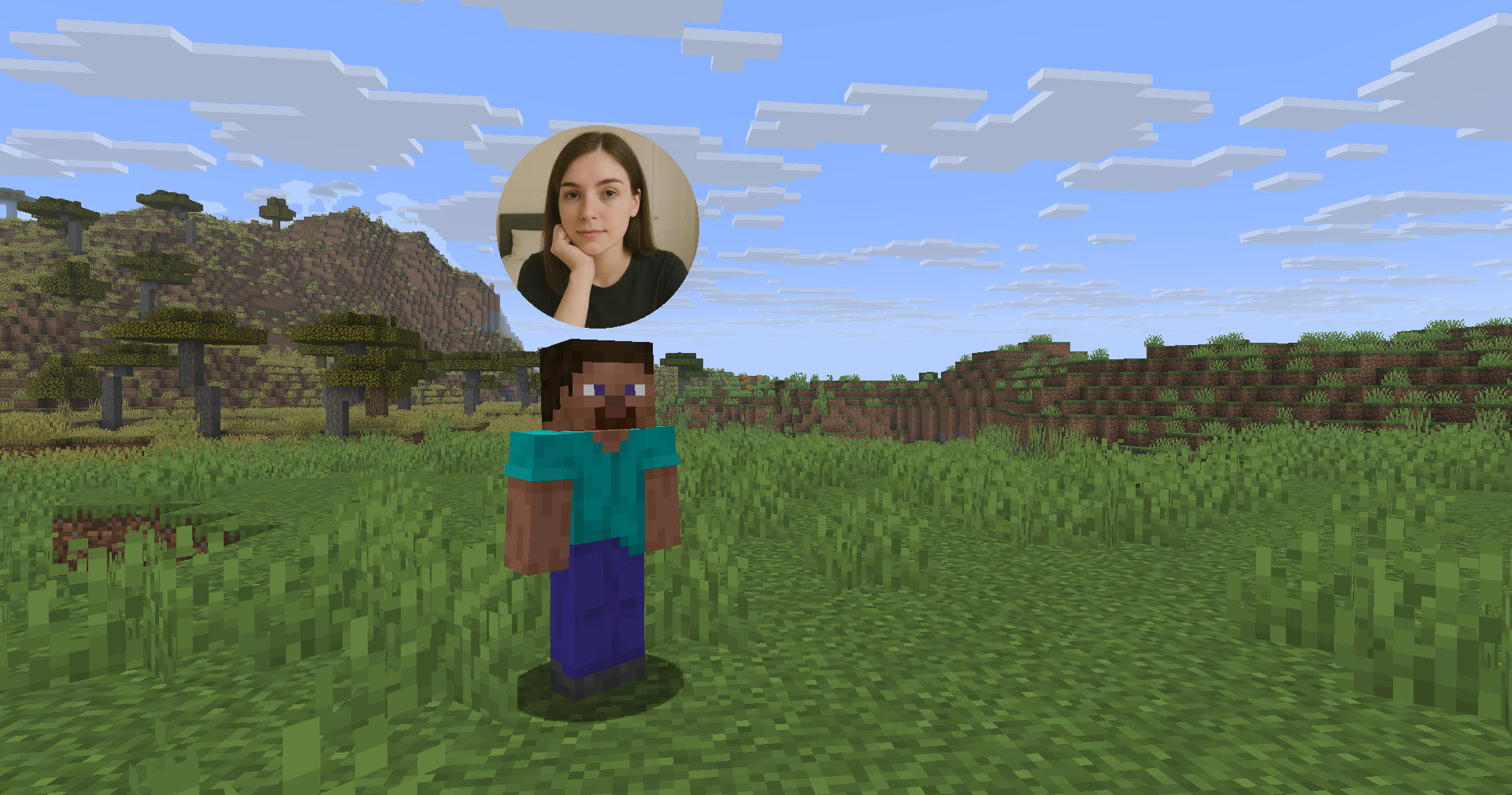
- Display on player model face
- Display distance limit
- Webcam broadcast and view permissions
- Advanced client configuration (Mod Menu & Cloth Config API required)
- Ability to hide selected players' webcams
- Velocity proxy support
- Compatibility with ReplayMod & Flashback
Client Usage
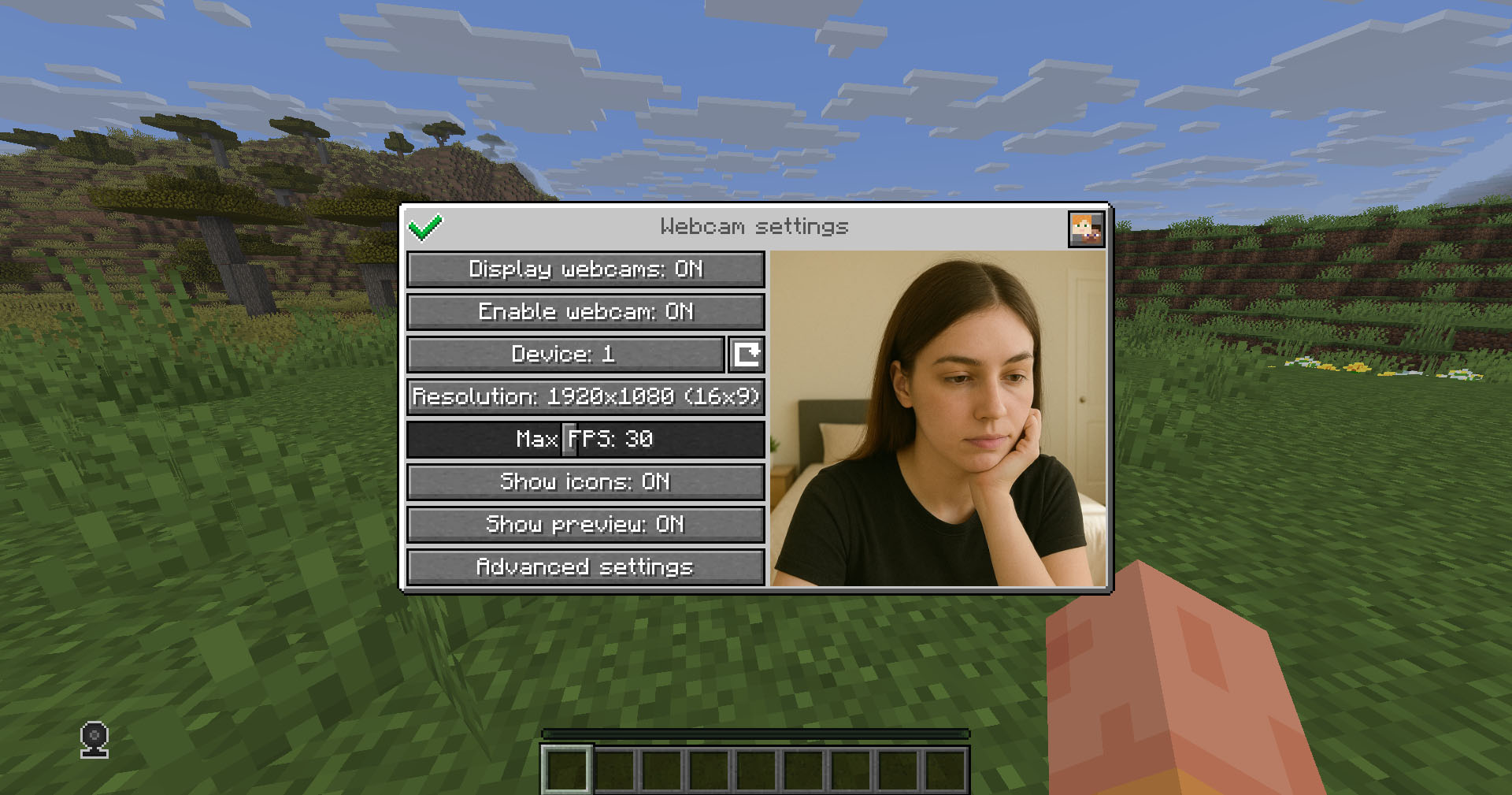
Put the mod in the mods directory (with the Fabric API if you are using Fabric). The settings menu can be opened by hotkey (C by default)
Icons
| Icon | Description |
|---|---|
 |
Your webcam is enabled |
 |
Your webcam is disabled |
 |
Connecting to Webcam server |
 |
Not connected to Webcam server |
Encryption
Webcam connection is encrypted, but we don't guarantee the security of it. Use at your own risk!
Setup on server
Webcam plugin uses UDP socket to transfer video packets.
So you need to open a UDP port in your server's firewall and panel (if present) to make Webcam server work. This is port 25454/udp by default. You can change the port in server config
If you are using Velocity, see Setup on proxy
Server config
Location:
- Fabric / Quilt / NeoForge:
config/webcam/server.json - Bukkit / Spigot / Paper:
plugins/webcam/server.json
Here are the default values with their descriptions:
{
  "port": 25454,                 // Webcam UDP server port. This must not clash with any other used UDP port (like Simple Voice Chat port)
  "bind_address": "",            // Address to bind the Webcam server to. Leave blank to use the wildcard (0.0.0.0) address. F.e. use "127.0.0.1" to accept only local connections
  "host": "",                    // The hostname that clients should use to connect to the Webcam server. Leave blank to use the address, that player is connected to Minecraft with. Can be a simple address or an address with port. This will be ignored, if the server is proxied
  "keep_alive_period": 1000,     // Period of sending keep alive packets is milliseconds
  "permission_check_period": 60, // Period of checking webcam.broadcast and webcam.view permissions in ticks
  "max_display_distance": 100.0, // The distance in blocks from player, in which other players can see his webcam
  "display_on_face": false,      // Whether to display webcam on player model face or above his head
  "display_shape": "round",      // Shape of webcams displayed above players' head. Possible values: "round", "square"
  "display_offset_y": 1.3,       // Y offset of webcams displayed above players' head
  "display_size": 1.2,           // Size of webcams displayed above players' head
  "hide_nicknames": true,        // Whether to hide player's nickname if his webcam is enabled
  "display_self_webcam": true,   // Whether to show the player's webcam to himself
  "synced": {                    // These settings are synchronized with clients
    "image_dimension": 360,      // Side dimension of square webcam images
    "mtu": 1100,                 // Maximum Transmission Unit of packets. You can lower this, if image on webcam starts look glitchy or not arrives at all
    "bitrate": 500               // Target video bitrate (kbps)
  },
  "messages": {                  // Custom transtalions for messages, that are sent to players in different situations. May contain placeholders - %s
    "incompatible_mod_version": "Incompatible Webcam version. Your - %s, server's - %s" // The message that will be sent to player if he has incompatible Webcam mod version. You can set this to empty to disable sending this message
  }
}
Commands
/webcamconfig <field> [new_value]- command to read/update config values. Requireswebcam.command.configpermission or OP.
Permissions
webcam.command.config- permission to modify Webcam server config (default: OP Level)webcam.broadcast- permission to broadcast webcam (default: true)webcam.view- permission to view webcams (default: true)
Setup on proxy
Webcam has Velocity plugin that proxies Webcam servers on the backend MC servers and allows to connect to different Webcam servers through the single port.
So it acts like a UDP proxy.
If you running proxy and backend servers on the same machine, you need to configure different ports for them. See Setup on server/Server config and Setup on proxy/Proxy config
Proxy config
Server config is located in plugins/webcam/config.properties
Here are the default values with their descriptions:
#Webcam proxy config

# Webcam UDP server port. This must not clash with any other used UDP port (like Simple Voice Chat port)
port=25454

# Address to bind the Webcam server to. Leave blank to use the wildcard (0.0.0.0) address. F.e. use "127.0.0.1" to accept only local connections
bind_address=

# The hostname that clients should use to connect to the Webcam server. Leave blank to use the address, that player is connected to Minecraft with. Can be a simple address or an address with port. This will override configured values on backend server's
host=
License
This mod is licensed under No Unauthorized Distribution License, which full text can be found at https://github.com/DimasKama/Webcam/blob/master/LICENSE.md
Summary
Modpacks: You can use this mod in modpacks, but you must not include its files directly. Instead, list it as a dependency (mod reference) that points to an official download source.
For Devs: You’re allowed to create addons or integrate support for the mod, but you must not copy any of its code. Instead, make it an external dependency that gets downloaded from an official source.
Redistribution Limits: You cannot re-upload or share the mod’s code or compiled files publicly without the author’s explicit permission. Forking for personal use is okay, but distributing a compiled fork is not allowed.
Personal Use: You may use and modify the mod for personal use, but any changes must remain private and not be shared publicly.
Official Download Requirement: Any dependency or modpack reference must point to the official download sources provided by the author.