

WAY: Where Are You?
Find your friends with innovative and configurable way-markers!
📖About WAY: Where Are You?

WAY: Where Are You?
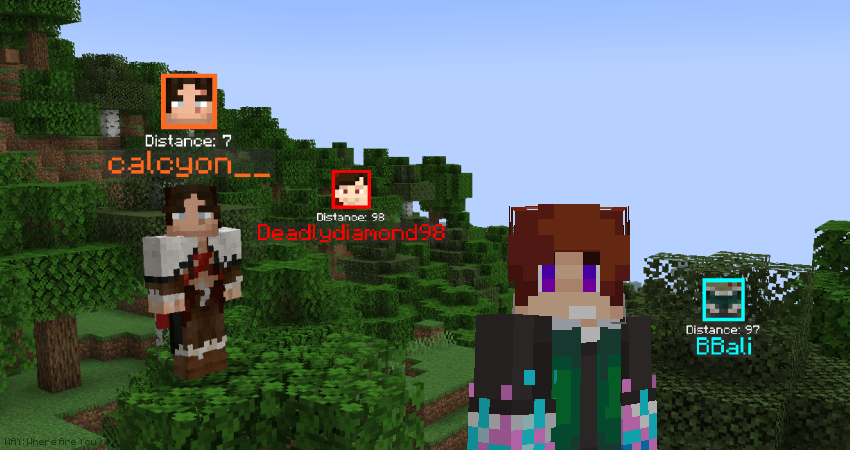
WAY is a multiplayer-based utility mod that allows you to easily find your WAY to your friends by highlighting them in-world in a variety of different ways when you press the M key.
I conceptualised this mod with accessibility as the primary focus, as I'm someone who both has a terrible sense of navigation, and who also very easily loses sight of his friends when adventuring out in the world - Particuarly in very lush and busy biomes, or in the cave depths. This mod will help save you and your pals a lot of time by removing the need to constantly communicate coordinates, or scramble around structures to reunite with one another. I hope you find it helpful!
Main Features
By default, WAY displays a player's HEAD, an OUTLINE around their head, their DISTANCE away from you, and their NAME. Additionally, you can also enable OUTLINES, and even your SELF's WAY information too if you want to. All this can be done with the corresponding /way see commands.
By default, the mod is always active, up until you're 3 blocks near a player, at which point WAY will disable for that player. It will also disable for any player further than 9999 blocks away. You can change these with /way admin disableIfWithin and /way admin disableIfFurtherThan respectively.
By default, /way see hideIfVisible is also false. If set to true, WAY visibility will only activate if other players are hidden behind walls!
Color
By default, all players are CLEAR of colour. If it hasn't been disabled by an admin, You can change your colour with /way color, and then either use one of Minecraft's default colours, or input a hex code value instead for a custom colour. Clearing removes any colour association.
Hex colors are powerful, since if /way admin seeTeamColorOnly is enabled and players are allowed to switch teams freely, one can choose to pick a hex color and make being found by others who they haven't shared their hex color with far more difficult, allowing for relative privacy amongst teammates even in public servers!
Admins can use /way admin teamColorNoFriendlyFire true to disable PVP between players of the same color, making co-op play much more efficient!
Players can use /way focus to focus on either a specific WAY color, a specific player, or clear their focus to see everyone again.
Opt-in/out
Players who don't want to be found in a multiplayer server via WAY can opt-out of WAY completely via the /way opt-out command. Those same players can opt back in via /way opt-in.
Server admins can force players to stay opted-in via the /way admin forceOpt-in true command.
Other Admin Commands
/way admin colorDistance true makes a player's color fainter the further away they are. The distances which determine how saturated or faded the colour is are controlled by /way admin disableIfWithin and /way admin disableIfFurtherThan.
/way admin lock see/color disallows players to change their see settings, for those who want to limit the available information to players like distance, identity or team color faction.
/way admin modify allows admins to change color, focus, opt-in, opt-out, and see settings for any and all players.
/way admin namepain nameFlashesWhenHurt makes player names flash red when they take damage!
/way admin namepain nameColorGetsRedder makes names get redder the more damage they take. This also applies to colored names, which can mix into muddier-looking colors, so enable this one at your own risk if you have team colors enabled.
/way admin seeAll true lets you see everyone, regardless of other settings.
/way admin packetUpdateRate changes how frequently position data is sent to align WAY nameplates. Change this at your own risk!
Feedback
If you have any questions, comments, or feedback for future updates, please consider joining the Infernal Studios Discord server and letting us know! Hope you enjoy the mod! :D