Logo
MINECRAFTBIBLE
Items
Items

All game items

Blocks
Blocks

Building blocks

Mobs
Mobs

Creatures & monsters

Biomes
Biomes

World biomes

Structures
Structures

Generated structures

Recipes
Recipes

Crafting guides

Advancements
Advancements

Achievements

Loot Tables
Loot Tables

Drop rates

Tags
Tags

Item groupings

All Versions
View all data →
Capes
Cape ArchiveNEW

Browse rare Minecon capes, OptiFine capes, and custom capes from players worldwide

Browse

Player Database
Player DatabasePopular

Search any player

Skin Browser
Skin Browser

Browse & download skins

Cape Gallery
Cape GalleryNEW

Minecon & OptiFine capes

Seed Vault
Seed Vault

Curated seeds

Learn

Guides
GuidesNew

Tutorials & tips

Blog
Blog

News & updates

Community

Community Hub
Community HubHub

Posts, discussions & more

All Versions
View community →
Seed Analyzer
Seed Analyzer

World seed analysis

Loot Explorer
Loot Explorer

Drop rates

Crafting Calculator
Crafting Calculator

Material planning

Enchant Calculator
Enchant Calculator

Probability math

Redstone Lab
Redstone Lab

Signal timing

Trading Profit
Trading Profit

Villager ROI

All Versions
View all tools →
Mods
Mods

Browse all mods

Plugins
Plugins

Server plugins

Resource Packs
Resource Packs

Textures & sounds

Shaders
Shaders

Visual enhancements

Datapacks
Datapacks

World logic

Scanner
Mod Intelligence

Scan & analyze any mod

All Versions
View all mods →
Loading...
IntroductionIntroductionVersion HistoryVersion HistoryGuidesGuidesBlog & NewsBlog & News
ItemsItemsBlocksBlocksMobsMobsRecipesRecipesBiomesBiomesStructuresStructuresAdvancementsAdvancementsLoot TablesLoot TablesTagsTags
ModsModsPluginsPluginsResource PacksResource PacksShadersShadersDatapacksDatapacks

MinecraftBible

The Ultimate Wiki

Logo
MINECRAFTBIBLE

The ultimate Minecraft reference. Every item, block, mob, and recipe documented with precision.

Community

  • Player Database
  • Skin Browser
  • Cape Gallery
  • Community Hub
  • Seed Vault

Database

  • Items
  • Blocks
  • Mobs
  • Recipes
  • Biomes
  • Structures

Tools

  • Seed Analyzer
  • Mod Intelligence
  • Crafting Calculator
  • Enchant Calculator

Mods & Packs

  • Mods
  • Plugins
  • Resource Packs
  • Shaders
  • Datapacks

© 2026 MinecraftBible. Not affiliated with Mojang or Microsoft.

PrivacyTermsContact
Valley
ModLicenseRef-All-Rights-Reserved

Valley

A world-gen river and valley mod

2.1K
Downloads
108
Followers
5 months ago
Updated
📦
3
Versions
adventureworldgenfabricforgeneoforge
Download Latestv0.1.0-BETA-a32f519View on Modrinth

📖About Valley

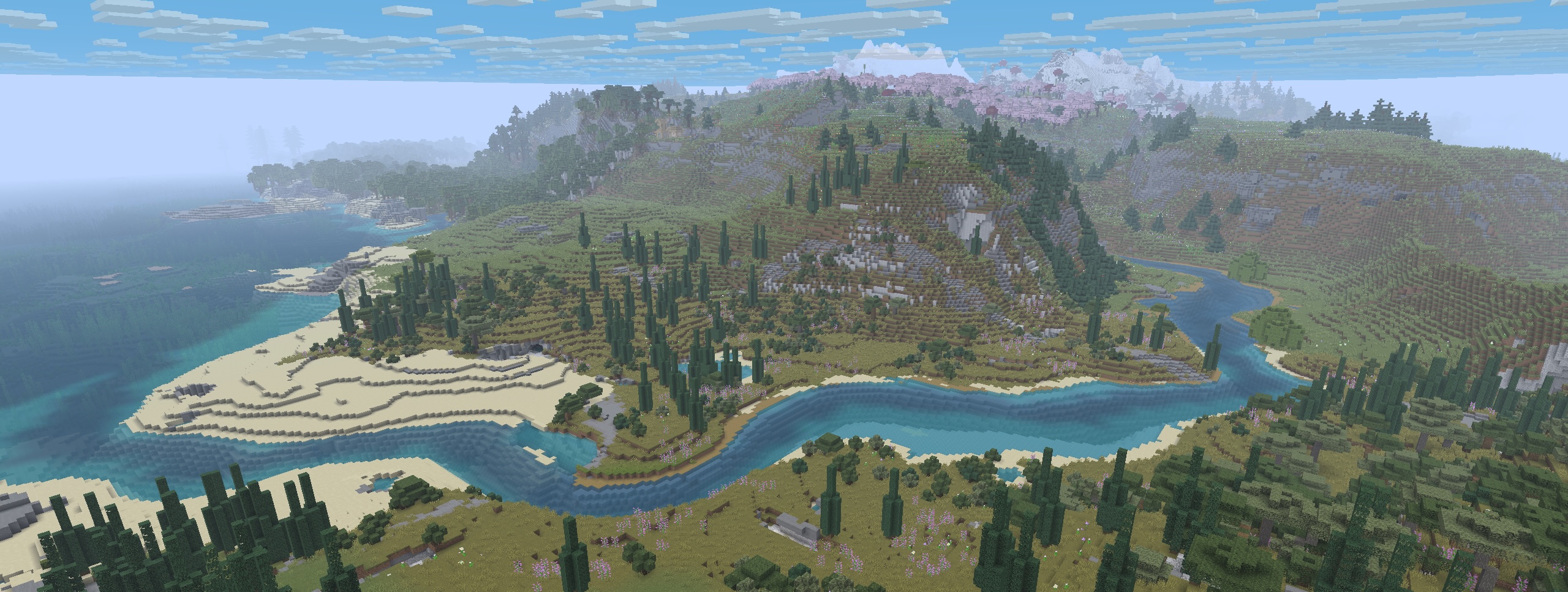
Example World-Gen with Valley + Other Mods

Valley

Valley is a world-gen mod that replaces vanilla rivers with ones that start inland and meander their way to the ocean.

This mod influences the terrain to generate in a more cohesive and natural-looking way creating beautiful rivers, valleys, ridgelines, and mountain chains. (And now that the rivers actually go somewhere, it makes possible a fun new form of navigation and exploration!).

Compatability

Valley is designed as a "drop-in" mod to use alongside other world-gen/biome mods and datapacks (eg Biomes'O'Plenty, Terralith, etc). Mods that entirely overhaul the world-generation or specifically change rivers or continents will probably not work with Valley.

See the gallery for some examples.

Server Setup

Valley can be installed on a modded server.
Clients do not need to have Valley installed in order to connect to the server.

Server setup steps:

  1. Make sure the server is not running!
  2. Install the Valley mod to your server's "mods" folder.
  3. If present, backup and remove the server's existing world.
  4. Launch the server allowing it to create a new world.
  5. Done!

Roadmap

This mod is in the early stages of development.
Our plans for future iterations include:

  • General refining of the default river/continent settings
  • Expose settings to make rivers and continents more easily configurable
  • Make it possible to distribute 'presets' that can override Valley's defaults
  • Provide GUI enhancements to allow user to preview changes before creating world

Permissions

You are of course free to use this mod in modpacks and to create content/media with it.
We only ask that you do not rehost the jar file.
Please reach out if you'd like us to host on other popular mod-hosting platforms.

👥 Team & Contributors

dagsu
dagsu
Lead

⚙️ Compatibility

Environment
🖥️ Server-side
Loaders
fabricforgeneoforge
Minecraft Versions
1.21.10

🔗 Links

Modrinth Page