Logo
MINECRAFTBIBLE
Items
Items

All game items

Blocks
Blocks

Building blocks

Mobs
Mobs

Creatures & monsters

Biomes
Biomes

World biomes

Structures
Structures

Generated structures

Recipes
Recipes

Crafting guides

Advancements
Advancements

Achievements

Loot Tables
Loot Tables

Drop rates

Tags
Tags

Item groupings

All Versions
View all data →
Capes
Cape ArchiveNEW

Browse rare Minecon capes, OptiFine capes, and custom capes from players worldwide

Browse

Player Database
Player DatabasePopular

Search any player

Skin Browser
Skin Browser

Browse & download skins

Cape Gallery
Cape GalleryNEW

Minecon & OptiFine capes

Seed Vault
Seed Vault

Curated seeds

Learn

Guides
GuidesNew

Tutorials & tips

Blog
Blog

News & updates

Community

Community Hub
Community HubHub

Posts, discussions & more

All Versions
View community →
Seed Analyzer
Seed Analyzer

World seed analysis

Loot Explorer
Loot Explorer

Drop rates

Crafting Calculator
Crafting Calculator

Material planning

Enchant Calculator
Enchant Calculator

Probability math

Redstone Lab
Redstone Lab

Signal timing

Trading Profit
Trading Profit

Villager ROI

All Versions
View all tools →
Mods
Mods

Browse all mods

Plugins
Plugins

Server plugins

Resource Packs
Resource Packs

Textures & sounds

Shaders
Shaders

Visual enhancements

Datapacks
Datapacks

World logic

Scanner
Mod Intelligence

Scan & analyze any mod

All Versions
View all mods →
Loading...
IntroductionIntroductionVersion HistoryVersion HistoryGuidesGuidesBlog & NewsBlog & News
ItemsItemsBlocksBlocksMobsMobsRecipesRecipesBiomesBiomesStructuresStructuresAdvancementsAdvancementsLoot TablesLoot TablesTagsTags
ModsModsPluginsPluginsResource PacksResource PacksShadersShadersDatapacksDatapacks

MinecraftBible

The Ultimate Wiki

Logo
MINECRAFTBIBLE

The ultimate Minecraft reference. Every item, block, mob, and recipe documented with precision.

Community

  • Player Database
  • Skin Browser
  • Cape Gallery
  • Community Hub
  • Seed Vault

Database

  • Items
  • Blocks
  • Mobs
  • Recipes
  • Biomes
  • Structures

Tools

  • Seed Analyzer
  • Mod Intelligence
  • Crafting Calculator
  • Enchant Calculator

Mods & Packs

  • Mods
  • Plugins
  • Resource Packs
  • Shaders
  • Datapacks

© 2026 MinecraftBible. Not affiliated with Mojang or Microsoft.

PrivacyTermsContact
Unown Font
ModLicenseRef-All-Rights-Reserved

Unown Font

Adds a font inspired by the unown characters to Minecraft.

2.8K
Downloads
9
Followers
5 months ago
Updated
📦
7
Versions
decorationmagicfabricforge
Download Latestv2.0.3View on Modrinth

📖About Unown Font

This mod adds an eerie eye font based on the Pokemon species Unown. The Unown font is sure to add some mystery to your game and pairs especially well with mods like Pixelmon and Cobblemon. The font can be used with anything that accepts raw JSON text, including item names, tooltips, books, and signs.

Overview

This font contains the 26 characters of the latin alphabet and both the exclamation and question mark characters. The uppercase and lowercase alphabet are both supported.
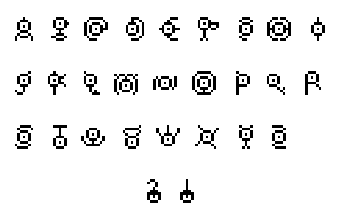
Overview of the font.

Banner Patterns

Starting with Minecraft 1.19.2 the wandering trader will sometimes have an unown banner pattern for sale. You can use this pattern at the loom to paint the unown symbols onto banners.
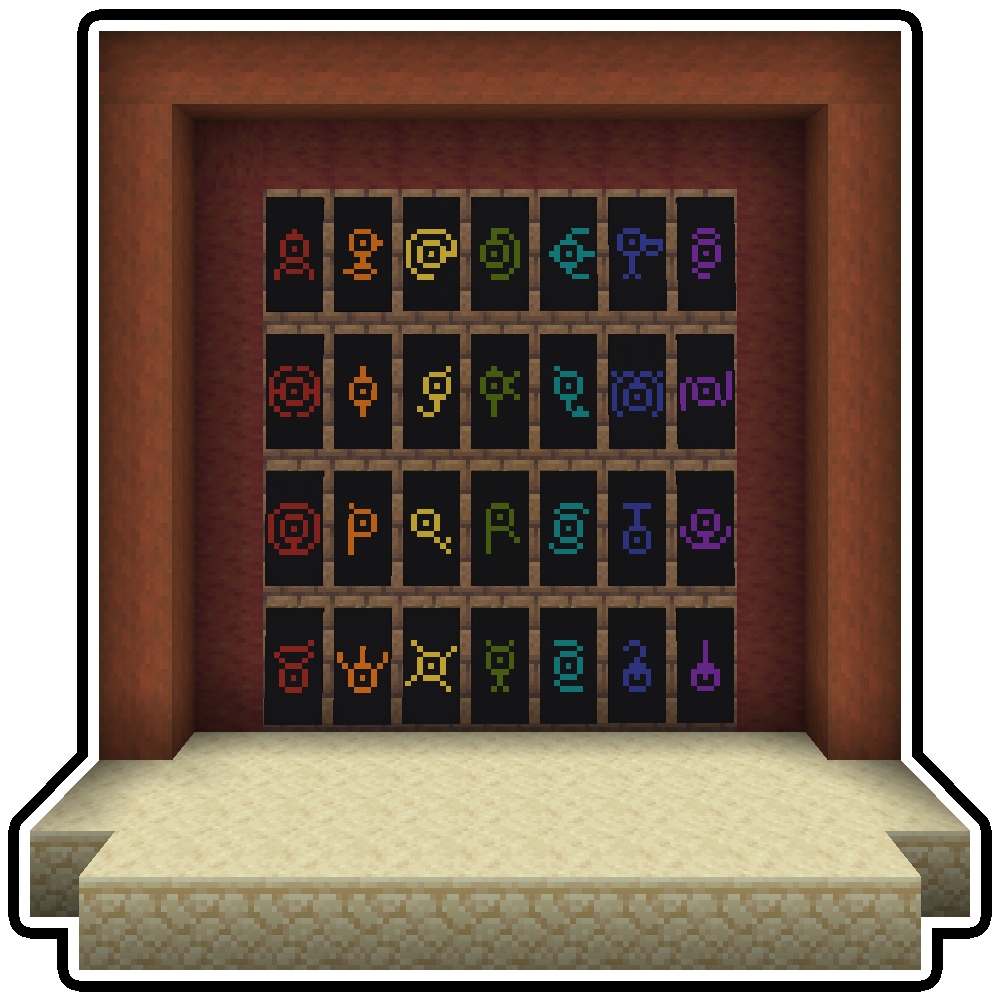
Banner Preview

Vanilla Commands

Many of the commands in Minecraft allow you to specify text. Commands that use the raw JSON format can use this font by setting the font ID to unownfont:unown. Here are a few examples.

  • /give @p stone{display:{Name:"[{\"text\":\"Hello\",\"italic\":false,\"color\":\"gold\",\"font\":\"unownfont:unown\"}]"}} 1
  • /title @a title {"text":"Hello","font":"unownfont:unown"}
  • /tellraw @p {"text":"Hello","font":"unownfont:unown"}

Bookshelf Commands

The Bookshelf mod adds several commands that can help you work with fonts. These commands work for the unown font and any other fonts loaded into the game.

  • /bookshelf font say <font_id> <msg> - Creates a chat message in the given font.
  • /bookshelf font item <font_id> - Applies the font to the currently held item.
  • /bookshelf font book <font_id> - Applies the font to the name and contents of the held book.
  • /bookshelf font block <font_id> x y z - Applies the font to a block at the given coordinates. Works with signs and namable blocks like chests.

Nodecraft sponsor banner

This project is sponsored by Nodecraft. Use code DARKHAX for 30% off your first month of service!

👥 Team & Contributors

Darkhax
DarkhaxOwner

⚙️ Compatibility

Environment
✅ Client & Server
Loaders
fabricforge
Minecraft Versions
1.20.1

🔗 Links

Modrinth Page