Logo
MINECRAFTBIBLE
Items
Items

All game items

Blocks
Blocks

Building blocks

Mobs
Mobs

Creatures & monsters

Biomes
Biomes

World biomes

Structures
Structures

Generated structures

Recipes
Recipes

Crafting guides

Advancements
Advancements

Achievements

Loot Tables
Loot Tables

Drop rates

Tags
Tags

Item groupings

All Versions
View all data →
Capes
Cape ArchiveNEW

Browse rare Minecon capes, OptiFine capes, and custom capes from players worldwide

Browse

Player Database
Player DatabasePopular

Search any player

Skin Browser
Skin Browser

Browse & download skins

Cape Gallery
Cape GalleryNEW

Minecon & OptiFine capes

Seed Vault
Seed Vault

Curated seeds

Learn

Guides
GuidesNew

Tutorials & tips

Blog
Blog

News & updates

Community

Community Hub
Community HubHub

Posts, discussions & more

All Versions
View community →
Seed Analyzer
Seed Analyzer

World seed analysis

Loot Explorer
Loot Explorer

Drop rates

Crafting Calculator
Crafting Calculator

Material planning

Enchant Calculator
Enchant Calculator

Probability math

Redstone Lab
Redstone Lab

Signal timing

Trading Profit
Trading Profit

Villager ROI

All Versions
View all tools →
Mods
Mods

Browse all mods

Plugins
Plugins

Server plugins

Resource Packs
Resource Packs

Textures & sounds

Shaders
Shaders

Visual enhancements

Datapacks
Datapacks

World logic

Scanner
Mod Intelligence

Scan & analyze any mod

All Versions
View all mods →
Loading...
IntroductionIntroductionVersion HistoryVersion HistoryGuidesGuidesBlog & NewsBlog & News
ItemsItemsBlocksBlocksMobsMobsRecipesRecipesBiomesBiomesStructuresStructuresAdvancementsAdvancementsLoot TablesLoot TablesTagsTags
ModsModsPluginsPluginsResource PacksResource PacksShadersShadersDatapacksDatapacks

MinecraftBible

The Ultimate Wiki

Logo
MINECRAFTBIBLE

The ultimate Minecraft reference. Every item, block, mob, and recipe documented with precision.

Community

  • Player Database
  • Skin Browser
  • Cape Gallery
  • Community Hub
  • Seed Vault

Database

  • Items
  • Blocks
  • Mobs
  • Recipes
  • Biomes
  • Structures

Tools

  • Seed Analyzer
  • Mod Intelligence
  • Crafting Calculator
  • Enchant Calculator

Mods & Packs

  • Mods
  • Plugins
  • Resource Packs
  • Shaders
  • Datapacks

© 2026 MinecraftBible. Not affiliated with Mojang or Microsoft.

PrivacyTermsContact
Underlay
ModGPL-3.0-only

Underlay

Place carpets (and more) under anything!

447.5K
Downloads
344
Followers
2 months ago
Updated
📦
30
Versions
decorationgame-mechanicsutilityfabricforgeneoforge
Download Latestv1.0.0View on Modrinth

📖About Underlay

Underlay is a Minecraft mod that lets you place carpets (and more) under any block with space beneath it (e.g. chests, beds, signs, torches, etc.)!

Just right click a block face with a block to place it, (for example, under an upside-down stair), and you're done! Right click again with another item to replace it quickly, or left click it to remove it. Works in Survival too!

You can make any other block work as an overlay too, keep reading!
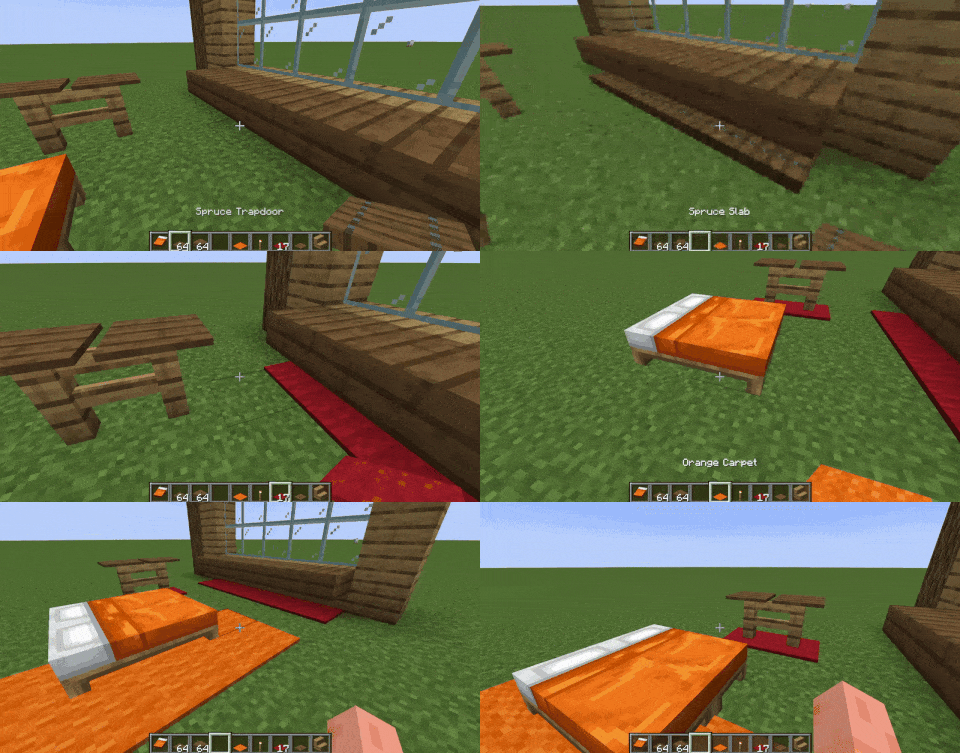
Preview

By default, you can place the following blocks as overlays: carpets, trapdoors, buttons, rails, slabs and pressure plates. To expand this to other blocks, such as grass, see "For Developers - Through Datapacks" (for players).

Join the Discord server for sneak peeks on upcoming updates!

Join now!


How does this work?

Underlay adds these things called "overlays" but they're really more like underlays xd, essentially they are fake versions of the item you place - which lets you place two things in the same block space!

For Developers

This mod adds an API that lets you mark your blocks as "yes you can behave like this too", either in code or via datapacks.

In Code

  • Just add my mod as a dependency, either from JitPack or Modrinth's maven, import com.dooji.underlay.UnderlayApi, and register the blocks you want to be able to placed under stairs/doors etc. with registerOverlayBlock.
  • You can also just add the underlay:overlay tag to the blocks you want to have this behavior instead of the method above.

Through Datapacks (for players too!)

  • Read this to know how datapacks work first: https://minecraft.wiki/w/Tutorial:Creating_a_data_pack
  • On 1.20.1 create data/underlay/tags/blocks/overlay.json in your datapack, on 1.21 and above create data/underlay/tags/block/overlay.json, then list the blocks you want, such as:
{
  "replace": false,
  "values": [
    "minecraft:short_grass",
    "minecraft:oak_planks",
    "mymod:shiny_block"
  ]
}
  • If you want to exclude a block from being able to be placed as an overlay, on 1.20.1 create data/underlay/tags/blocks/exclude.json in your datapack, on 1.21 and above create data/underlay/tags/block/exclude.json, then list the blocks you want to be omitted, such as:
{
  "replace": false,
  "values": [
    "minecraft:oak_button",
    "minecraft:rail"
  ]
}

On 1.12.2, you have config/underlay.cfg in your Minecraft folder; it is global and server authoritative. Use the overlay_blocks list as follows:

general {
    S:overlay_blocks <
        minecraft:tallgrass
        mymod:shiny_block
    >
}

👥 Team & Contributors

Dooji
DoojiOwner

⚙️ Compatibility

Environment
✅ Client & Server
Loaders
fabricforgeneoforge
Minecraft Versions
1.21.1

🔗 Links

Modrinth Page