Logo
MINECRAFTBIBLE
Items
Items

All game items

Blocks
Blocks

Building blocks

Mobs
Mobs

Creatures & monsters

Biomes
Biomes

World biomes

Structures
Structures

Generated structures

Recipes
Recipes

Crafting guides

Advancements
Advancements

Achievements

Loot Tables
Loot Tables

Drop rates

Tags
Tags

Item groupings

All Versions
View all data →
Capes
Cape ArchiveNEW

Browse rare Minecon capes, OptiFine capes, and custom capes from players worldwide

Browse

Player Database
Player DatabasePopular

Search any player

Skin Browser
Skin Browser

Browse & download skins

Cape Gallery
Cape GalleryNEW

Minecon & OptiFine capes

Seed Vault
Seed Vault

Curated seeds

Learn

Guides
GuidesNew

Tutorials & tips

Blog
Blog

News & updates

Community

Community Hub
Community HubHub

Posts, discussions & more

All Versions
View community →
Seed Analyzer
Seed Analyzer

World seed analysis

Loot Explorer
Loot Explorer

Drop rates

Crafting Calculator
Crafting Calculator

Material planning

Enchant Calculator
Enchant Calculator

Probability math

Redstone Lab
Redstone Lab

Signal timing

Trading Profit
Trading Profit

Villager ROI

All Versions
View all tools →
Mods
Mods

Browse all mods

Plugins
Plugins

Server plugins

Resource Packs
Resource Packs

Textures & sounds

Shaders
Shaders

Visual enhancements

Datapacks
Datapacks

World logic

Scanner
Mod Intelligence

Scan & analyze any mod

All Versions
View all mods →
Loading...
IntroductionIntroductionVersion HistoryVersion HistoryGuidesGuidesBlog & NewsBlog & News
ItemsItemsBlocksBlocksMobsMobsRecipesRecipesBiomesBiomesStructuresStructuresAdvancementsAdvancementsLoot TablesLoot TablesTagsTags
ModsModsPluginsPluginsResource PacksResource PacksShadersShadersDatapacksDatapacks

MinecraftBible

The Ultimate Wiki

Logo
MINECRAFTBIBLE

The ultimate Minecraft reference. Every item, block, mob, and recipe documented with precision.

Community

  • Skin Browser
  • Cape Gallery
  • Seed Vault
  • Blog
  • Guides

Database

  • Items
  • Blocks
  • Mobs
  • Recipes
  • Biomes
  • Structures

Tools

  • Seed Analyzer
  • Mod Intelligence
  • Crafting Calculator
  • Enchant Calculator

Mods & Packs

  • Mods
  • Plugins
  • Resource Packs
  • Shaders
  • Datapacks

Site & Legal

  • About
  • Authors
  • Editorial Policy
  • Corrections
  • Contact
  • Privacy Policy
  • Terms of Service
  • DMCA
  • Sitemap

© 2026 MinecraftBible. Not affiliated with Mojang or Microsoft.

PrivacyTermsContact
TWISB-Exploration
ModMIT

TWISB-Exploration

Exploration, the way it should be! This mod adds an Atlas item to contain all your maps, and makes compasses more useful.

1.3K
Downloads
14
Followers
5 months ago
Updated
📦
7
Versions
adventurestorageutilityfabric
Download Latestv0.1.4View on Modrinth

📖About TWISB-Exploration

Summary

Noticed how many people play with minimap mods, or often use the F3 screen for coordinates even though the vanilla game has maps and compasses? Thats because those items are not that usefull in vanilla. This mod adds an Atlas item to keep your maps tidy and buffs compasses.

I created this mod to improve Minecraft exploration while keeping it as close to Vanilla as possible. The goal is to take what is already in the game and make it actually useful (Mojang, if you read this, I would love if you added these changes to the game).

The Atlas

The Atlas is a new item which can contain filled maps and shows the closest one to your current position. Here is the recipe:
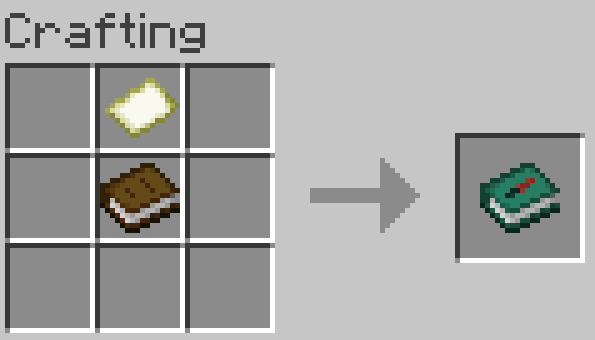
Crafting recipe for the Atlas

It works like a bundle: select it and click on map items to place them in the Atlas. You can alternatively select the map and click it into the Atlas instead. To extract maps right click the Atlas onto an empty slot or right click the Atlas without any item selected.

Only maps of the same scale and dimension can be placed in an Atlas. For example, if the Atlas contain maps from the overworld it will not take maps from the nether.

If the Atlas contains a map, when you hold it, it will show the one closest to your location.

If you right click while having empty maps in your inventory and the current location does not have a map in the Atlas, a new map will be made and added to the Atlas. If a new map made this way needs to be scaled (because other maps in the Atlas are scaled) paper will be required: one paper is used for each scale-up required.

Compass buff

Having an compass in your inventory will show coordinates and faced direction (N/E/S/W).

The F3 screen does not show coordinates unless you're in creative mode (from mod version 0.1.4) or cheats are enabled (before mod version 0.1.3) giving you an actual reason to have a compass.

Known bugs

For mod versions before 0.1.4 due to a vanilla Minecraft bug (afaik) you are able to place a map from the wrong dimension into an Atlas after reloading the game. Avoid doing that or it gets confusing.

Check out my other mods

TWISB-Enchanting Allows selecting enchantments in a vanilla-friendly way that promotes exploration. It also buffs anvils.

TWISB-Combat Tweaks health regeneration, potions and tridents to make combat more interesting.

👥 Team & Contributors

S
SunScript_Owner

⚙️ Compatibility

Environment
✅ Client & Server
Loaders
fabric
Minecraft Versions
1.21.91.21.10

🔗 Links

Modrinth Page