Multi Tools

日本語の説明は下にあります。
This mod adds multiple multi-tools.
This Mod is an addon for Tokorotenslime, so you'll also need to download that as well.
Wooden, Stone, Copper, Iron, Golden, Diamond, and Netherite Multitools
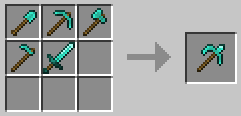
Crafting
- Each type of shovel, pickaxe, axe, hoe, and sword is used to crafting.
Specifications
- When attacking an entity, it functions as a sword.
- When breaking blocks, the tool is treated as a shovel, pickaxe, axe, hoe, or sword depending on the block type.
- Right-click to use the shovel, axe, and hoe.
- Right-clicking while holding down the Shift key activates the hoe function.
- Enchantments can be applied to shovels, pickaxes, axes, hoes, and swords.
Notes
- Enchantments cannot be transferred when crafting.
- You cannot craft a Netherite Multitool from a Diamond Multitool.
Actually, everything up to this point is just a bonus feature.
Slime Tool
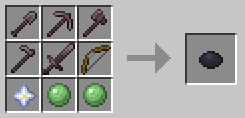
Crafting
- You can create it using any of the following recipes:
- Netherite Shovel, Pickaxe, Axe, Hoe, Sword, Bow, Nether Star, and 2 Slimeballs
- Netherite Multitool, Bow, Nether Star, and 2 Slimeballs

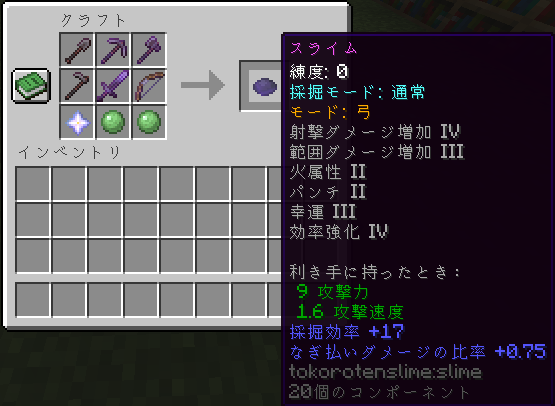
Specifications
- This item has no durability and consumes experience points when used.
- Using it increases "Proficiency":
- As proficiency increases, the probability of consuming experience points decreases.
- Maximum proficiency level 50,000, with experience point consumption reduced to 1/5 when used.
- Using
/slimecount, you can set the count to any value.
- This item cannot be used if your experience points are 0.
- Left-click functions the same as the multi-tools, but glass and wool are also recognized as suitable tools.
- The appearance of items changes depending on the blocks destroyed and the amount of experience points gained.
- This item has modes that can be switched using specific keys:
- Bow Mode: Right-click to perform the bow action (Arrows are not needed).
- Tool Mode: Right-clicking performs the same action as the multi-tools.
- If the item has the Luck or Silk Touch enchantment, you can swap them using the mode change key.
(Default: Luck Lv3, Silk Touch Lv1)
- Enchantments can be transferred during crafting.
- Enchantments compatible with multi-tools and bows can be applied.
- However, Durability, Repair, and Infinity enchantments cannot be applied.
- X key (default): Change Mining Mode (Luck or Silk Touch)
- X key (default) + Ctrl: Change Mode (Bow or Tool)
Notes
- The X key conflicts with the load hotbar activator, so one of them must be changed.
- Slime recipes are not normally displayed.

The English explanation is above.
このModは複数のマルチツールを追加します。
このModはTokorotenslimeのアドオンであるため、そちらもダウンロードが必要です。
木、石、銅、鉄、金、ダイヤ、ネザライトのマルチツール
クラフト
- それぞれの種類のシャベル、ツルハシ、斧、クワ、剣をクラフトに使用します。
仕様
- エンティティを攻撃する際は剣として動作します。
- ブロックを破壊する際は、対応するブロックに応じてシャベル、ツルハシ、斧、クワ、剣として扱われます。
- 右クリックでシャベル、斧、クワの動作を行えます。
- Shiftキーを押しながら右クリックをすると、クワの動作になります。
- シャベル、ツルハシ、斧、クワ、剣に対応するエンチャントを付与可能です。
注意事項
- クラフトする際、エンチャントは引き継げません。
- ダイヤマルチツールから、ネザライトマルチツールをクラフトすることはできません。
実は、ここまではおまけ要素です。
スライムツール
クラフト
- 次のいずれかのレシピで作成できます。
- ネザライトのシャベル、ツルハシ、斧、クワ、剣、弓、ネザースター、スライムボール×2
- ネザライトのマルチツール、弓、ネザースター、スライムボール×2
仕様
- このアイテムには耐久値がなく、使用時に経験値を消費します。
- 使用することで「練度」が増加します。
- 練度が上がると、経験値の消費確率が減少します。
- 最大練度50,000で、使用時の経験値消費は1/5になります。
/slimecountでカウントを任意の値にできます。
- 経験値が0の場合、このアイテムは使用できません。
- 左クリックの動作はマルチツールと同じですが、ガラスや羊毛も適性ツールと判定されます。
- 壊すブロックや経験値量に応じて、アイテムの見た目が変化します。
- このアイテムにはモードがあり、特定のキーで切り替え可能です。
- 弓モード: 右クリックで弓の動作をします。矢は不要です。
- ツールモード: 右クリックでマルチツールと同じ動作をします。
- 幸運またはシルクタッチのエンチャントが付与されている場合、モード変更キーでスワップ可能です。
(デフォルトは幸運Lv3、シルクタッチLv1)
- クラフト時にエンチャントを引き継ぐことが可能です。
- マルチツールや弓に対応するエンチャントを付与可能です。
- ただし、耐久力、修繕、無限のエンチャントは付与できません。
- Xキー(デフォルト): 採掘モード変更 (幸運 ↔ シルクタッチ)
- Xキー(デフォルト) + Ctrlキー: モード変更(弓 ↔ ツール)
注意事項
- Xキーはホットバーの読み込みと被っているため、どちらかの変更が必要です。
- スライムのレシピは通常表示されません。