Logo
MINECRAFTBIBLE
Items
Items

All game items

Blocks
Blocks

Building blocks

Mobs
Mobs

Creatures & monsters

Biomes
Biomes

World biomes

Structures
Structures

Generated structures

Recipes
Recipes

Crafting guides

Advancements
Advancements

Achievements

Loot Tables
Loot Tables

Drop rates

Tags
Tags

Item groupings

All Versions
View all data →
Capes
Cape ArchiveNEW

Browse rare Minecon capes, OptiFine capes, and custom capes from players worldwide

Browse

Player Database
Player DatabasePopular

Search any player

Skin Browser
Skin Browser

Browse & download skins

Cape Gallery
Cape GalleryNEW

Minecon & OptiFine capes

Seed Vault
Seed Vault

Curated seeds

Learn

Guides
GuidesNew

Tutorials & tips

Blog
Blog

News & updates

Community

Community Hub
Community HubHub

Posts, discussions & more

All Versions
View community →
Seed Analyzer
Seed Analyzer

World seed analysis

Loot Explorer
Loot Explorer

Drop rates

Crafting Calculator
Crafting Calculator

Material planning

Enchant Calculator
Enchant Calculator

Probability math

Redstone Lab
Redstone Lab

Signal timing

Trading Profit
Trading Profit

Villager ROI

All Versions
View all tools →
Mods
Mods

Browse all mods

Plugins
Plugins

Server plugins

Resource Packs
Resource Packs

Textures & sounds

Shaders
Shaders

Visual enhancements

Datapacks
Datapacks

World logic

Scanner
Mod Intelligence

Scan & analyze any mod

All Versions
View all mods →
Loading...
IntroductionIntroductionVersion HistoryVersion HistoryGuidesGuidesBlog & NewsBlog & News
ItemsItemsBlocksBlocksMobsMobsRecipesRecipesBiomesBiomesStructuresStructuresAdvancementsAdvancementsLoot TablesLoot TablesTagsTags
ModsModsPluginsPluginsResource PacksResource PacksShadersShadersDatapacksDatapacks

MinecraftBible

The Ultimate Wiki

Logo
MINECRAFTBIBLE

The ultimate Minecraft reference. Every item, block, mob, and recipe documented with precision.

Community

  • Skin Browser
  • Cape Gallery
  • Seed Vault
  • Blog
  • Guides

Database

  • Items
  • Blocks
  • Mobs
  • Recipes
  • Biomes
  • Structures

Tools

  • Seed Analyzer
  • Mod Intelligence
  • Crafting Calculator
  • Enchant Calculator

Mods & Packs

  • Mods
  • Plugins
  • Resource Packs
  • Shaders
  • Datapacks

Site & Legal

  • About
  • Authors
  • Editorial Policy
  • Corrections
  • Contact
  • Privacy Policy
  • Terms of Service
  • DMCA
  • Sitemap

© 2026 MinecraftBible. Not affiliated with Mojang or Microsoft.

PrivacyTermsContact
True Fullbright
ModLicenseRef-All-Rights-Reserved

True Fullbright

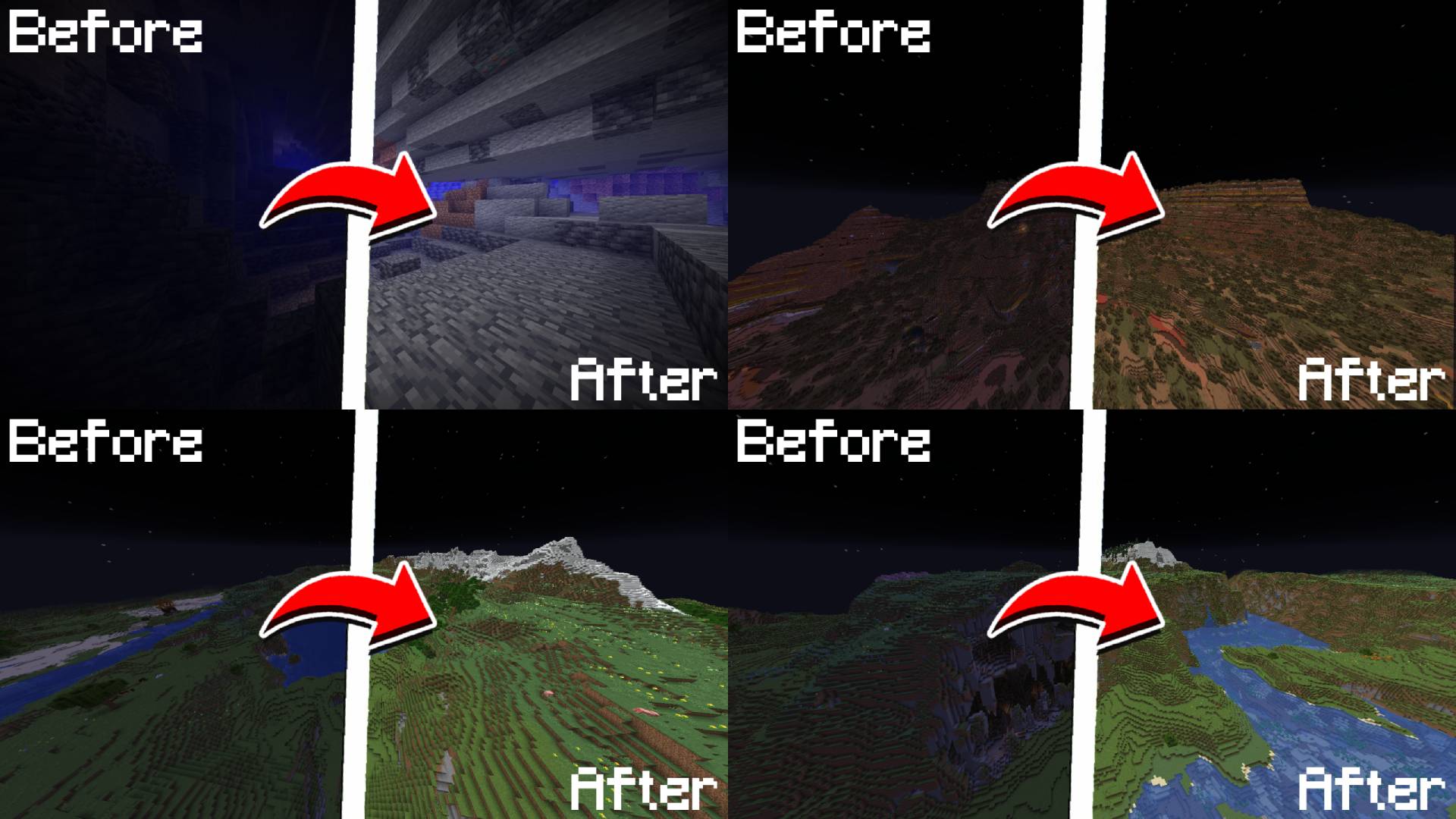
A simple, toggleable, and configurable full brightness mod for Fabric.

15.9K
Downloads
7
Followers
4 months ago
Updated
📦
7
Versions
utilityfabric
Download Latestv1.0.4View on Modrinth

📖About True Fullbright

💡 True Fullbright

A simple, toggleable, and configurable full brightness mod for Fabric.

CurseForge
Modrinth Downloads
Discord Server


Requires:

  • Fabric API
  • YetAnotherConfigLib (YACL)
  • Mod Menu

Example

Feature List

  • Toggle fullbright using a keybind (default: B)
  • Adjust gamma value dynamically
  • Switch between gamma override and night vision modes
  • Fully configurable via /fullbright commands or the in-game config screen
  • Keybinds available for toggling, increasing/decreasing gamma, and jumping to min/max
Command List
Command Description
/fullbright or /fullbright status Check current brightness settings
/fullbright toggle Turn fullbright on/off
/fullbright mode gamma Switch to gamma brightness mode
/fullbright mode nightvision Switch to night vision mode
/fullbright mode off Turn off all brightness modes
/fullbright set <number> Set brightness to exact value
/fullbright increase Make it brighter by one step
/fullbright decrease Make it dimmer by one step
/fullbright max Jump to maximum brightness
/fullbright min Jump to minimum brightness
/fullbright config Open the settings screen
/fullbright saveconfig Save your current settings
/fullbright resetconfig Reset everything to default
Default Keybinds
Action Default Key
Toggle Fullbright On/Off B
Increase Brightness Arrow Up
Decrease Brightness Arrow Down
Maximum Brightness End
Minimum Brightness Home
Open Config Screen Not set

Customize all of these under: Options → Controls → Keybinds → True Fullbright


How do I install the mod?

  1. Drop the .jar file into your mods/ folder
  2. Make sure the dependencies listed above are installed
  3. Launch the game

How do I use the mod?

  • Press B to toggle fullbright on/off
  • Use /fullbright commands to adjust gamma, change modes, or view status
  • Open the config screen with /fullbright config or via Mod Menu
  • Use keybinds to adjust brightness step bystep or jump to min/max

Contact / Report Bug

Found an issue or have feedback?
→ DM me on Discord: rijz.gg


Developed by Rijz & Clyriz4.

👥 Team & Contributors

No authors recorded.

⚙️ Compatibility

Environment
💻 Client-side
Loaders
fabric
Minecraft Versions
1.21.11

🔗 Links

Modrinth Page