Logo
MINECRAFTBIBLE
Items
Items

All game items

Blocks
Blocks

Building blocks

Mobs
Mobs

Creatures & monsters

Biomes
Biomes

World biomes

Structures
Structures

Generated structures

Recipes
Recipes

Crafting guides

Advancements
Advancements

Achievements

Loot Tables
Loot Tables

Drop rates

Tags
Tags

Item groupings

All Versions
View all data →
Capes
Cape ArchiveNEW

Browse rare Minecon capes, OptiFine capes, and custom capes from players worldwide

Browse

Player Database
Player DatabasePopular

Search any player

Skin Browser
Skin Browser

Browse & download skins

Cape Gallery
Cape GalleryNEW

Minecon & OptiFine capes

Seed Vault
Seed Vault

Curated seeds

Learn

Guides
GuidesNew

Tutorials & tips

Blog
Blog

News & updates

Community

Community Hub
Community HubHub

Posts, discussions & more

All Versions
View community →
Seed Analyzer
Seed Analyzer

World seed analysis

Loot Explorer
Loot Explorer

Drop rates

Crafting Calculator
Crafting Calculator

Material planning

Enchant Calculator
Enchant Calculator

Probability math

Redstone Lab
Redstone Lab

Signal timing

Trading Profit
Trading Profit

Villager ROI

All Versions
View all tools →
Mods
Mods

Browse all mods

Plugins
Plugins

Server plugins

Resource Packs
Resource Packs

Textures & sounds

Shaders
Shaders

Visual enhancements

Datapacks
Datapacks

World logic

Scanner
Mod Intelligence

Scan & analyze any mod

All Versions
View all mods →
Loading...
IntroductionIntroductionVersion HistoryVersion HistoryGuidesGuidesBlog & NewsBlog & News
ItemsItemsBlocksBlocksMobsMobsRecipesRecipesBiomesBiomesStructuresStructuresAdvancementsAdvancementsLoot TablesLoot TablesTagsTags
ModsModsPluginsPluginsResource PacksResource PacksShadersShadersDatapacksDatapacks

MinecraftBible

The Ultimate Wiki

Logo
MINECRAFTBIBLE

The ultimate Minecraft reference. Every item, block, mob, and recipe documented with precision.

Community

  • Skin Browser
  • Cape Gallery
  • Seed Vault
  • Blog
  • Guides

Database

  • Items
  • Blocks
  • Mobs
  • Recipes
  • Biomes
  • Structures

Tools

  • Seed Analyzer
  • Mod Intelligence
  • Crafting Calculator
  • Enchant Calculator

Mods & Packs

  • Mods
  • Plugins
  • Resource Packs
  • Shaders
  • Datapacks

Site & Legal

  • About
  • Authors
  • Editorial Policy
  • Corrections
  • Contact
  • Privacy Policy
  • Terms of Service
  • DMCA
  • Sitemap

© 2026 MinecraftBible. Not affiliated with Mojang or Microsoft.

PrivacyTermsContact
Trims - Color Splash!
ModCC-BY-4.0

Trims - Color Splash!

Expands the available materials used while trimming armor!

10.0K
Downloads
27
Followers
6 months ago
Updated
📦
23
Versions
decorationequipmentdatapackfabricforgeneoforgequilt
Download Latestvv1.2.1+modView on Modrinth

📖About Trims - Color Splash!

Trims - Color Splash!

LOOKING FOR TRANSLATORS!

IF INTERESTED, PLEASE CONTRIBUTE ON CROWDIN!


Adds 29 trim materials that you can apply to your armor in the smithing table!

Heavily inspired by More Trim Colors by Skottify!


Please join the Discord if you have questions!


(When using the datapack version, please make sure you install the required resource pack as it is needed for it to function correctly!)
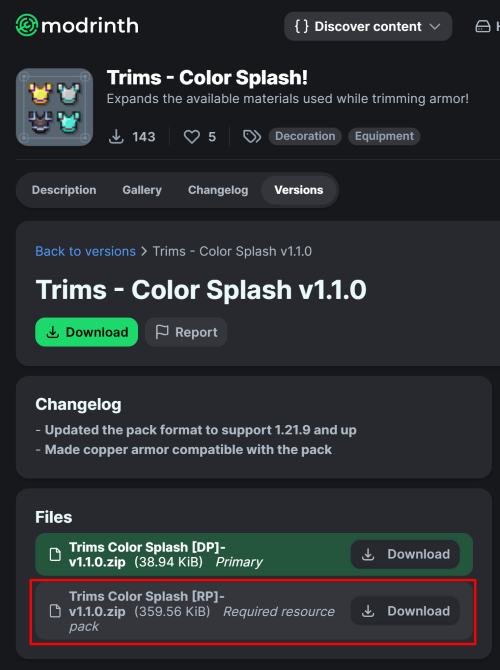
Resource Pack Download Guide

All new trim materials

1.21 and up

  • Armadillo Scute Armadillo Scute
  • Blaze Rod Blaze Rod
  • Blue Ice Blue Ice
  • Breeze Rod Breeze Rod
  • Crying Obsidian Crying Obsidian
  • Dragon Breath Dragon Breath
  • Dripstone Block Dripstone Block
  • Echo Shard Echo Shard
  • End Crystal End Crystal
  • Ender Pearl Ender Pearl
  • Ghast Tear Ghast Tear
  • Glass Glass (Removes trims)
  • Glowstone Dust Glowstone Dust
  • Heart Of The Sea Heart Of The Sea
  • Leather Leather
  • Magma Cream Magma Cream
  • Nautilus Shell Nautilus Shell
  • Nether Star Nether Star
  • Nether Wart Nether Wart
  • Netherite Scrap Netherite Scrap
  • Obsidian Obsidian
  • Phantom Membrane Phantom Membrane
  • Prismarine Shard Prismarine Shard
  • Prismarine Crystals Prismarine Crystals
  • Rabbit Hide Rabbit Hide
  • Rose Gold Rose Gold
  • Shulker Shell Shulker Shell
  • Slime Ball Slime Ball
  • Turtle Scute Turtle Scute

1.20.x

  • Armadillo Scute Armadillo Scute -> Brick Brick
  • Rose Gold Rose Gold -> Honey Block Honey Block
  • Resin Brick Resin Brick -> Magma Block Magma Block
  • Breeze Rod Breeze Rod -> Pearlescent Froglight Pearlescent Froglight
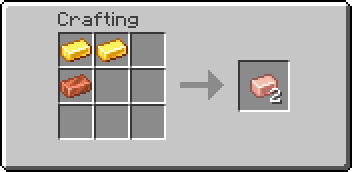
Rose Gold Recipe

Rose Gold Recipe

(Shapeless)


This data pack is compatible with:

Compatible Mods
  • Elytra Trims (KikuGie)
    Elytra Trims Logo - ( No item texture )

  • Alex's Caves (AlexModGuy)
    Alex's Caves Logo

  • Ancient Aether (Builderdog841)
    Ancient Aether Logo

  • Frostiful (TheDeathlyCow)
    Frostiful Logo

  • Geode+ (Team Chorus)
    Geode+ Logo

  • More Armor Trims (masik16u)
    More Armor Trims Logo

  • More Sniffer Flowers (Nikdo53)
    More Sniffer Flowers Logo

  • TaTe's Extra Trims (AverageTaTeMan)
    TaTe's Extra Trims Logo

  • Too Many Trims (Herobrine011840)
    Too Many Trims Logo

  • Trims Expanded (Omniv)
    Trims Expanded Logo

FAQ:

Q: Why does the smithing table recipe have a red 'X' over it when I try to trim my armor?

A: First, drop the trim material on the ground, pick it up again, and try crafting. If the issue persists, restart your server. If neither of these steps resolves the problem, please report the issue in the Discord Server or on the github page.

Q: Why can't I place the materials in the smithing table?

A: If the issue continues after trying the fixes above, double-check that you have installed the datapack correctly. If you are certain the datapack is installed right, please report the issue in the Discord Server or on the github page.

Q: Why are none of the recipes working?

A: You might need to restart your world, server, or realm. The recipes should function correctly after the restart.

Q: I am seeing a missing texture when I try to use this. How can I fix it?

A: When using the datapack version, you must download and install the required resource pack.

Q: Where can I find and download the resource pack?

A: The main download button on Modrinth only provides the datapack, not the resource pack. You need to go to the "Versions" tab to find and download the resource pack file. (see img at the top of the page)

Special thanks to Lynx for help with generating files!

👥 Team & Contributors

Keitooo
KeitoooOwner

⚙️ Compatibility

Environment
🖥️ Server-side
Loaders
datapackfabricforgeneoforgequilt
Minecraft Versions
1.21.11

🔗 Links

Modrinth Page