Logo
MINECRAFTBIBLE
Items
Items

All game items

Blocks
Blocks

Building blocks

Mobs
Mobs

Creatures & monsters

Biomes
Biomes

World biomes

Structures
Structures

Generated structures

Recipes
Recipes

Crafting guides

Advancements
Advancements

Achievements

Loot Tables
Loot Tables

Drop rates

Tags
Tags

Item groupings

All Versions
View all data →
Capes
Cape ArchiveNEW

Browse rare Minecon capes, OptiFine capes, and custom capes from players worldwide

Browse

Player Database
Player DatabasePopular

Search any player

Skin Browser
Skin Browser

Browse & download skins

Cape Gallery
Cape GalleryNEW

Minecon & OptiFine capes

Seed Vault
Seed Vault

Curated seeds

Learn

Guides
GuidesNew

Tutorials & tips

Blog
Blog

News & updates

Community

Community Hub
Community HubHub

Posts, discussions & more

All Versions
View community →
Seed Analyzer
Seed Analyzer

World seed analysis

Loot Explorer
Loot Explorer

Drop rates

Crafting Calculator
Crafting Calculator

Material planning

Enchant Calculator
Enchant Calculator

Probability math

Redstone Lab
Redstone Lab

Signal timing

Trading Profit
Trading Profit

Villager ROI

All Versions
View all tools →
Mods
Mods

Browse all mods

Plugins
Plugins

Server plugins

Resource Packs
Resource Packs

Textures & sounds

Shaders
Shaders

Visual enhancements

Datapacks
Datapacks

World logic

Scanner
Mod Intelligence

Scan & analyze any mod

All Versions
View all mods →
Loading...
IntroductionIntroductionVersion HistoryVersion HistoryGuidesGuidesBlog & NewsBlog & News
ItemsItemsBlocksBlocksMobsMobsRecipesRecipesBiomesBiomesStructuresStructuresAdvancementsAdvancementsLoot TablesLoot TablesTagsTags
ModsModsPluginsPluginsResource PacksResource PacksShadersShadersDatapacksDatapacks

MinecraftBible

The Ultimate Wiki

Logo
MINECRAFTBIBLE

The ultimate Minecraft reference. Every item, block, mob, and recipe documented with precision.

Community

  • Skin Browser
  • Cape Gallery
  • Seed Vault
  • Blog
  • Guides

Database

  • Items
  • Blocks
  • Mobs
  • Recipes
  • Biomes
  • Structures

Tools

  • Seed Analyzer
  • Mod Intelligence
  • Crafting Calculator
  • Enchant Calculator

Mods & Packs

  • Mods
  • Plugins
  • Resource Packs
  • Shaders
  • Datapacks

Site & Legal

  • About
  • Authors
  • Editorial Policy
  • Corrections
  • Contact
  • Privacy Policy
  • Terms of Service
  • DMCA
  • Sitemap

© 2026 MinecraftBible. Not affiliated with Mojang or Microsoft.

PrivacyTermsContact
Tornado Intercept (PMW)
ModLicenseRef-All-Rights-Reserved

Tornado Intercept (PMW)

A mod that adds the Tornado Intercept Vehicle 2 (TIV2) to the game!

20.3K
Downloads
27
Followers
5 months ago
Updated
📦
8
Versions
adventuretransportationutilityneoforge
Download Latestv1.4.3View on Modrinth

📖About Tornado Intercept (PMW)

Requirements (Important):

  1. PMWeather
  2. Tornado Intercept Lib

The mod will only work with a proper version of Tornado Intercept Lib (intercept tools)


Introduction

This mod adds the Tornado Intercept Vehicle 2, or TIV2 for short. The vehicle is a heavily modified Dodge Ram 3500 with 1/8 inch thick steel armour, as well as hydraulic flaps and spikes to anchor the vechicle to the ground, which will prevent the vechicle flying in tornadic winds.
It's designed to work with Protomanly's Weather Mod.


tiv2ingame
real tiv2
(real TIV2 compared to minecraft)

Deployment placement matters!

The mod has a mechanic that determines your threshold based on the terrain the vehicle is on. This means that you cannot deploy on a single block, over a hole or on uneven terrain since you will get lofted easier

The optimal placement is when every wheel of the tiv is on the ground

good placement

However, if the tiv is deployed on uneven terrain with many holes and parts of the body in the air the threshold will change accordingly

bad placement

Controls

  • Deploy - X

  • Undeploy - V

  • Toggle headlights on/off - H

  • Drive forward - W

  • Drive backwards - S

  • Turn left - A

  • Turn right - D

  • Reset max windspeed - 0 (zero, not O)

  • Pick up vehicle - Shift + Right-click

  • Handbrake - Space

Weather 2 support

For now, only versions below 1.3.3 work with Weather2

How to change threshold

The tiv has a default deployed threshold of 220 MPH, and 120 MPH undeployed. Click Esc -> Go into Mods -> Find Tornado intercept tools -> Click Config -> Choose Server Settings -> Type whatever numbers you want!

Crafting

Here's how to craft the tiv!
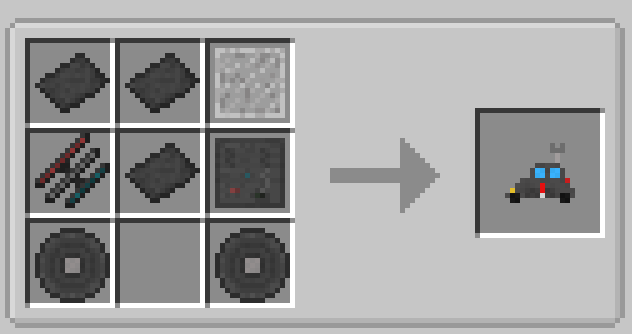
tivcraft

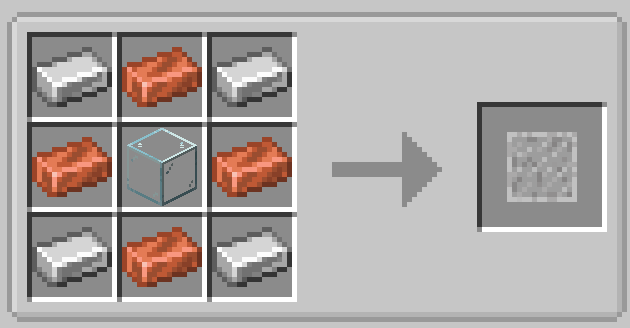
You will need 3 of these armour platings
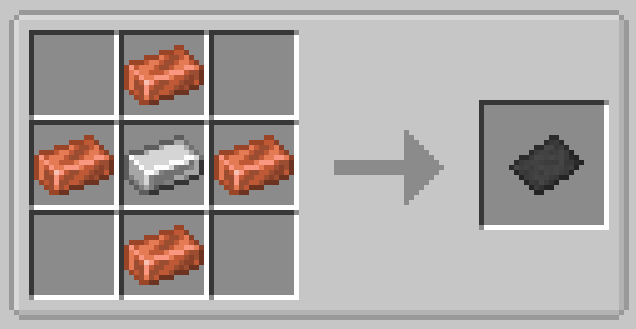
craft

One bulletproof window

crfth

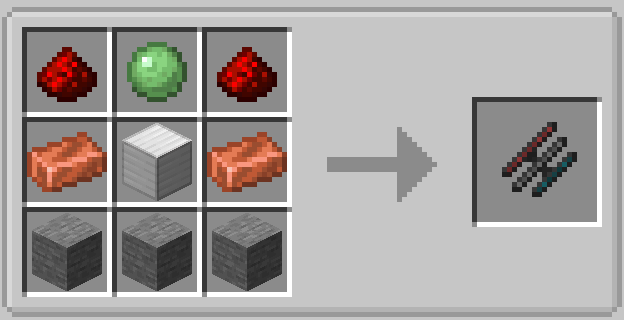
One hydraulic system

hydra

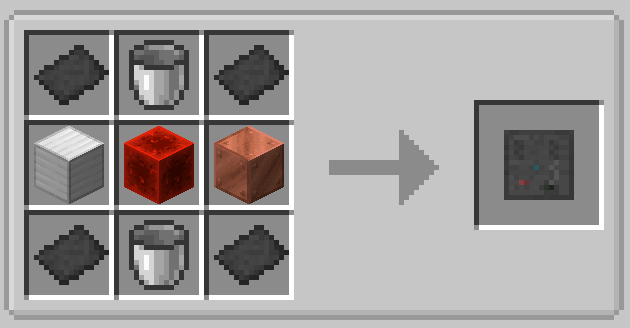
One engine

eng

And two wheels (any type of wool is okay)
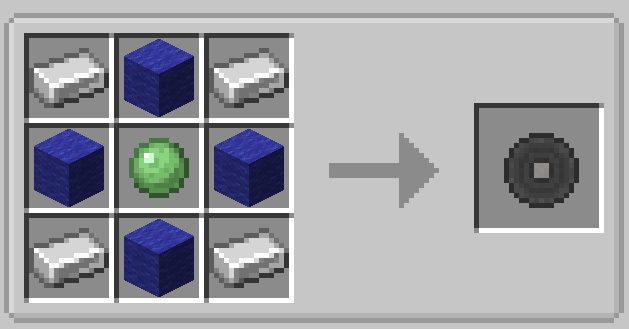
wheel

Here's how to craft the Protective Vest
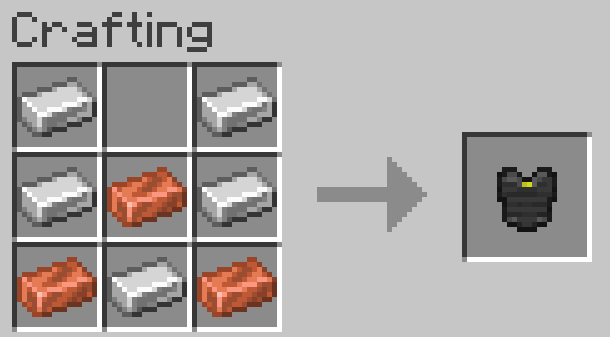
vbets

FAQ

-Will you be adding more interceptors?

Yes, i definetly plan to add all of them (the doms, tivs, tornado attack, armadillo, utav, maybe titus and tornado wrangler but probably not) as well as normal cars with attachable mesonets and other stuff.

-Will this be on Bedrock?

Definetly not.

-Will it be ported to forge/older versions? (mainly forge 1.20.1)

Yes, but that depends if protomanly's weather releases on a older version (forge 1.20.1)

-Is it coming to curseforge?

Unless pmw releases on cursforge, no

Can i become a tester?

No, we don't really need testers, since we know our code best and exactly what bugs to look for. Also don't say this just because you want to play with the new features. Be patient

Credits

To Raptor, who helped develop the early stages of the mod and made it more fun, and testing features with me

To Elton, who made all of the more complex code that i could only dream of doing in Mcreator that makes the mod actually fun to play

To Metro, who made all the crazy models that really put the mod to life, i don't think i could ever find a better modeler than him

👥 Team & Contributors

Wolf-X
Wolf-XOwner
Elton_inc.
Elton_inc.
Helper/Java Coder
Raptaaaaaaaaaaa
Raptaaaaaaaaaaa
Texturer/Tester
GamingwMetroMN
GamingwMetroMN
Modeler

⚙️ Compatibility

Environment
✅ Client & Server
Loaders
neoforge
Minecraft Versions
1.21.1

🔗 Links

Modrinth Page