Logo
MINECRAFTBIBLE
Items
Items

All game items

Blocks
Blocks

Building blocks

Mobs
Mobs

Creatures & monsters

Biomes
Biomes

World biomes

Structures
Structures

Generated structures

Recipes
Recipes

Crafting guides

Advancements
Advancements

Achievements

Loot Tables
Loot Tables

Drop rates

Tags
Tags

Item groupings

All Versions
View all data →
Capes
Cape ArchiveNEW

Browse rare Minecon capes, OptiFine capes, and custom capes from players worldwide

Browse

Player Database
Player DatabasePopular

Search any player

Skin Browser
Skin Browser

Browse & download skins

Cape Gallery
Cape GalleryNEW

Minecon & OptiFine capes

Seed Vault
Seed Vault

Curated seeds

Learn

Guides
GuidesNew

Tutorials & tips

Blog
Blog

News & updates

Community

Community Hub
Community HubHub

Posts, discussions & more

All Versions
View community →
Seed Analyzer
Seed Analyzer

World seed analysis

Loot Explorer
Loot Explorer

Drop rates

Crafting Calculator
Crafting Calculator

Material planning

Enchant Calculator
Enchant Calculator

Probability math

Redstone Lab
Redstone Lab

Signal timing

Trading Profit
Trading Profit

Villager ROI

All Versions
View all tools →
Mods
Mods

Browse all mods

Plugins
Plugins

Server plugins

Resource Packs
Resource Packs

Textures & sounds

Shaders
Shaders

Visual enhancements

Datapacks
Datapacks

World logic

Scanner
Mod Intelligence

Scan & analyze any mod

All Versions
View all mods →
Loading...
IntroductionIntroductionVersion HistoryVersion HistoryGuidesGuidesBlog & NewsBlog & News
ItemsItemsBlocksBlocksMobsMobsRecipesRecipesBiomesBiomesStructuresStructuresAdvancementsAdvancementsLoot TablesLoot TablesTagsTags
ModsModsPluginsPluginsResource PacksResource PacksShadersShadersDatapacksDatapacks

MinecraftBible

The Ultimate Wiki

Logo
MINECRAFTBIBLE

The ultimate Minecraft reference. Every item, block, mob, and recipe documented with precision.

Community

  • Skin Browser
  • Cape Gallery
  • Seed Vault
  • Blog
  • Guides

Database

  • Items
  • Blocks
  • Mobs
  • Recipes
  • Biomes
  • Structures

Tools

  • Seed Analyzer
  • Mod Intelligence
  • Crafting Calculator
  • Enchant Calculator

Mods & Packs

  • Mods
  • Plugins
  • Resource Packs
  • Shaders
  • Datapacks

Site & Legal

  • About
  • Authors
  • Editorial Policy
  • Corrections
  • Contact
  • Privacy Policy
  • Terms of Service
  • DMCA
  • Sitemap

© 2026 MinecraftBible. Not affiliated with Mojang or Microsoft.

PrivacyTermsContact
Too Many Entities
ModMIT

Too Many Entities

Hide extra entities in order to reduce lag, especially with mob farms. The mobs still exist in the world, they are just not visible.

70.5K
Downloads
74
Followers
5 months ago
Updated
📦
30
Versions
optimizationfabricforgeneoforge
Download Latestv1.2.1View on Modrinth

📖About Too Many Entities

Description

This mod allows you to hide extra entities in order to reduce lag, especially with mob farms. The mobs still exist in the world, they are just not visible. In order to use the mod, you first have to configure a maximum entity limit (which can either be set per entity type, or globally). By default, this is set to 64. If the entity limit is set to 64 and it is applied globally, then the mod will prevent rendering more than 64 of one entity type at a time. You can also specify a limit for each entity type, for example a limit of 5 cows, meaning that at all times there will be no more than 5 cows rendered on screen. This is particularly useful for mob farms, where you can have up to hundreds of entities that aren't necessarily important to see, and hiding them can give a big increase in FPS depending on how many entities there were.

This mod requires Cloth Config to run, as well as Architectury API for versions of the mod past v1.0.1. For Fabric, this mod requires the Fabric API, and it is strongly recommended to install Mod Menu. This will allow you to modify the mod's configuration without having to restart the game. If Entity Culling is installed, there is an option you can toggle that will make the mod work with Entity Culling, for an extra boost in performance

If the mod isn't doing anything, make sure you have it configured properly. By default, the mod doesn't hide extra entities in order to avoid unexpected/confusion behavior. You can enable this by toggling the "Apply Max Entity Count Globally" setting, or tweaking the individual maximum entity counts in the "Entity" tab of the settings menu.

Performance

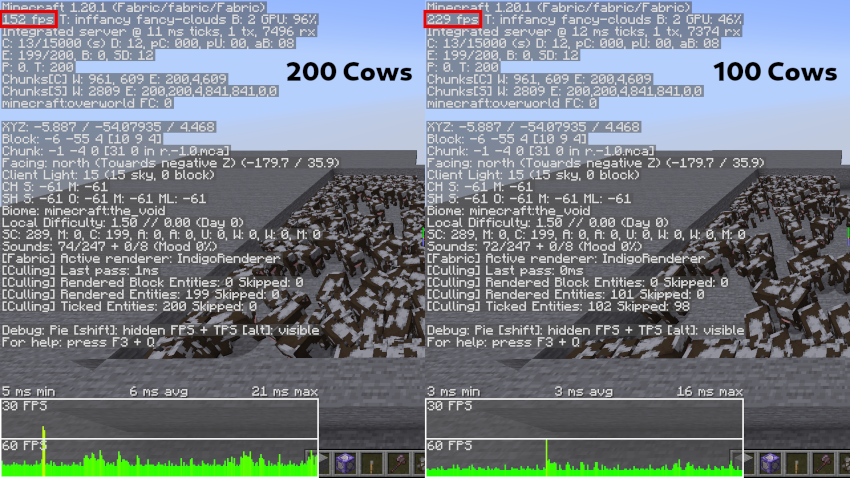
In order to test the efficiency of this mod, I summoned many cows and compared the FPS when using the mod to cap the number of cows to 100, and when the mod is disabled. On the left is when the mod is disabled, and on the right is when the number of cows is capped.
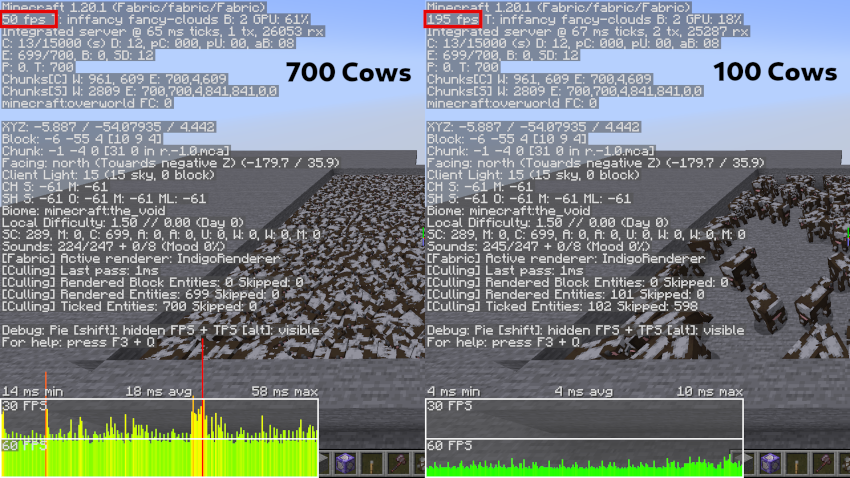
On the left, 700 cows are being displayed, and the FPS is 50. On the right, the mod is activated, and the number of rendered cows is capped to 100, bringing the FPS up to 195
On the left, 200 cows are being rendered, and the FPS is 152. On the right, the number of cows rendered is limited to 100, and the FPS is 229.

👥 Team & Contributors

Discusser
DiscusserOwner

⚙️ Compatibility

Environment
💻 Client-side
Loaders
fabricforgeneoforge
Minecraft Versions
1.21.91.21.101.21.11

🔗 Links

Modrinth Page