Logo
MINECRAFTBIBLE
Items
Items

All game items

Blocks
Blocks

Building blocks

Mobs
Mobs

Creatures & monsters

Biomes
Biomes

World biomes

Structures
Structures

Generated structures

Recipes
Recipes

Crafting guides

Advancements
Advancements

Achievements

Loot Tables
Loot Tables

Drop rates

Tags
Tags

Item groupings

All Versions
View all data →
Capes
Cape ArchiveNEW

Browse rare Minecon capes, OptiFine capes, and custom capes from players worldwide

Browse

Player Database
Player DatabasePopular

Search any player

Skin Browser
Skin Browser

Browse & download skins

Cape Gallery
Cape GalleryNEW

Minecon & OptiFine capes

Seed Vault
Seed Vault

Curated seeds

Learn

Guides
GuidesNew

Tutorials & tips

Blog
Blog

News & updates

Community

Community Hub
Community HubHub

Posts, discussions & more

All Versions
View community →
Seed Analyzer
Seed Analyzer

World seed analysis

Loot Explorer
Loot Explorer

Drop rates

Crafting Calculator
Crafting Calculator

Material planning

Enchant Calculator
Enchant Calculator

Probability math

Redstone Lab
Redstone Lab

Signal timing

Trading Profit
Trading Profit

Villager ROI

All Versions
View all tools →
Mods
Mods

Browse all mods

Plugins
Plugins

Server plugins

Resource Packs
Resource Packs

Textures & sounds

Shaders
Shaders

Visual enhancements

Datapacks
Datapacks

World logic

Scanner
Mod Intelligence

Scan & analyze any mod

All Versions
View all mods →
Loading...
IntroductionIntroductionVersion HistoryVersion HistoryGuidesGuidesBlog & NewsBlog & News
ItemsItemsBlocksBlocksMobsMobsRecipesRecipesBiomesBiomesStructuresStructuresAdvancementsAdvancementsLoot TablesLoot TablesTagsTags
ModsModsPluginsPluginsResource PacksResource PacksShadersShadersDatapacksDatapacks

MinecraftBible

The Ultimate Wiki

Logo
MINECRAFTBIBLE

The ultimate Minecraft reference. Every item, block, mob, and recipe documented with precision.

Community

  • Skin Browser
  • Cape Gallery
  • Seed Vault
  • Blog
  • Guides

Database

  • Items
  • Blocks
  • Mobs
  • Recipes
  • Biomes
  • Structures

Tools

  • Seed Analyzer
  • Mod Intelligence
  • Crafting Calculator
  • Enchant Calculator

Mods & Packs

  • Mods
  • Plugins
  • Resource Packs
  • Shaders
  • Datapacks

Site & Legal

  • About
  • Authors
  • Editorial Policy
  • Corrections
  • Contact
  • Privacy Policy
  • Terms of Service
  • DMCA
  • Sitemap

© 2026 MinecraftBible. Not affiliated with Mojang or Microsoft.

PrivacyTermsContact
Technical Utilities
ModCC0-1.0

Technical Utilities

Tech Utils is a mod providing client-side tweaks for Litematica, WorldEdit and other small utilities.

50.6K
Downloads
249
Followers
3 months ago
Updated
📦
30
Versions
managementstorageutilityfabricquilt
Download Latestv0.6.3+1.21.11View on Modrinth

📖About Technical Utilities

Technical Utilities

Tech Utils is a mod providing client-side tweaks for Litematica, WorldEdit and other small utilities.

Mod config

To access mod config open Mod Menu and select this mod.

Features

  • Inventory Verifier addon to Litematica's Schematic Verifier

    • Conveniently displays the difference between the expected and found inventory contents side-by-side.
    • Has semantic slot highlighting (view feature inventoryScreenOverlay further down).
    • Turning on verifyItemComponents will require item components to match and will also visualize them in the item tooltip for you to compare.
    • Enables schematic creators to use item predicates - a flexible way to specify what properties items should have. Here's an impractical but exhaustive example via Misode's handy generator.


    Check out the feature's showcase video:

    This feature only works if your server has Servux (or PCA Protocol in 1.20.1-4), or you have nbt query permissions (e.g. by being an operator or installing a permissions mod/plugin), or you're in Singleplayer.

  • Sync WorldEdit selection
    Snap WorldEdit region to active Litematica selection - autoWeSync.
    Region synchronizes shortly after you modify a selection, showing you a confirmation message above the hotbar.

  • Litematic preview (1.21 and below)
    Show 3D render of selected litematic in Load Schematics menu - renderPreview.
    This only works for .litematic files.

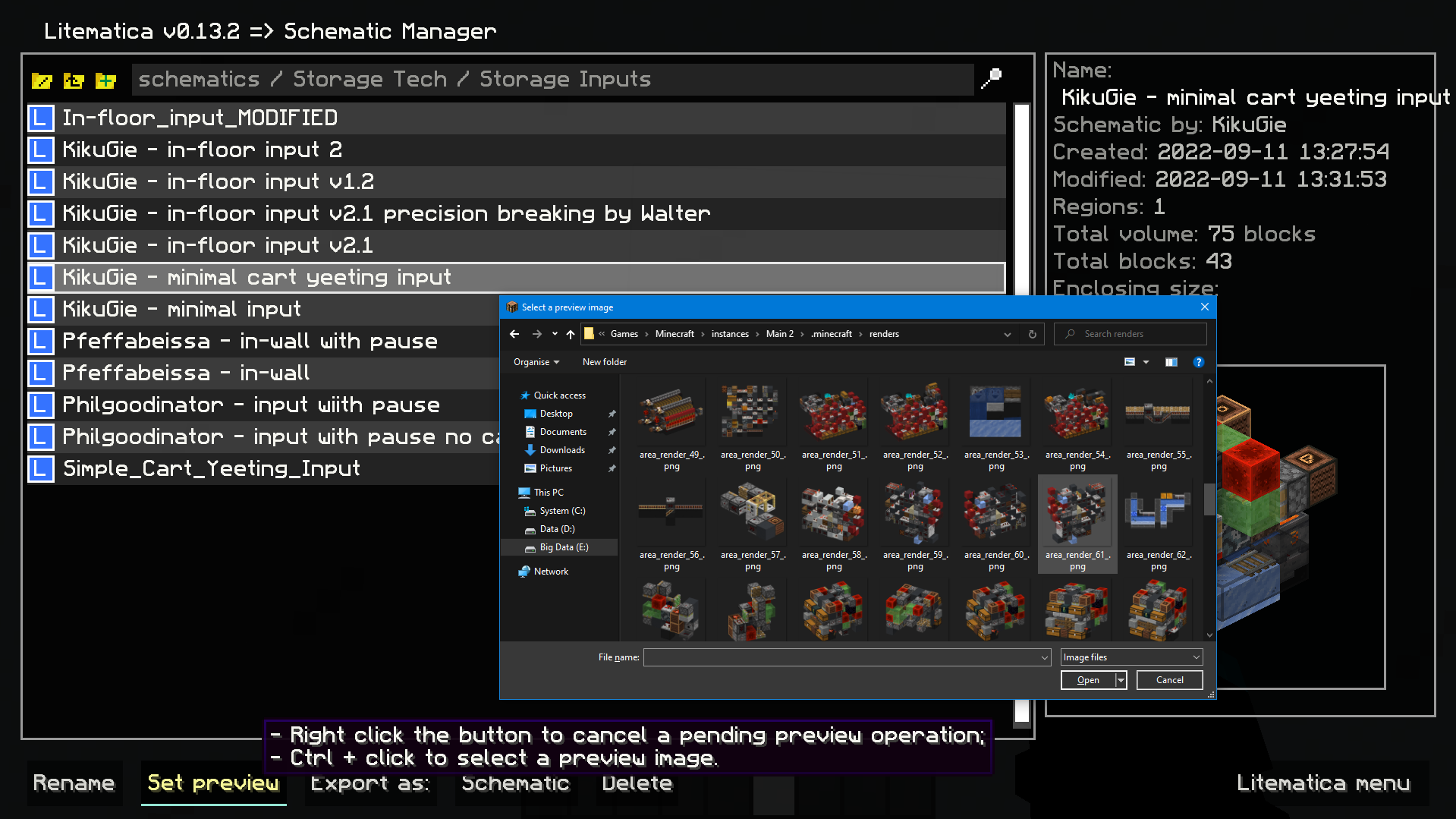
  • Image selection dialog for litematica preview:
    Set litematic preview image to one you select, which unlike the 3D preview feature will be shown to any player, even without this mod.
    In main Litematica menu go to Schematic Manager, select a litematic and ctrl + click on Set Preview button to open the prompt.
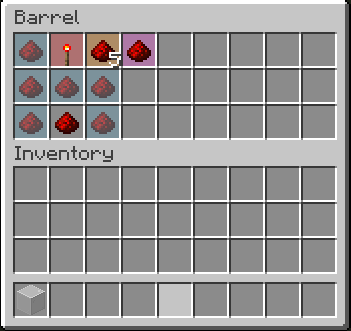
  • Inventory setup preview:
    Show items that have to be in a container and highlights wrong or mismatched ones - inventoryScreenOverlay.
    *Item colors match your placement block colors. By default its:
    • Light blue: missing item;
    • Orange: mismatched amount or nbt data;
    • Magenta: extra item that shouldn't be present;
    • Red: wrong item type.*

  • Compact scoreboard (ported from my old mod) - compactScoreboard.
    Using short number format:
    • 1000 -> 1k
    • 1000000 -> 1M
    • 1000000000 -> 1B
  • Disable WorldEdit neighbor updates on log-in - autoDisableUpdates.
  • Hotkeys for litematic placement rotation & mirror - rotatePlacement and mirrorPlacement.
  • /isorender selection shortcut for rendering current Litematica selection in Isometric Renders.
  • A hotkey to give yourself a container full of the item you're holding - giveFullInv. Supports boxes, chests, and bundles. Nesting them is possible.
  • A hotkey to refresh the material list - refreshMaterialList.
  • Make easy place act as if all blocks are full blocks. Useful for placing blocks with small hit boxes.
  • And more to come!

Dependencies

  • Fabric API
  • MaliLib
  • Litematica

Mod logo by Mizeno

👥 Team & Contributors

KikuGie
KikuGieOwner
Velizar
Velizar
Developer

⚙️ Compatibility

Environment
💻 Client-side
Loaders
fabricquilt
Minecraft Versions
1.21.11

🔗 Links

Modrinth Page