


Tech Extensions
An add-on for Tech Reborn that adds new useful tools, mainly for mid/end game.
📖About Tech Extensions
Tech Extensions
Tech Extensions is a Minecraft mod that serves as an add-on for the
Tech Reborn mod.
It introduces new high-tech gadgets and utilities to enhance the gameplay experience.
- Current Mod Version: 1.0.0
- Supported Minecraft Version: 1.21.10
- Dependencies:
Items
Currently, the mod adds four new items:
1. Electric Jetpack
The Electric Jetpack is a powerful chestplate that grants thrust-based flight.
It is a High-tier powered device with realistic physics.
Controls
- Space (Jump): Thrust upward - works from ground or in air
- Space + WASD: Directional flight while thrusting
- Space + Sprint (Ctrl): Sprint boost for faster forward movement (1.5x max speed)
- Shift (in air): Hover mode - slows descent and counteracts gravity
Mechanics
- Physics-based flight with thrust, drag, and gravity
- Horizontal and vertical speed caps for balanced gameplay
- Friction/drag slows movement gradually instead of instant stops
- Fall damage is negated while the jetpack is active
- Must be charged in a battery box or similar power source
Specifications
| Setting | Default Value | Description |
|---|---|---|
| Capacity | 600,000 E | Total energy storage |
| Flying Cost | 150 E/tick | Energy consumed while thrusting |
| Hover Cost | 50 E/tick | Energy consumed while hovering |
| Sprint Cost | +100 E/tick | Additional energy when sprinting |
Look at the config file for more detailed settings and adjustments.
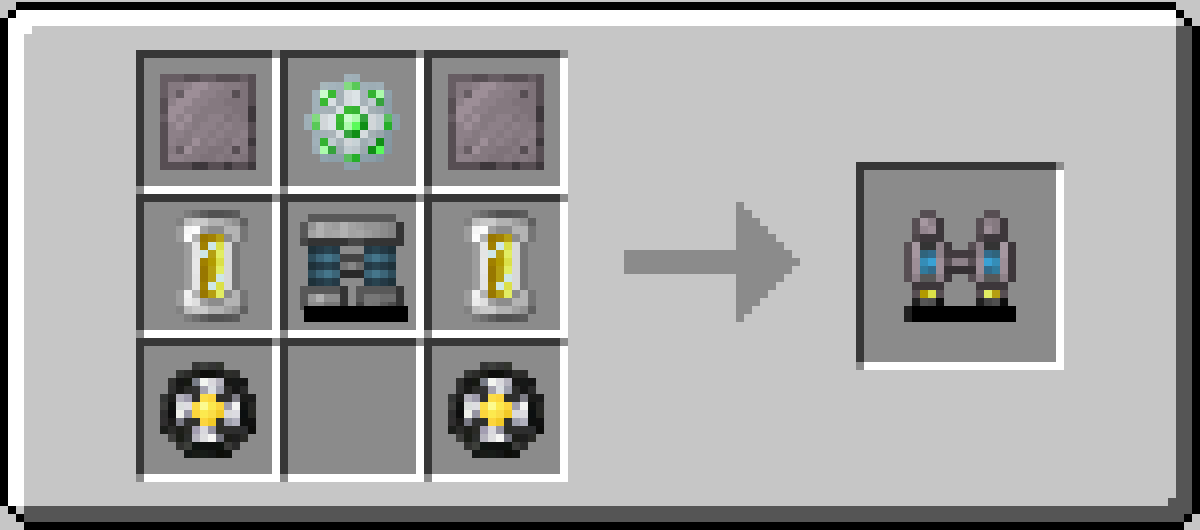
Crafting Recipe
- 1x Lithium Ion Batpack
- 2x Electric Ducted Fans (see below)
- 2x Helium Coolant Cells (60k)
- 1x Data Storage Core
- 2x Magnalium Plates
2. Electric Ducted Fan
The Electric Ducted Fan is a high-tech crafting component used primarily in the construction of the Electric Jetpack. It combines lightweight carbon materials with titanium for durability and an electronic circuit for precise motor control.
Currently, it is only used as a crafting ingredient for the Electric Jetpack (2 required per jetpack).
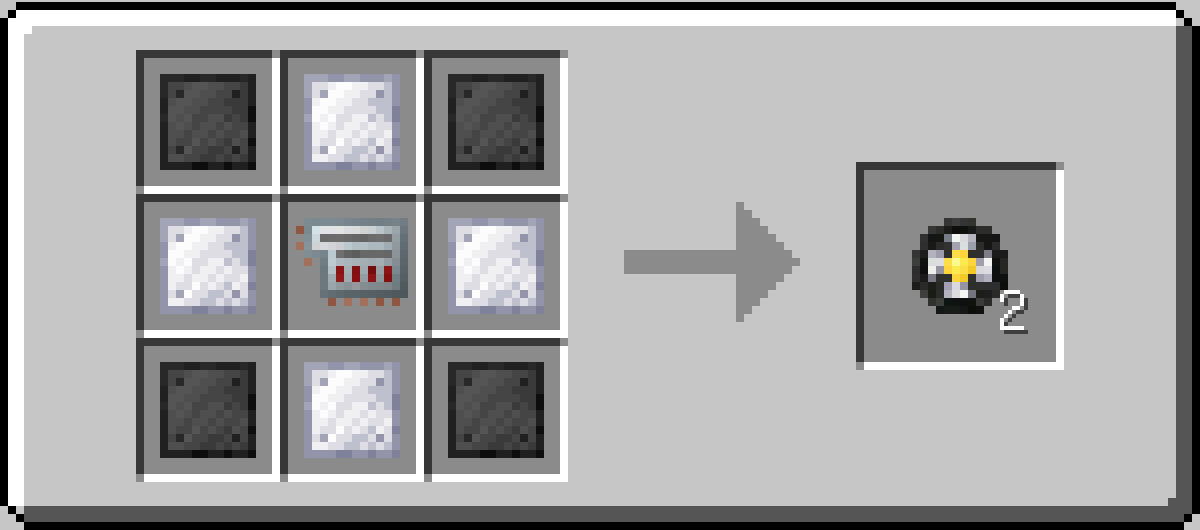
Crafting Recipe
- 4x Carbon Plates
- 4x Titanium Plates
- 1x Electronic Circuit
- Yields: 2 Fans
3. Resonance Scanner
The Resonance Scanner is an advanced exploration tool designed to locate specific blocks in the environment. Perfect for finding rare ores or tracking down specific materials in large caves or mining operations.
How to Use
- Open GUI: Right-click the scanner to open its interface.
- Set Target: Place a block inside the scanner's inventory slot to set it as the target (e.g., Diamond Ore).
- Activate: Sneak + Right-click to toggle the scanner ON/OFF.
- Scan: Hold the scanner in your Main Hand or Off Hand. It will scan in a cylindrical beam along your view direction.
- Feedback: If the target block is found within range, the scanner will ping with a sound and display an estimated distance message.
Range & Consumption Mechanics
The scanner's effectiveness scales with the number of target blocks in the inventory slot:
| Mechanic | Scaling | Formula |
|---|---|---|
| Range | Logarithmic | 6 + (10 × ln(count)) blocks |
| Energy Cost | Linear | 100 + (10 × count) E/scan |
Tip: Adding more blocks gives diminishing returns on range but linear increases in power cost. Find the sweet spot for your needs!
Upgrades
Unlike Tech Reborn machines, the scanner is a handheld item and accepts only up to 2 Upgrades:
| Upgrade | Effect |
|---|---|
| Overclocker | Reduces cooldown between scans (faster detection), but increases energy cost |
| Energy Storage | Increases internal battery capacity |
Specifications
| Setting | Default Value | Description |
|---|---|---|
| Capacity | 200,000 E | Total energy storage |
| Base Cost | 100 E/scan | Base energy per scan |
| Per-Item Cost | +10 E/scan | Additional cost per item in stack |
| Base Range | 6 blocks | Minimum scanning range |
| Range Multiplier | 10 | Multiplier for logarithmic range scaling |
| Scan Cooldown | 80 ticks | Time between scans (4 seconds) |
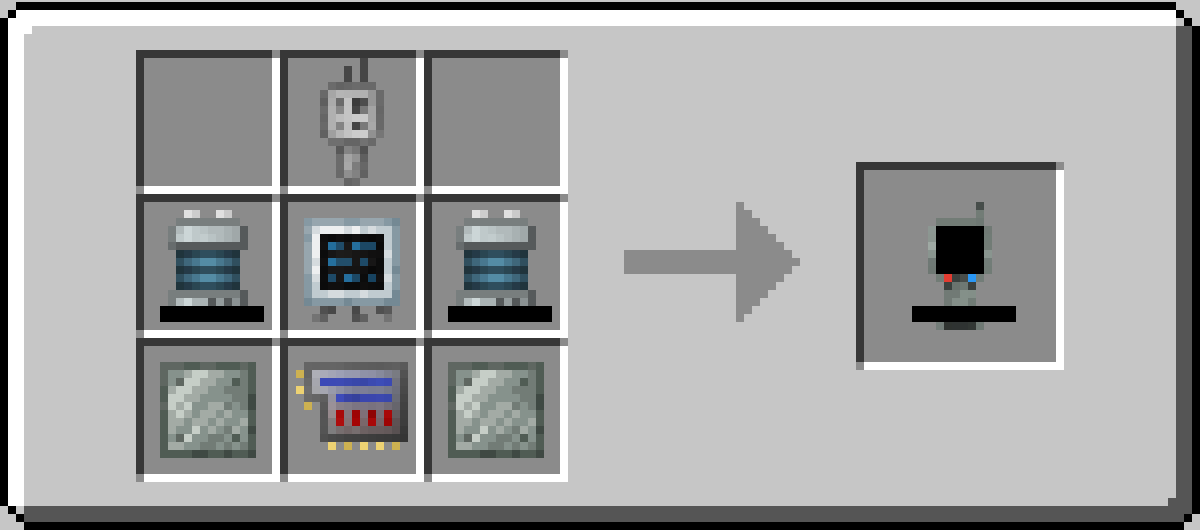
Crafting Recipe
- 1x Frequency Transmitter
- 1x Digital Display
- 2x Lithium Ion Batteries
- 1x Advanced Circuit
- 2x Invar Plates
4. Meta-Tool
The Meta-Tool is the ultimate multi-purpose tool, a significantly enhanced version of
Tech Reborn's Omni-Tool.
It combines the functionality of a pickaxe, axe, shovel, sword, shears (and optionally, torch!)
into a single high-capacity powered device with intelligent mining modes.
Features
Ever felt like the Omni-Tool was cool, but it felt more in the Advanced tools tier instead of
in the Industrial tools tier? The Meta-Tool is basically the Industrial version of the Omni-Tool,
with vastly improved energy capacity, faster mining speed, higher attack stats, and new intelligent mining modes.
First of all, the Meta-Tool includes all the functionalities of the Omni-Tool, reported below:
- Functions as a pickaxe, axe, shovel, sword and shears
- Strips Logs & Flattens Paths when right-clicking on appropriate blocks
- Automatically places torches from inventory when right-clicking on other blocks
- Works as a wrench for rotating and dismantling Tech Reborn machines
Unlike the Omni-Tool, though, the Meta-Tool stores 40M E, mines at the same speed
as the Industrial Drill/Chainsaw, and deals the same damage as the Nanosaber.
Additionally, it introduces different mining modes to enhance block breaking
(which can be cycled through with Sneak + Right-click):
| Mode | Description |
|---|---|
| Inactive | Standard single-block mining |
| 3×3 | Mines a 3×3 area centered on the targeted block |
| Smart | Intelligent mode that adapts to what you're mining (see below) |
Last but not least, if you have LambDynamicLights
installed, the Meta-Tool will also emit light!
Smart Mode Behavior
The Smart mode automatically detects what you're mining and applies the best strategy:
- Ores: Activates Vein Mining — breaks all connected ore blocks of the same type (up to 64 blocks)
- Logs/Leaves: Activates Tree Capitator — chops down entire trees (up to 64 logs + 256 leaves), similarly to the Industrial Chainsaw
- Other blocks: Falls back to 3×3 mining
Specifications
| Setting | Default Value | Description |
|---|---|---|
| Capacity | 40,000,000 E | Total energy storage |
| Mining Cost | 200 E/block | Energy consumed per block mined |
| Hit Cost | 250 E/hit | Energy consumed per enemy hit |
| Energy Tier | Insane | Accepts Insane-tier energy transfer |
Look at the config file for more detailed settings and adjustments.
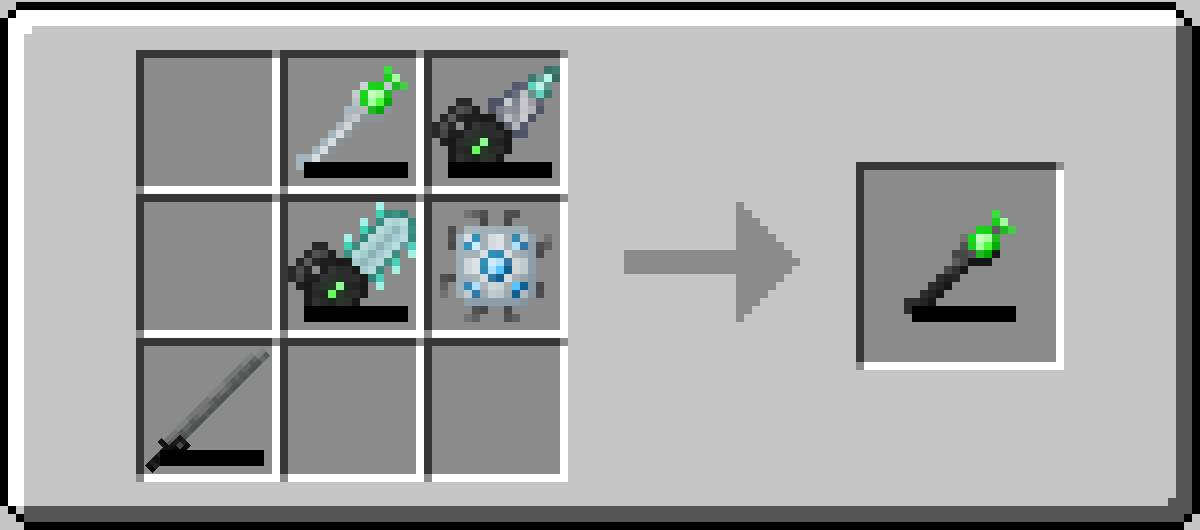
Crafting Recipe
With great power comes great crafting complexity. The Meta-Tool recipe is similar to that of the
Omni-Tool, but requires top-tier tools:
- 1x Omni-Tool
- 1x Industrial Drill
- 1x Industrial Chainsaw
- 1x Nanosaber
- 1x Energy Flow Chip
Contributing
Contributions are welcome! If you have ideas for new features, improvements, or bug fixes,
feel free to open an issue or submit a pull request on the GitHub repository.
For developers, the structure of the mod is deliberately based on the Tech Reborn
codebase to facilitate easier integration and understanding.
License
This mod is licensed under the MIT License. See the LICENSE.md file for more information.