Logo
MINECRAFTBIBLE
Items
Items

All game items

Blocks
Blocks

Building blocks

Mobs
Mobs

Creatures & monsters

Biomes
Biomes

World biomes

Structures
Structures

Generated structures

Recipes
Recipes

Crafting guides

Advancements
Advancements

Achievements

Loot Tables
Loot Tables

Drop rates

Tags
Tags

Item groupings

All Versions
View all data →
Capes
Cape ArchiveNEW

Browse rare Minecon capes, OptiFine capes, and custom capes from players worldwide

Browse

Player Database
Player DatabasePopular

Search any player

Skin Browser
Skin Browser

Browse & download skins

Cape Gallery
Cape GalleryNEW

Minecon & OptiFine capes

Seed Vault
Seed Vault

Curated seeds

Learn

Guides
GuidesNew

Tutorials & tips

Blog
Blog

News & updates

Community

Community Hub
Community HubHub

Posts, discussions & more

All Versions
View community →
Seed Analyzer
Seed Analyzer

World seed analysis

Loot Explorer
Loot Explorer

Drop rates

Crafting Calculator
Crafting Calculator

Material planning

Enchant Calculator
Enchant Calculator

Probability math

Redstone Lab
Redstone Lab

Signal timing

Trading Profit
Trading Profit

Villager ROI

All Versions
View all tools →
Mods
Mods

Browse all mods

Plugins
Plugins

Server plugins

Resource Packs
Resource Packs

Textures & sounds

Shaders
Shaders

Visual enhancements

Datapacks
Datapacks

World logic

Scanner
Mod Intelligence

Scan & analyze any mod

All Versions
View all mods →
Loading...
IntroductionIntroductionVersion HistoryVersion HistoryGuidesGuidesBlog & NewsBlog & News
ItemsItemsBlocksBlocksMobsMobsRecipesRecipesBiomesBiomesStructuresStructuresAdvancementsAdvancementsLoot TablesLoot TablesTagsTags
ModsModsPluginsPluginsResource PacksResource PacksShadersShadersDatapacksDatapacks

MinecraftBible

The Ultimate Wiki

Logo
MINECRAFTBIBLE

The ultimate Minecraft reference. Every item, block, mob, and recipe documented with precision.

Community

  • Skin Browser
  • Cape Gallery
  • Seed Vault
  • Blog
  • Guides

Database

  • Items
  • Blocks
  • Mobs
  • Recipes
  • Biomes
  • Structures

Tools

  • Seed Analyzer
  • Mod Intelligence
  • Crafting Calculator
  • Enchant Calculator

Mods & Packs

  • Mods
  • Plugins
  • Resource Packs
  • Shaders
  • Datapacks

Site & Legal

  • About
  • Authors
  • Editorial Policy
  • Corrections
  • Contact
  • Privacy Policy
  • Terms of Service
  • DMCA
  • Sitemap

© 2026 MinecraftBible. Not affiliated with Mojang or Microsoft.

PrivacyTermsContact
Structure Void Toggle
ModMIT

Structure Void Toggle

Gets rid of that annoying Structure Void hitbox when building with a toggle!

10.2K
Downloads
21
Followers
5 months ago
Updated
📦
30
Versions
utilityfabricforgeneoforgequilt
Download Latestv4.5.3+1.21.11View on Modrinth

📖About Structure Void Toggle

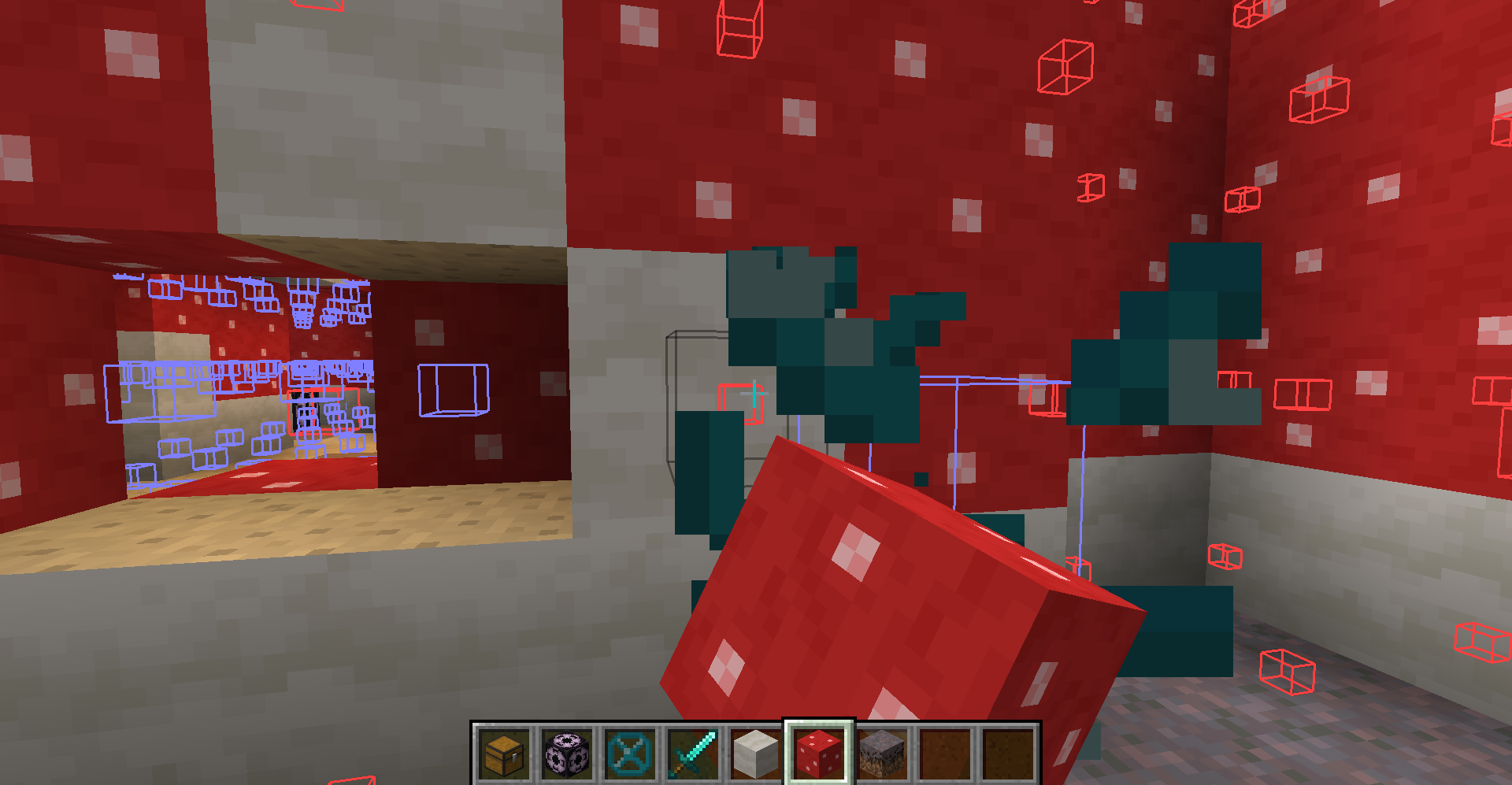
Are you annoyed with Structure Void getting in the way of you breaking/placing blocks in your structure? SO WAS I!
 
https://cdn.modrinth.com/data/S1tbzJ6Y/images/5ed6bd476f255ea4d7808bc2b69524d4956be8f4.png


SOLUTION: STRUCTURE VOID TOGGLE MOD!

   A little backstory, I was making structures and using Structure Blocks to save them with Structure Void for world generation later. However, I got fed up with Structure Void making it difficult to add/remove blocks in my structures. So I decided to make this really simple mod where you can toggle between the size of the hitbox for the block!

AS OF 1.19.2 (Some features are not available in older MC versions):

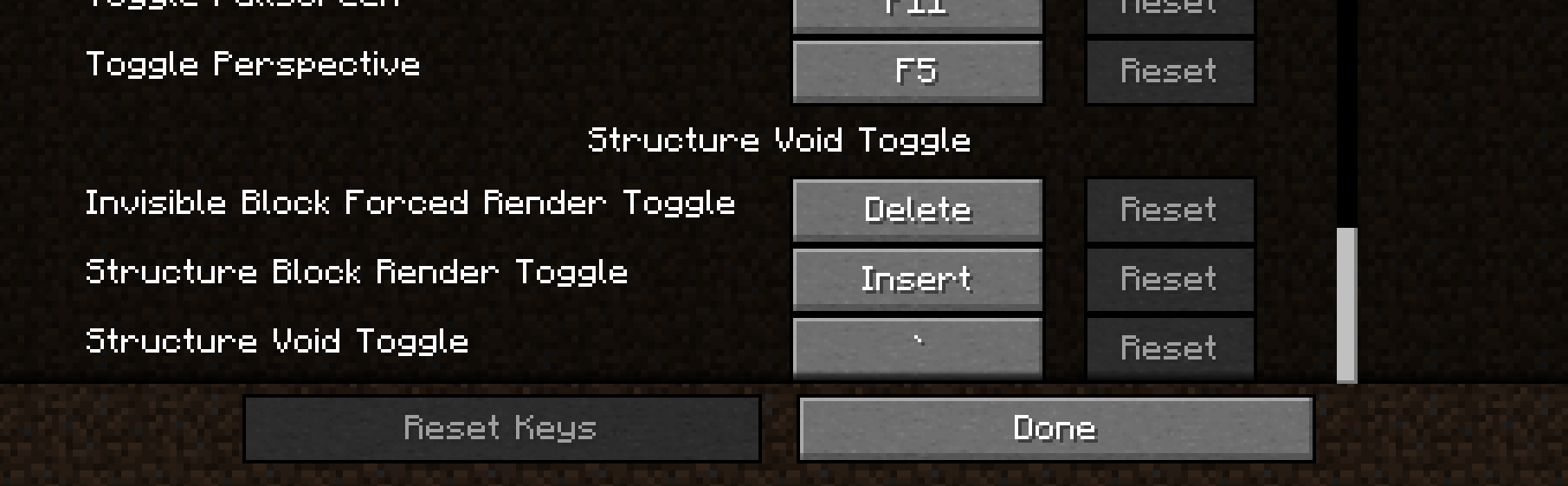
  • BACKTICK KEY ` will switch between 'Default', 'No Hitbox', 'Small Hitbox', and 'Large Hitbox'. This will apply to Structure Void, Light, and Barrier block. Default goes back to normal shape and behavior for each block. The rest forces the block's hitbox to be whatever the mode is.

  • INSERT KEY will disable any invisible block rendering from Structure Blocks. May be useful as the Structure Block's rendering is very laggy when showing a ton of invisible blocks.

  • DELETE KEY will switch on the 'Forced Rendering' option which will render all Structure Void, Light, and Barrier blocks so that they all are visible when close enough to you even if not in bounds of a Structure Block! If 'Large Hitbox' mode is on alongside 'Forced Rendering', the blocks will get a full-cube solid rendering to make it mush easier to see where all the blocks are and easier to break them.

  • PAGE UP KEY will make it so that placing any block on Structure Void or Light will place the blocks on the side instead of replacing the Structure Void or Light block.

NOTE: You can change any of the keybinds in the Controls section of settings.
 https://cdn.modrinth.com/data/S1tbzJ6Y/images/17f273d102c07560c937aef3de080a3c9fb4d641.png

I hope you enjoy this mod to make structure building a little easier and don't forget to report any bugs or issues you find with this mod in the Issue tab above or in my discord below! Or you can comment on this mod page too

Discord Link to #telepathicgrunt-mods channel for my mods! :

https://discord.gg/K8qRev3yKZ

👥 Team & Contributors

TelepathicGrunt
TelepathicGruntOwner

⚙️ Compatibility

Environment
💻 Client-side
Loaders
fabricforgeneoforgequilt
Minecraft Versions
1.21.11

🔗 Links

Modrinth Page