Logo
MINECRAFTBIBLE
Items
Items

All game items

Blocks
Blocks

Building blocks

Mobs
Mobs

Creatures & monsters

Biomes
Biomes

World biomes

Structures
Structures

Generated structures

Recipes
Recipes

Crafting guides

Advancements
Advancements

Achievements

Loot Tables
Loot Tables

Drop rates

Tags
Tags

Item groupings

All Versions
View all data →
Capes
Cape ArchiveNEW

Browse rare Minecon capes, OptiFine capes, and custom capes from players worldwide

Browse

Player Database
Player DatabasePopular

Search any player

Skin Browser
Skin Browser

Browse & download skins

Cape Gallery
Cape GalleryNEW

Minecon & OptiFine capes

Seed Vault
Seed Vault

Curated seeds

Learn

Guides
GuidesNew

Tutorials & tips

Blog
Blog

News & updates

Community

Community Hub
Community HubHub

Posts, discussions & more

All Versions
View community →
Seed Analyzer
Seed Analyzer

World seed analysis

Loot Explorer
Loot Explorer

Drop rates

Crafting Calculator
Crafting Calculator

Material planning

Enchant Calculator
Enchant Calculator

Probability math

Redstone Lab
Redstone Lab

Signal timing

Trading Profit
Trading Profit

Villager ROI

All Versions
View all tools →
Mods
Mods

Browse all mods

Plugins
Plugins

Server plugins

Resource Packs
Resource Packs

Textures & sounds

Shaders
Shaders

Visual enhancements

Datapacks
Datapacks

World logic

Scanner
Mod Intelligence

Scan & analyze any mod

All Versions
View all mods →
Loading...
IntroductionIntroductionVersion HistoryVersion HistoryGuidesGuidesBlog & NewsBlog & News
ItemsItemsBlocksBlocksMobsMobsRecipesRecipesBiomesBiomesStructuresStructuresAdvancementsAdvancementsLoot TablesLoot TablesTagsTags
ModsModsPluginsPluginsResource PacksResource PacksShadersShadersDatapacksDatapacks

MinecraftBible

The Ultimate Wiki

Logo
MINECRAFTBIBLE

The ultimate Minecraft reference. Every item, block, mob, and recipe documented with precision.

Community

  • Skin Browser
  • Cape Gallery
  • Seed Vault
  • Blog
  • Guides

Database

  • Items
  • Blocks
  • Mobs
  • Recipes
  • Biomes
  • Structures

Tools

  • Seed Analyzer
  • Mod Intelligence
  • Crafting Calculator
  • Enchant Calculator

Mods & Packs

  • Mods
  • Plugins
  • Resource Packs
  • Shaders
  • Datapacks

Site & Legal

  • About
  • Authors
  • Editorial Policy
  • Corrections
  • Contact
  • Privacy Policy
  • Terms of Service
  • DMCA
  • Sitemap

© 2026 MinecraftBible. Not affiliated with Mojang or Microsoft.

PrivacyTermsContact
SpecSpoof
ModGPL-3.0-or-later

SpecSpoof

Modify your hardware specifications string in the F3 Menu!

10.5K
Downloads
23
Followers
6 months ago
Updated
📦
13
Versions
cursedutilityfabric
Download Latestv1.4.2View on Modrinth

📖About SpecSpoof

SpecSpoof: A fabric mod to modify the hardware string in the F3 menu!

SpecSpoof is a Fabric mod that allows you to modify the hardware string displayed in the F3 menu. With this mod, you can customize the hardware information shown in the F3 menu to your liking. Whether you want to show off your (fraud) high-end hardware or keep your specs private. Now depends on Roselib!

Compatibility

This mod should be highly compatible with other mods, but if you find any incompatibilities or bugs, just open up an issue in the GitHub repo. I'll probably try to implement a workaround.

Additional Infos:

ModMenu is recommended for easier config modification!
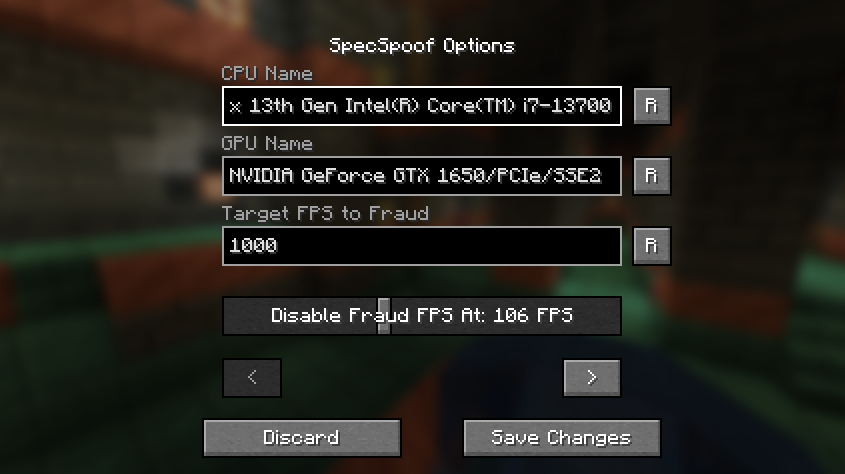
an image of the config menu

All options should be straightforward, so go nuts!

JSON Instructions (for legacy versions):

Quick Documentation JSON:

{
  "CPU": "your cpu name", //desired fake CPU name
  "GPU": ""your gpu name", // desired fake GPU name
  "FPS": 1000, // desired FPS to be faked as
  "disableFPSThreshold": 100 // The FPS Threshold for the fake fps to be deactivated, you see, to make it more believable, if your frames are dipping, the fps should actually reflect to that. imagine saying you have 1000 fps but your game runs like a slideshow, that just wouldn't work. (set to 999999 if you don't want this feature, set to 0 if you want to always fake your FPS)
  "GPUVendor": "the vendor", // This is what shows in the brackets right beside your resolution, you might want to change this to your desired GPU brand if you want to make it believable.
  "GPUDriver": "the driver" // This is the GPU driver string, which shows below the GPU string, you should also change this if you want to make your fake GPU believable.
}

The formatting is also your choice, you can make it actually believable or just put random nonsense on the string.

Examples:

{
  "CPU": "112x Intel(R) Xeon(R) w9-3495X",
  "GPU": "NVIDIA GeForce RTX 2080 SUPER/PCIe/SSE2",
  "FPS": 3400,
  "disableFPSThreshold": 100
  "GPUVendor": "NVIDIA Corporation",
  "GPUDriver": "3.2.0 NVIDIA 531.37"
}
{
  "CPU": "Rose Flowers",
  "GPU": "Pigeons",
  "FPS": 10,
  "disableFPSThreshold": 0
  "GPUVendor": "Eggs Inc",
  "GPUDriver": "1.2 months"
}

👥 Team & Contributors

Aeroshide
AeroshideOwner

⚙️ Compatibility

Environment
💻 Client-side
Loaders
fabric
Minecraft Versions
1.21.11

🔗 Links

Modrinth Page