Logo
MINECRAFTBIBLE
Items
Items

All game items

Blocks
Blocks

Building blocks

Mobs
Mobs

Creatures & monsters

Biomes
Biomes

World biomes

Structures
Structures

Generated structures

Recipes
Recipes

Crafting guides

Advancements
Advancements

Achievements

Loot Tables
Loot Tables

Drop rates

Tags
Tags

Item groupings

All Versions
View all data →
Capes
Cape ArchiveNEW

Browse rare Minecon capes, OptiFine capes, and custom capes from players worldwide

Browse

Player Database
Player DatabasePopular

Search any player

Skin Browser
Skin Browser

Browse & download skins

Cape Gallery
Cape GalleryNEW

Minecon & OptiFine capes

Seed Vault
Seed Vault

Curated seeds

Learn

Guides
GuidesNew

Tutorials & tips

Blog
Blog

News & updates

Community

Community Hub
Community HubHub

Posts, discussions & more

All Versions
View community →
Seed Analyzer
Seed Analyzer

World seed analysis

Loot Explorer
Loot Explorer

Drop rates

Crafting Calculator
Crafting Calculator

Material planning

Enchant Calculator
Enchant Calculator

Probability math

Redstone Lab
Redstone Lab

Signal timing

Trading Profit
Trading Profit

Villager ROI

All Versions
View all tools →
Mods
Mods

Browse all mods

Plugins
Plugins

Server plugins

Resource Packs
Resource Packs

Textures & sounds

Shaders
Shaders

Visual enhancements

Datapacks
Datapacks

World logic

Scanner
Mod Intelligence

Scan & analyze any mod

All Versions
View all mods →
Loading...
IntroductionIntroductionVersion HistoryVersion HistoryGuidesGuidesBlog & NewsBlog & News
ItemsItemsBlocksBlocksMobsMobsRecipesRecipesBiomesBiomesStructuresStructuresAdvancementsAdvancementsLoot TablesLoot TablesTagsTags
ModsModsPluginsPluginsResource PacksResource PacksShadersShadersDatapacksDatapacks

MinecraftBible

The Ultimate Wiki

Logo
MINECRAFTBIBLE

The ultimate Minecraft reference. Every item, block, mob, and recipe documented with precision.

Community

  • Player Database
  • Skin Browser
  • Cape Gallery
  • Community Hub
  • Seed Vault

Database

  • Items
  • Blocks
  • Mobs
  • Recipes
  • Biomes
  • Structures

Tools

  • Seed Analyzer
  • Mod Intelligence
  • Crafting Calculator
  • Enchant Calculator

Mods & Packs

  • Mods
  • Plugins
  • Resource Packs
  • Shaders
  • Datapacks

© 2026 MinecraftBible. Not affiliated with Mojang or Microsoft.

PrivacyTermsContact
Sort It Out!
ModMIT

Sort It Out!

A capable inventory sorting mod that works either client-side or server-side

150.2K
Downloads
107
Followers
2 months ago
Updated
📦
30
Versions
game-mechanicsstorageutilityfabricforgeneoforge
Download Latestv1.2.1+1.20.1View on Modrinth

📖About Sort It Out!

Sort It Out!: A capable inventory sorting mod that works either client-side or server-side

Report Issues • Chat on Discord • CurseForge • Modrinth

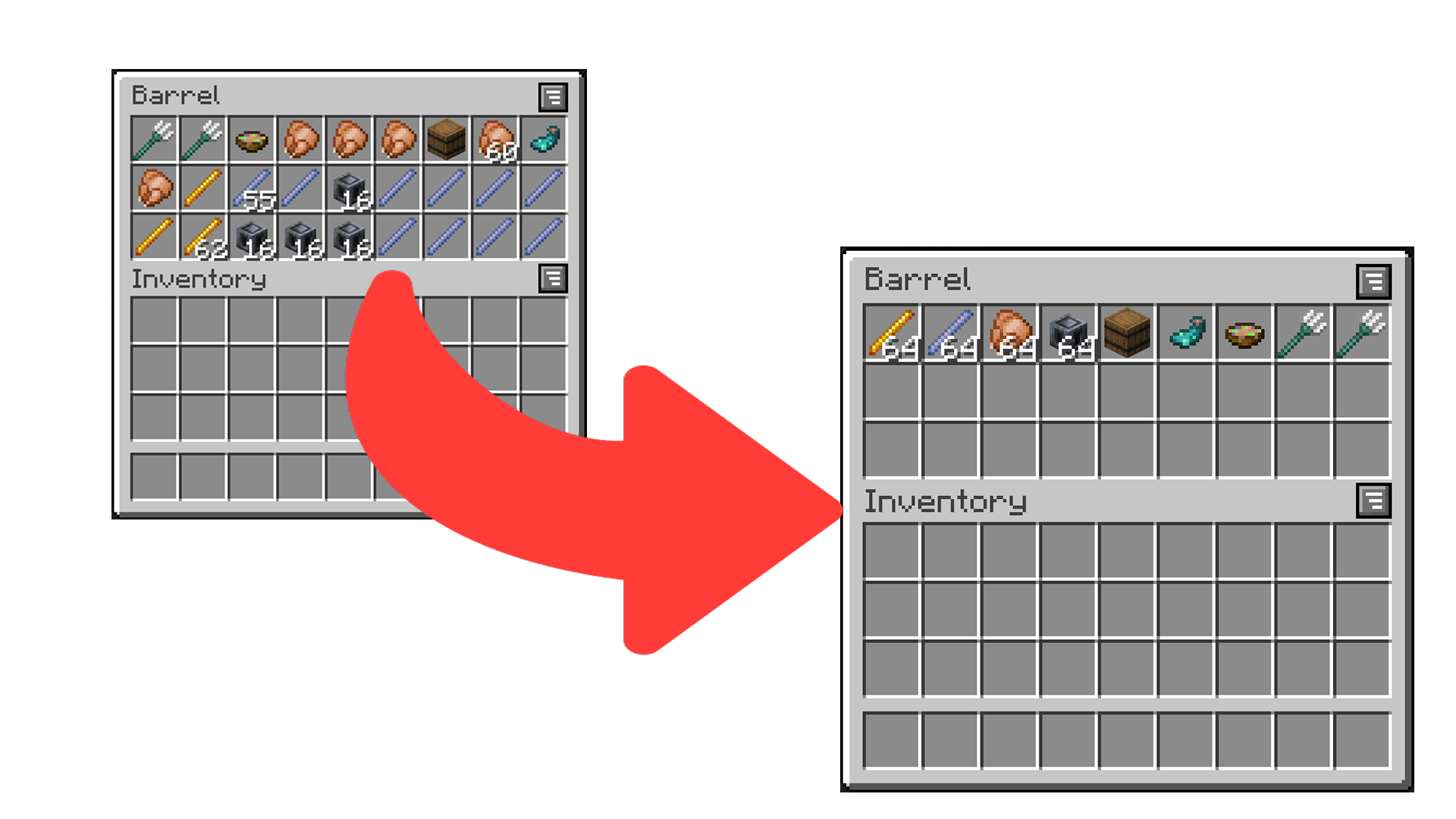
A screenshot of a unsorted inventory, and a sorted inventory to the right of it

Sort It Out! is an inventory sorting mod that:

  • has configurable sorting;
  • works when installed only on the server (even with vanilla clients!);
  • works when installed only on the client;
  • and allows data-driven custom sort button locations.

How to Use

There are multiple ways to trigger sorting:

  1. Double-click an empty slot (configurable) (client or server).
  2. Click the sort button (client only).
  3. Press the sort keybind (default is I) (client only).

How to Configure

Sort It Out! can be configured via an in-game configuration screen which can be accessed in Mod Menu (Fabric/Quilt) or the mods screen (Forge/NeoForge). In the case that the mod is not installed on the clientside, players can use the /sortitout preferences command to view and update their preferences (which will persist across rejoins and server restarts).

  • Packet Send Interval: defines the interval, in ticks, at which packets are sent when sorting on the client side (this will not take effect if the mod is installed on the serverside). Too low of an interval may cause a server to kick you.
  • Invert Sorting: whether to invert the sorting order.
  • Comparators: a list of comparators to use when comparing item stacks. If the first comparator states that the stacks are equal, the second will be used to break the tie (and so on).
  • Slot Sorting Trigger: the action to use to trigger a sort by clicking on a slot. Defaults to double clicking an empty slot, but can be set to clicking the offhand key when hovering a slot.

FAQ

Does this need to be installed on the server/client?

Sort It Out! works in any configuration - as long as the mod is installed on one of the server or the client.

  • Server only: any player without the mod (even vanilla clients) will be able to double-click to sort (by default) and use /sortitout to change their preferences.
  • Client only: players can join any server regardless of whether the server has the mod and will be able to double-click or use the sort buttons to sort. The config screen can be used to change preferences.
  • Server and Client (recommended): players can sort using double-click or the sort buttons. The command or config screen can be used to change preferences.

How do I configure the location of sort buttons in screens?

See the docs page here.

I think I found a bug!

Report any issues you find on the GitHub issue tracker.

Rent a server with Bisect Hosting: Use Code jamalam to get 25% off

👥 Team & Contributors

No authors recorded.

⚙️ Compatibility

Environment
❓ Unknown
Loaders
fabricforgeneoforge
Minecraft Versions
1.20.1

🔗 Links

Modrinth Page