Logo
MINECRAFTBIBLE
Items
Items

All game items

Blocks
Blocks

Building blocks

Mobs
Mobs

Creatures & monsters

Biomes
Biomes

World biomes

Structures
Structures

Generated structures

Recipes
Recipes

Crafting guides

Advancements
Advancements

Achievements

Loot Tables
Loot Tables

Drop rates

Tags
Tags

Item groupings

All Versions
View all data →
Capes
Cape ArchiveNEW

Browse rare Minecon capes, OptiFine capes, and custom capes from players worldwide

Browse

Player Database
Player DatabasePopular

Search any player

Skin Browser
Skin Browser

Browse & download skins

Cape Gallery
Cape GalleryNEW

Minecon & OptiFine capes

Seed Vault
Seed Vault

Curated seeds

Learn

Guides
GuidesNew

Tutorials & tips

Blog
Blog

News & updates

Community

Community Hub
Community HubHub

Posts, discussions & more

All Versions
View community →
Seed Analyzer
Seed Analyzer

World seed analysis

Loot Explorer
Loot Explorer

Drop rates

Crafting Calculator
Crafting Calculator

Material planning

Enchant Calculator
Enchant Calculator

Probability math

Redstone Lab
Redstone Lab

Signal timing

Trading Profit
Trading Profit

Villager ROI

All Versions
View all tools →
Mods
Mods

Browse all mods

Plugins
Plugins

Server plugins

Resource Packs
Resource Packs

Textures & sounds

Shaders
Shaders

Visual enhancements

Datapacks
Datapacks

World logic

Scanner
Mod Intelligence

Scan & analyze any mod

All Versions
View all mods →
Loading...
IntroductionIntroductionVersion HistoryVersion HistoryGuidesGuidesBlog & NewsBlog & News
ItemsItemsBlocksBlocksMobsMobsRecipesRecipesBiomesBiomesStructuresStructuresAdvancementsAdvancementsLoot TablesLoot TablesTagsTags
ModsModsPluginsPluginsResource PacksResource PacksShadersShadersDatapacksDatapacks

MinecraftBible

The Ultimate Wiki

Logo
MINECRAFTBIBLE

The ultimate Minecraft reference. Every item, block, mob, and recipe documented with precision.

Community

  • Skin Browser
  • Cape Gallery
  • Seed Vault
  • Blog
  • Guides

Database

  • Items
  • Blocks
  • Mobs
  • Recipes
  • Biomes
  • Structures

Tools

  • Seed Analyzer
  • Mod Intelligence
  • Crafting Calculator
  • Enchant Calculator

Mods & Packs

  • Mods
  • Plugins
  • Resource Packs
  • Shaders
  • Datapacks

Site & Legal

  • About
  • Authors
  • Editorial Policy
  • Corrections
  • Contact
  • Privacy Policy
  • Terms of Service
  • DMCA
  • Sitemap

© 2026 MinecraftBible. Not affiliated with Mojang or Microsoft.

PrivacyTermsContact
Create: Some Assembly Required
ModMIT

Create: Some Assembly Required

Design your own sandwiches

233.6K
Downloads
127
Followers
3 months ago
Updated
📦
26
Versions
decorationfoodforgeneoforge
Download Latestv5.2.7View on Modrinth

📖About Create: Some Assembly Required

Some Assembly Required logo
Some Assembly Required is a Farmer's Delight and Create add-on that allows players to create custom sandwiches.

To get started, create some bread slices using Farmer's Delight's cutting board, or make a burger bun. Then, place down a Sandwiching Station, place a bread slice or bun on top, and start adding ingredients. In addition to food, potions can also be added. Once your sandwich is finished, you can pick it up by breaking it. Sandwiches can be placed down anywhere in your world by shift-right-clicking.

A sandwich restores the same amount of hunger and saturation as it's ingredients. However, if it contains at least 2 unique ingredients (excluding bread and potions), it will additionally grant a Comfort buff if it's a sandwich, or a Nourishment buff if it's a burger. The length of this effect increases with the number of unique ingredients.

If doing things automatically is more your style, you can automate the production of sandwiches using Create's deployers. Furthermore, spouts can add fluids such as potions, honey or chocolate to your sandwiches. A full list of compatible fluids can be found in JEI.
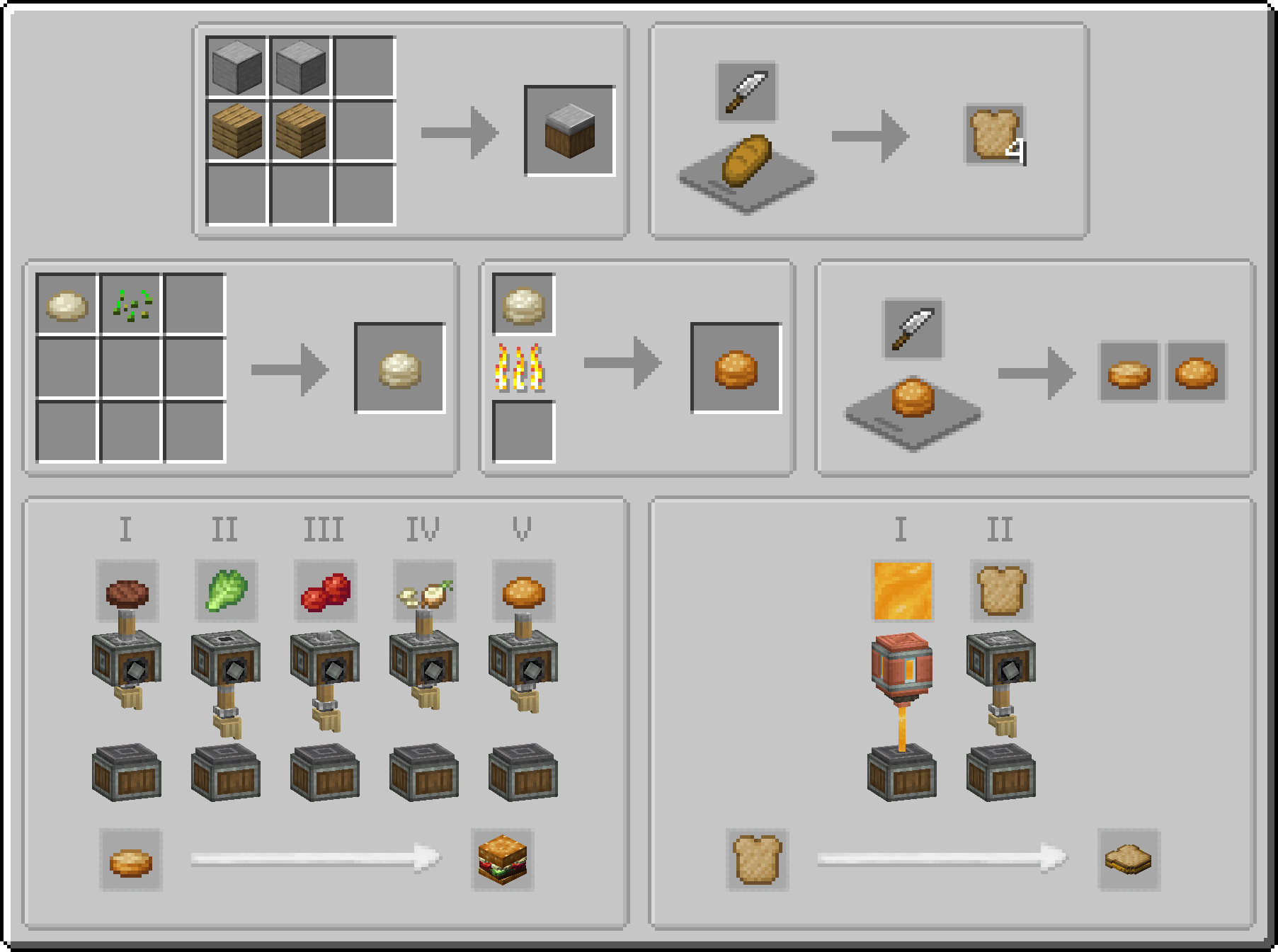
A collection of recipes from the mod, as they appear in JEI

👥 Team & Contributors

ochotonida
ochotonidaOwner

⚙️ Compatibility

Environment
✅ Client & Server
Loaders
forgeneoforge
Minecraft Versions
1.21.1

🔗 Links

Modrinth Page