This is an updated fork of Txni's Spice of Life: Valheim Edition mod, aimed at fixing critical bugs. This version should be more compatible with other mods that modify player health, and the config no longer resets every time the game is restarted. Here's a description from the original CurseForge page:
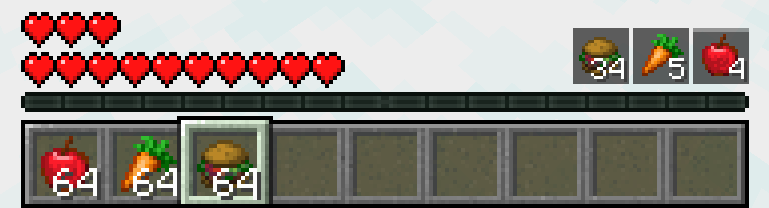
Spice of Life: Valheim Edition completely overhaul's Minecraft's food meter to work like a proper survival game, taking after Valheim's food slot system, where food lasts for a set amount of time and provides you with health, regeneration, and other benefits.
While not required, it is highly recommended to install a food addon like Farmer's Delight alongside this mod.
Why Use This Mod?
Minecraft's food system is inherently unbalanced. As more food items have been added, and become easy to obtain and farm, hunger has become just an annoyance. When your only goal is to keep the meter full enough to sprint (e.g. chugging a stack of bread), the problem can be solved 30 seconds after creating a new world by planting sweetberries or punching a few animals. The only benefit to better foods is eating less often (and regenerating more in combat), but you can get a steady supply of endgame foods in a few hours with farms.
Other mods, like previous Spice of Life editions, attempt to fix this problem by giving the player rewards or punishments for not maintaining a diverse diet. This is layering an extra system on top of the food meter, which most players ignore and continue chugging bread, or find ways to game the system.
In Minecraft Alpha, there was no hunger bar, and you would eat food to heal hearts when you got low. Spice of Life: Valheim Edition essentially replicates this with a more modern take. Like in Valheim, you have three food slots which you must fill. Eating a food item will fill a slot, giving you the benefits of increased health and regeneration until it runs out. You then cannot eat that food again until the timer runs out (or almost runs out).
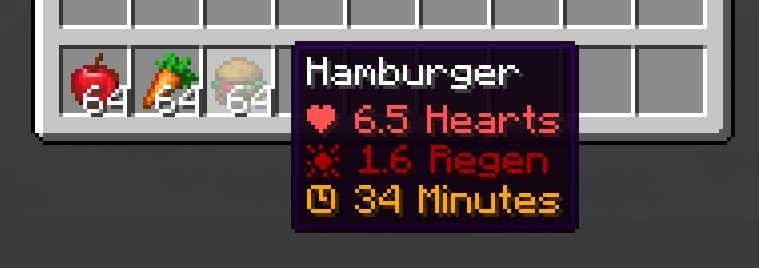
You will start with three hearts (configurable), and you must eat food to increase that, up to a maximum of an entire extra bar of hearts if you eat healthy modded foods from Farmer's Delight and similar mods. If you have a full stomach, you also get a slight speed boost (also configurable). You can see these stats when you hover over a food item, and when you eat it, it will appear above your hotbar with a timer.
This is a pretty simple system, but ends up balancing many unrelated aspects of the game. You must plan when to eat and what foods to eat instead of just chugging bread. Survival is more difficult, since you don't start with full hearts, and must eat good food to build up your durability. Combat is harder, since you won't regenerate hearts until you haven't taken damage in a few seconds (though you can still eat Golden Apples whenever you want). Farming and cooking is more rewarding, since you can no longer get by with mediocre foods, and must craft good meals. And, lastly, baking cake is actually useful for once--providing a good source of multiple meals that you can quickly eat after respawning.
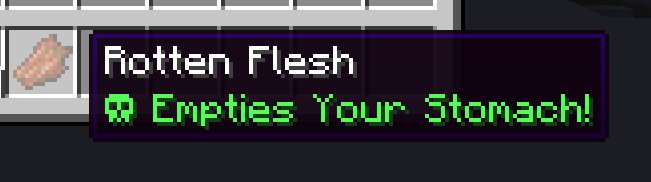
You can also reset your currently eaten foods by vomiting, which you can trigger by eating rotten flesh:
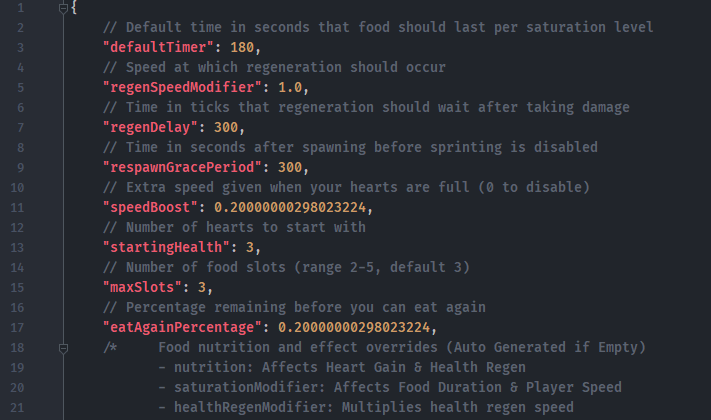
Every aspect of the mod is configurable, so you can adjust the strength of certain foods, regeneration, and timers.
This does fundamentally change how Minecraft's food works by effectively disabling the food bar entirely, so some other mods may function unexpectedly as if the player is starving or full. Please report any breaking issues to the issue tracker or on Discord.
This is compatible with other mods that modify the hunger bar, like AppleSkin. But since rendering of the hunger bar is turned off, AppleSkin won't do anything, so we have marked it as incompatible on Curseforge for clarity.