Logo
MINECRAFTBIBLE
Items
Items

All game items

Blocks
Blocks

Building blocks

Mobs
Mobs

Creatures & monsters

Biomes
Biomes

World biomes

Structures
Structures

Generated structures

Recipes
Recipes

Crafting guides

Advancements
Advancements

Achievements

Loot Tables
Loot Tables

Drop rates

Tags
Tags

Item groupings

All Versions
View all data →
Capes
Cape ArchiveNEW

Browse rare Minecon capes, OptiFine capes, and custom capes from players worldwide

Browse

Player Database
Player DatabasePopular

Search any player

Skin Browser
Skin Browser

Browse & download skins

Cape Gallery
Cape GalleryNEW

Minecon & OptiFine capes

Seed Vault
Seed Vault

Curated seeds

Learn

Guides
GuidesNew

Tutorials & tips

Blog
Blog

News & updates

Community

Community Hub
Community HubHub

Posts, discussions & more

All Versions
View community →
Seed Analyzer
Seed Analyzer

World seed analysis

Loot Explorer
Loot Explorer

Drop rates

Crafting Calculator
Crafting Calculator

Material planning

Enchant Calculator
Enchant Calculator

Probability math

Redstone Lab
Redstone Lab

Signal timing

Trading Profit
Trading Profit

Villager ROI

All Versions
View all tools →
Mods
Mods

Browse all mods

Plugins
Plugins

Server plugins

Resource Packs
Resource Packs

Textures & sounds

Shaders
Shaders

Visual enhancements

Datapacks
Datapacks

World logic

Scanner
Mod Intelligence

Scan & analyze any mod

All Versions
View all mods →
Loading...
IntroductionIntroductionVersion HistoryVersion HistoryGuidesGuidesBlog & NewsBlog & News
ItemsItemsBlocksBlocksMobsMobsRecipesRecipesBiomesBiomesStructuresStructuresAdvancementsAdvancementsLoot TablesLoot TablesTagsTags
ModsModsPluginsPluginsResource PacksResource PacksShadersShadersDatapacksDatapacks

MinecraftBible

The Ultimate Wiki

Logo
MINECRAFTBIBLE

The ultimate Minecraft reference. Every item, block, mob, and recipe documented with precision.

Community

  • Player Database
  • Skin Browser
  • Cape Gallery
  • Community Hub
  • Seed Vault

Database

  • Items
  • Blocks
  • Mobs
  • Recipes
  • Biomes
  • Structures

Tools

  • Seed Analyzer
  • Mod Intelligence
  • Crafting Calculator
  • Enchant Calculator

Mods & Packs

  • Mods
  • Plugins
  • Resource Packs
  • Shaders
  • Datapacks

© 2026 MinecraftBible. Not affiliated with Mojang or Microsoft.

PrivacyTermsContact
Pufferfish's Skills
ModLicenseRef-Custom

Pufferfish's Skills

Adds a fully configurable skill system to the game.

2.4M
Downloads
949
Followers
2 months ago
Updated
📦
30
Versions
adventuregame-mechanicsutilityfabricforgeneoforge
Download Latestv0.17.2View on Modrinth

📖About Pufferfish's Skills

Pufferfish's Skills
Banner

Discord

About

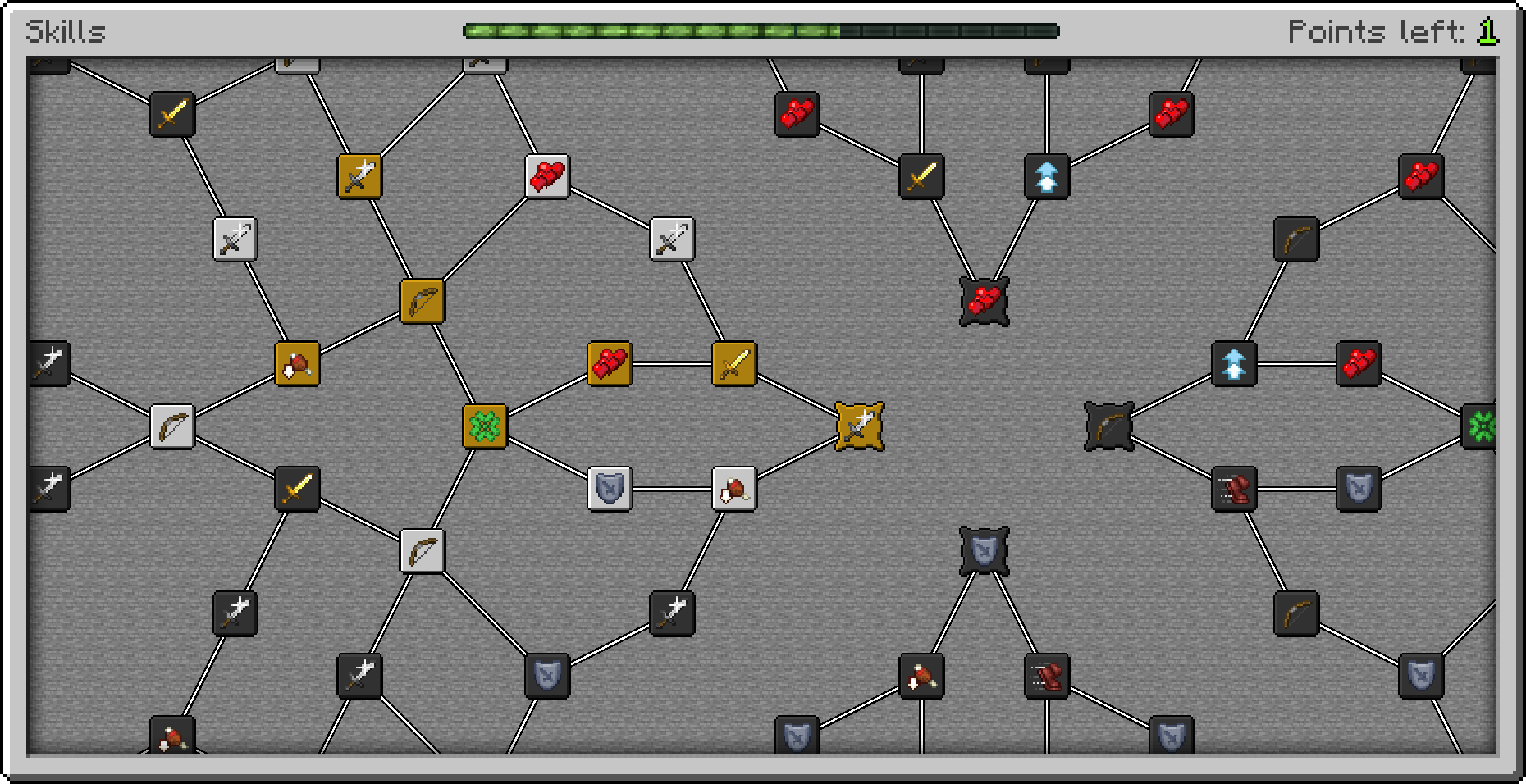
Pufferfish’s Skills is a mod that adds a framework to create fully configurable skill systems. It has a dedicated online editor to make designing skills layouts easier. There is also an API which allows extending the functionality and managing skills.

Getting started

For Players

This mod is just a framework. You need to install skill trees separately. The easiest way to start playing is to install Default Skill Trees mod and Pufferfish's Attributes mod.

For Creators

The recommended way to begin creating is to follow the Creating Skill Trees Tutorial. Alternatively you can start by analyzing and modifying existing skill trees like Default Skill Trees data pack.

Commands

/puffish_skills points add <player> <category> <count> - Adds points.

/puffish_skills points set <player> <category> <count> - Sets points.

/puffish_skills experience add <player> <category> <amount> - Adds experience.

/puffish_skills experience set <player> <category> <amount> - Sets experience.

/puffish_skills skills unlock <player> <category> <skill> - Unlocks skill.

/puffish_skills skills reset <player> <category> - Locks all skills, points are refunded.

/puffish_skills category lock <player> <category> - Locks category.

/puffish_skills category unlock <player> <category> - Unlocks category.

/puffish_skills category erase <player> <category> - Resets points, experience, skills.

Default keybindings

k - Opens skills screen.

Configuration

Configuration is JSON driven. It is possible to reload in without restarting game using /reload command.

To easily edit skills you can use online editor.

You can read more about configuration in the documentation.

Compatibility

This mod supports both Forge and Fabric. What's more it is cross-compatible, so the client can use different loader than the server.

This mod should not conflict with other mods. Please report an issue if you find an incompatibility.

Versions

Versions that are maintained and will receive future updates: 1.18.2, 1.19.2, 1.19.4, 1.20, 1.20.1, 1.20.2, 1.20.4, 1.21.1, 1.21.3, 1.21.4.

Modpacks

You can use this mod in your modpack as long as you do not redistribute this mod.

Community-made tutorials

Videos

👥 Team & Contributors

Pufferfish
PufferfishOwner

⚙️ Compatibility

Environment
✅ Client & Server
Loaders
fabricforgeneoforge
Minecraft Versions
1.19.4

🔗 Links

Modrinth Page