


Simply No Shading
Removes darkening on sides of geometry, inspired by the old lighting from OptiFine's internal shaders, for in-game blocks, clouds, and (block) entities.
📖About Simply No Shading
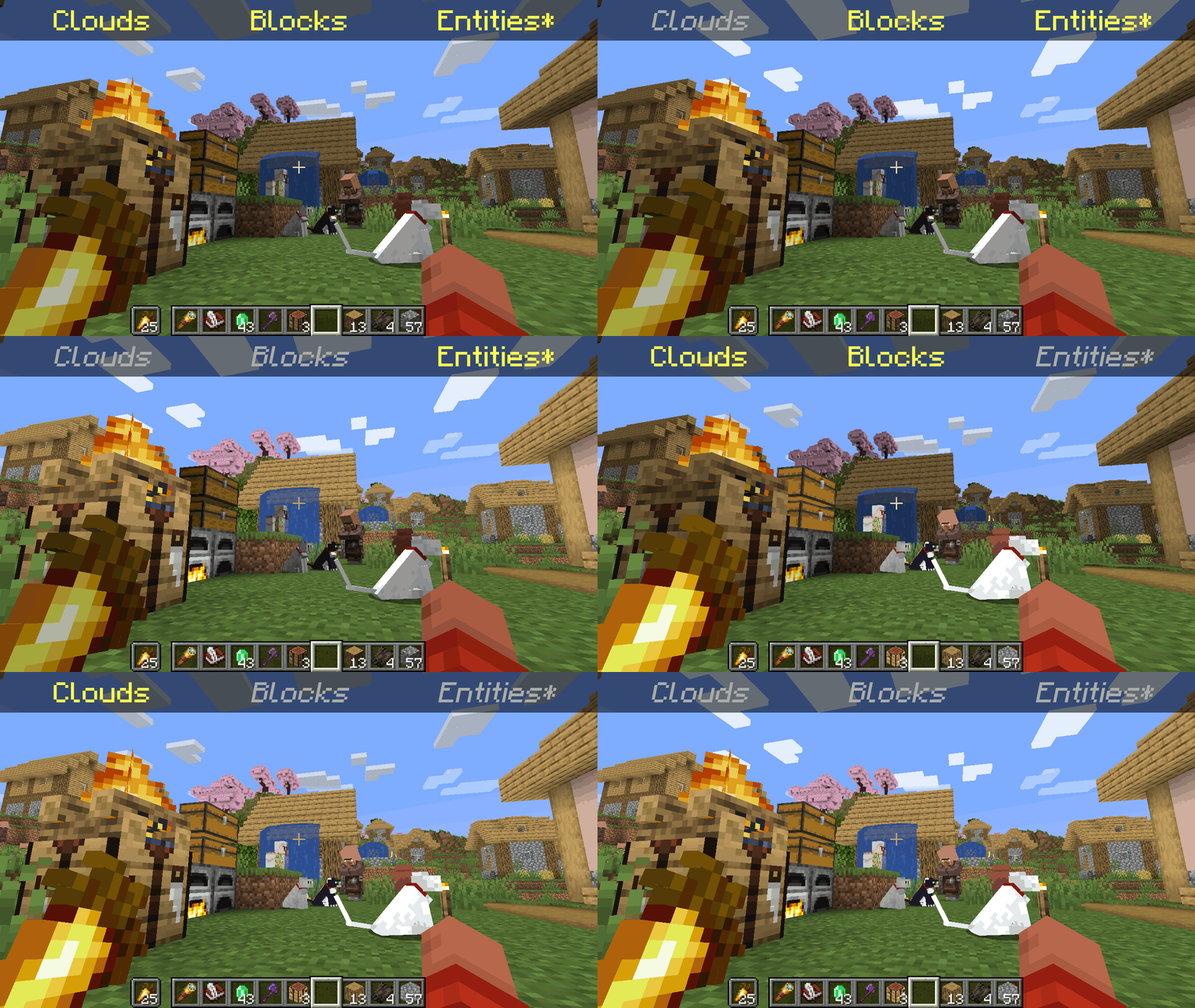
*Clarification that Entity shading is now stable and DOES NOT affect the inventory and in-game screens.
Simply No Shading is a Fabric-based modification (mod) for the Minecraft client. This mod removes the darkening on sides or faces (also known as shading) to in-game objects such as blocks, clouds, and entities as illustrated above.
Compatibility
Simply No Shading provides active compatibility for BedrockIfy and Sodium. Some mods that provide or replace stuff may work such as Enhanced Block Entities (EBE), where block entities act like blocks and are affected as such when toggling shading. Some mods that replace rendering are most likely incompatible; exceptions have active support such as Sodium, for example. One example of incompatibility is shaders, usually applied using Iris, as they may not crash the game but would just render this mod ineffective when they are applied.
Similar Solutions
Simply No Shading is not the only effort to removing shading, there are other solutions such as:
- Flat Lighting is a simple Fabric mod that achieves the same results for blocks and supports Sodium.
- internal-shaders, though unlisted, is a simple Iris shader that removes shading on blocks and entities.
- Lightingless is a simple shader that removes shading on blocks and entities.
- OptiFine's old lighting through the internal shader. Achieved by turning
Options > Video Settings > Shaders... > (internal) > Old LightingtoON. - New Lighting 1.18+ (Internal Shaders without Optifine). This resource pack achieves the similar results by setting the
shadeflag on block models tofalse(OFF).
Features
Simply No Shading supports the following categories for toggling shading:
- Blocks — this includes blocks, liquids, and EBE's block entities
- Clouds — this includes clouds
- Entities (
≥7.4.0) — this includes normal entities and block entities in the world - Deprecated Experimental Entities Built-in Resource Pack — this includes block entities, entities, and blocks, block entities, entities, and items in toasts (pop-ups, e.g. completing an advancement) and inventories and or Graphical User Interfaces (GUIs)
Configuration
Simply No Shading has a configuration screen and it's accessible through:
- a key mapping. It's unbound by default and can be bound at
Options > Controls > Keys > Simply No Shading > Open Config Screen - Mod Menu.
Mods > Simply No Shading > Configure...
Simply No Shading stores its configuration as a formatted JSON file at <your minecraft folder>/config/simply-no-shading.json.
Versions
Simply No Shading follows semantic versioning. This mod aims to maintain the same feature across supported Minecraft versions. Given the version X.Y.Z where:
Xchanges when breaking changes occur, such as with breaking config format changes.Ychanges when features are added or changed (non-breaking).Zchanges for bug and compatibility fixes and may not stay consistent across supported Minecraft versions.
Target versions is currently being reconsidered. Mod version 8.x will likely only be maintained for the newest versions of the game. 7.x will still remain maintained for bug-fixing and translations.
Simply No Shading aims to provide support for the latest minor updates to major releases along with some April Fool's snapshots. All minor releases for the latest major version are supported. The latest snapshot versions also get temporary support before the next major release. Following are all those versions:
| # | Mod Version | Minecraft Version |
|---|---|---|
| 1 | 7.6.4 |
1.14.4 |
| 2 | 7.6.4 |
1.15.2 |
| 3 | 7.6.4 |
20w14infinite |
| 4 | 7.6.4 |
1.16.5 |
| 5 | 7.6.4 |
1.17.1 |
| 6 | 7.6.4 |
1.18.2 |
| 7 | 7.6.4 |
22w13oneblockatatime |
| 8 | 7.6.4 |
1.19.4 |
| 9 | 7.6.4 |
23w13a_or_b |
| 10 | 7.6.4 |
1.20.1 |
| 11 | 7.6.4 |
24w14potato |
| 12 | 7.6.4 |
1.20.6 |
| 13 | 7.6.4 |
1.21 |
| 14 | 7.6.4 |
1.21.1 |
| 15 | 7.6.4 |
1.21.2 |
| 16 | 7.6.4 |
1.21.3 |
| 17 | 7.6.4 |
1.21.4 |
| 18 | 7.6.4 |
25w14craftmine |
| 19 | 7.6.4 |
1.21.5 |
| 20 | 7.6.4 |
1.21.6 |
| 21 | 7.6.4 |
1.21.7 |
| 22 | 7.6.4 |
1.21.8 |
| 23 | 7.6.6 |
1.21.9 |
| 24 | 8.0.0-alpha.1 |
1.21.10 |
| 25 | 8.0.0-alpha.3 |
1.21.11 |
| 26 | 8.0.0-alpha.3 |
26.1-snapshot-2 |