Logo
MINECRAFTBIBLE
Items
Items

All game items

Blocks
Blocks

Building blocks

Mobs
Mobs

Creatures & monsters

Biomes
Biomes

World biomes

Structures
Structures

Generated structures

Recipes
Recipes

Crafting guides

Advancements
Advancements

Achievements

Loot Tables
Loot Tables

Drop rates

Tags
Tags

Item groupings

All Versions
View all data →
Capes
Cape ArchiveNEW

Browse rare Minecon capes, OptiFine capes, and custom capes from players worldwide

Browse

Player Database
Player DatabasePopular

Search any player

Skin Browser
Skin Browser

Browse & download skins

Cape Gallery
Cape GalleryNEW

Minecon & OptiFine capes

Seed Vault
Seed Vault

Curated seeds

Learn

Guides
GuidesNew

Tutorials & tips

Blog
Blog

News & updates

Community

Community Hub
Community HubHub

Posts, discussions & more

All Versions
View community →
Seed Analyzer
Seed Analyzer

World seed analysis

Loot Explorer
Loot Explorer

Drop rates

Crafting Calculator
Crafting Calculator

Material planning

Enchant Calculator
Enchant Calculator

Probability math

Redstone Lab
Redstone Lab

Signal timing

Trading Profit
Trading Profit

Villager ROI

All Versions
View all tools →
Mods
Mods

Browse all mods

Plugins
Plugins

Server plugins

Resource Packs
Resource Packs

Textures & sounds

Shaders
Shaders

Visual enhancements

Datapacks
Datapacks

World logic

Scanner
Mod Intelligence

Scan & analyze any mod

All Versions
View all mods →
Loading...
IntroductionIntroductionVersion HistoryVersion HistoryGuidesGuidesBlog & NewsBlog & News
ItemsItemsBlocksBlocksMobsMobsRecipesRecipesBiomesBiomesStructuresStructuresAdvancementsAdvancementsLoot TablesLoot TablesTagsTags
ModsModsPluginsPluginsResource PacksResource PacksShadersShadersDatapacksDatapacks

MinecraftBible

The Ultimate Wiki

Logo
MINECRAFTBIBLE

The ultimate Minecraft reference. Every item, block, mob, and recipe documented with precision.

Community

  • Skin Browser
  • Cape Gallery
  • Seed Vault
  • Blog
  • Guides

Database

  • Items
  • Blocks
  • Mobs
  • Recipes
  • Biomes
  • Structures

Tools

  • Seed Analyzer
  • Mod Intelligence
  • Crafting Calculator
  • Enchant Calculator

Mods & Packs

  • Mods
  • Plugins
  • Resource Packs
  • Shaders
  • Datapacks

Site & Legal

  • About
  • Authors
  • Editorial Policy
  • Corrections
  • Contact
  • Privacy Policy
  • Terms of Service
  • DMCA
  • Sitemap

© 2026 MinecraftBible. Not affiliated with Mojang or Microsoft.

PrivacyTermsContact
Simple Elytra Hud
ModMIT

Simple Elytra Hud

An elytra HUD mod

11.1K
Downloads
42
Followers
4 months ago
Updated
📦
29
Versions
adventuretransportationutilityfabric
Download Latestv1.8+1.21.11View on Modrinth

📖About Simple Elytra Hud

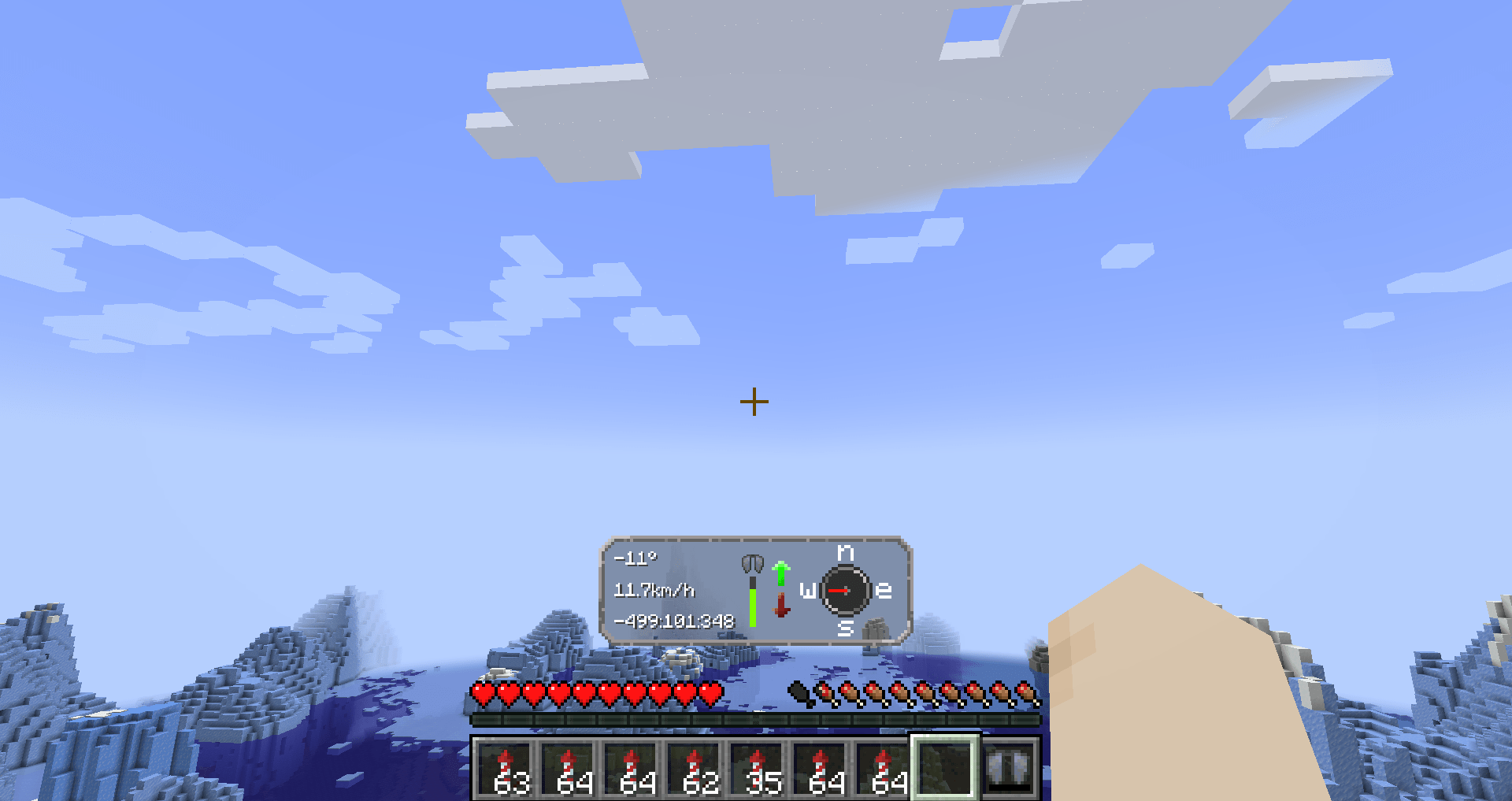
Elytra hud

Flying with an elytra with the hud up

Information

Elytra Hud add in a new way to fly with your elytra.
It adds important information on the screen while flying.
Use this mod for your long flights to get the most out of the trip

HUD:s features

Left side

We have three text fields, in order they are

  1. Your pitch angle.
  2. Speed in km/h
  3. Coordinates (Will scale to how many numbers that are up)

Middle

In the middle, you have the status of your Elytra.

To the right of that you have up and down arrows.
If you are flying up, it will light upp; that's the same for going down.

Right side

On the right side you have a compass. This is not a normal compass, because it will always point towards the direction you are going

Config

The mod requires YetAnotherConfigLib and modmenu.

To be able to edit the config, you need thees mods.

Config Options

They are in order in the config menu.

  • Hud's visibility — If you want to turn of the HUD's visibility
  • Hud's delay — The time it takes for the hud to appear.
  • Elytra status — You can turn of the damage level for elytra in the HUD
  • Elyta coordinates — If you want, you can disable coordinates in the HUD
  • Speed measurement — There is km/h (default), m/s or mph available

Looking for a server?

Get BisectHosting and save 25% off for new customers using code Lukas at checkout.
Thanks for your support — it helps me develop this and other mods I make!
#ad

Support me

How to download?

With launcher (recommended)

  1. Download Modrinth launcher (more user-friendly) or Prism launcher (A lot more options but harder to use for someone new)
  2. Create a profile for the minecraft version you want and make sure its fabric. Check so the mod has compatibility with that version first.
  3. You can download the mod in the launcher
    1. (Modrinth launcher) In your profile in the right corner, press "Add content" and search up "Simple Elytra Hud" and press "install."
    2. (Prism launcher) Go in to the profile by pressing "edit" and then you want and press "Mods" and then "Download mods". Under the Modrinth tab write "Simple Elytra Hud". Mark for download and then press confirm.
    3. You need modmenu and YetAnotherConfigLib. Download it in the same way!
  4. Now you can start your profile and enjoy!

Without launcher

  1. You can download the mod here on Modrinth or Github
  2. You also need to download Fabric API
  3. You also need Mod Menu and YetAnotherConfigLib (Versions bellow and 1.6 use and its optional cloth config)
  4. You also need fabric and this will automatically create a profile for you
  5. Put the mods in %appdata%/.minecraft/mods
  6. Now you can play Minecraft

Open source

Nearly all my mods are opensource and under MIT.
Feel free to use however you want.
If you want to help the development, check out the GitHub!

If you found a bug, please report it here!

Inspiration and credit

  • The mod is inspired by Boat HUD
  • Lukasabbe has coded
  • Lemonixi made the graphics.
  • Smurre came up with the idea

Thank you all for downloading the mod!

👥 Team & Contributors

lukasabbe
lukasabbeOwner
lemonixi
lemonixi
Artist
Smurre
Smurre
Project pitcher

⚙️ Compatibility

Environment
💻 Client-side
Loaders
fabric
Minecraft Versions
1.21.11

🔗 Links

Modrinth Page