Logo
MINECRAFTBIBLE
Items
Items

All game items

Blocks
Blocks

Building blocks

Mobs
Mobs

Creatures & monsters

Biomes
Biomes

World biomes

Structures
Structures

Generated structures

Recipes
Recipes

Crafting guides

Advancements
Advancements

Achievements

Loot Tables
Loot Tables

Drop rates

Tags
Tags

Item groupings

All Versions
View all data →
Capes
Cape ArchiveNEW

Browse rare Minecon capes, OptiFine capes, and custom capes from players worldwide

Browse

Player Database
Player DatabasePopular

Search any player

Skin Browser
Skin Browser

Browse & download skins

Cape Gallery
Cape GalleryNEW

Minecon & OptiFine capes

Seed Vault
Seed Vault

Curated seeds

Learn

Guides
GuidesNew

Tutorials & tips

Blog
Blog

News & updates

Community

Community Hub
Community HubHub

Posts, discussions & more

All Versions
View community →
Seed Analyzer
Seed Analyzer

World seed analysis

Loot Explorer
Loot Explorer

Drop rates

Crafting Calculator
Crafting Calculator

Material planning

Enchant Calculator
Enchant Calculator

Probability math

Redstone Lab
Redstone Lab

Signal timing

Trading Profit
Trading Profit

Villager ROI

All Versions
View all tools →
Mods
Mods

Browse all mods

Plugins
Plugins

Server plugins

Resource Packs
Resource Packs

Textures & sounds

Shaders
Shaders

Visual enhancements

Datapacks
Datapacks

World logic

Scanner
Mod Intelligence

Scan & analyze any mod

All Versions
View all mods →
Loading...
IntroductionIntroductionVersion HistoryVersion HistoryGuidesGuidesBlog & NewsBlog & News
ItemsItemsBlocksBlocksMobsMobsRecipesRecipesBiomesBiomesStructuresStructuresAdvancementsAdvancementsLoot TablesLoot TablesTagsTags
ModsModsPluginsPluginsResource PacksResource PacksShadersShadersDatapacksDatapacks

MinecraftBible

The Ultimate Wiki

Logo
MINECRAFTBIBLE

The ultimate Minecraft reference. Every item, block, mob, and recipe documented with precision.

Community

  • Player Database
  • Skin Browser
  • Cape Gallery
  • Community Hub
  • Seed Vault

Database

  • Items
  • Blocks
  • Mobs
  • Recipes
  • Biomes
  • Structures

Tools

  • Seed Analyzer
  • Mod Intelligence
  • Crafting Calculator
  • Enchant Calculator

Mods & Packs

  • Mods
  • Plugins
  • Resource Packs
  • Shaders
  • Datapacks

© 2026 MinecraftBible. Not affiliated with Mojang or Microsoft.

PrivacyTermsContact
Simple Shulker Preview
ModLGPL-3.0-only

Simple Shulker Preview

A minecraft fabric mod that displays a configurable icon indicating the contents of a shulker box, as well as a capacity bar.

159.4K
Downloads
291
Followers
3 months ago
Updated
📦
21
Versions
equipmentstorageutilityfabric
Download Latestv2.4.11-mc1.21.11View on Modrinth

📖About Simple Shulker Preview

Simple Shulker Preview

GitHub license
GitHub release
GitHub issues

Simple Shulker Preview is a small fabric mod that displays an icon indicating the contents of a shulker. This icon appears on top of the shulker icon in inventory slots.
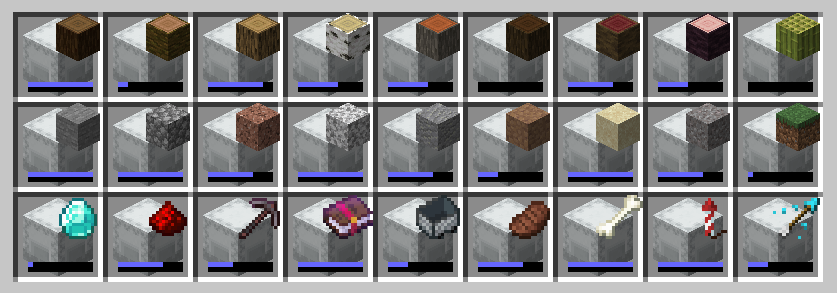
An inventory filled with shulkers that have an item displayed on them.

For other download pages, please see CurseForge or Modrinth.

Dependencies

This mod requires ModMenu to adjust the configs. The Cloth Config API mod is embedded - you don't need to download it yourself.

Configs

I won't go through all the configs, since they've increased over time. A brief overview is as follows:

Option Description
Display Item Decides which item in the shulker should be displayed based on position or quantity.
Custom Name Provides options to display an icon based on custom named shulkers
Icon Positions Modify the x and y offsets of the icon, as well as scale.
Capacity Bar Display a capacity bar, indicating how full the shulker box is
Bar Position Set the position, size, and direction the capacity bar is drawn.
Stack Limits Set minimum limits for the number of items required to display an icon
Enable ... Option to enable additional features, such as bundles or recursive shulker support
Disable Mod Disables the mod so that overlay icons are not displayed.

When using custom named shulkers, you need to name it using the same conventions required for spawning in items. For example, naming a shulker minecraft:grass_block will display a grass block. If an invalid name has been given, it will continue to follow the 'Display Item' configuration (unless 'Custom Name' has been set to 'ALWAYS', of course).

Contributing

Contributions and suggestions are always welcome! Please limit all issues to only one feature at a time - feel free to open multiple at once if you have many ideas. Similarly, please limit pull requests to a single feature at a time and try to follow the existing code style.

To further discuss or get notifications of new updates, check out my Discord. If you like what I do, consider supporting me on Ko-Fi! ko-fi

👥 Team & Contributors

BVengo
BVengoOwner

⚙️ Compatibility

Environment
💻 Client-side
Loaders
fabric
Minecraft Versions
1.21.11

🔗 Links

Modrinth Page