Logo
MINECRAFTBIBLE
Items
Items

All game items

Blocks
Blocks

Building blocks

Mobs
Mobs

Creatures & monsters

Biomes
Biomes

World biomes

Structures
Structures

Generated structures

Recipes
Recipes

Crafting guides

Advancements
Advancements

Achievements

Loot Tables
Loot Tables

Drop rates

Tags
Tags

Item groupings

All Versions
View all data →
Capes
Cape ArchiveNEW

Browse rare Minecon capes, OptiFine capes, and custom capes from players worldwide

Browse

Player Database
Player DatabasePopular

Search any player

Skin Browser
Skin Browser

Browse & download skins

Cape Gallery
Cape GalleryNEW

Minecon & OptiFine capes

Seed Vault
Seed Vault

Curated seeds

Learn

Guides
GuidesNew

Tutorials & tips

Blog
Blog

News & updates

Community

Community Hub
Community HubHub

Posts, discussions & more

All Versions
View community →
Seed Analyzer
Seed Analyzer

World seed analysis

Loot Explorer
Loot Explorer

Drop rates

Crafting Calculator
Crafting Calculator

Material planning

Enchant Calculator
Enchant Calculator

Probability math

Redstone Lab
Redstone Lab

Signal timing

Trading Profit
Trading Profit

Villager ROI

All Versions
View all tools →
Mods
Mods

Browse all mods

Plugins
Plugins

Server plugins

Resource Packs
Resource Packs

Textures & sounds

Shaders
Shaders

Visual enhancements

Datapacks
Datapacks

World logic

Scanner
Mod Intelligence

Scan & analyze any mod

All Versions
View all mods →
Loading...
IntroductionIntroductionVersion HistoryVersion HistoryGuidesGuidesBlog & NewsBlog & News
ItemsItemsBlocksBlocksMobsMobsRecipesRecipesBiomesBiomesStructuresStructuresAdvancementsAdvancementsLoot TablesLoot TablesTagsTags
ModsModsPluginsPluginsResource PacksResource PacksShadersShadersDatapacksDatapacks

MinecraftBible

The Ultimate Wiki

Logo
MINECRAFTBIBLE

The ultimate Minecraft reference. Every item, block, mob, and recipe documented with precision.

Community

  • Skin Browser
  • Cape Gallery
  • Seed Vault
  • Blog
  • Guides

Database

  • Items
  • Blocks
  • Mobs
  • Recipes
  • Biomes
  • Structures

Tools

  • Seed Analyzer
  • Mod Intelligence
  • Crafting Calculator
  • Enchant Calculator

Mods & Packs

  • Mods
  • Plugins
  • Resource Packs
  • Shaders
  • Datapacks

Site & Legal

  • About
  • Authors
  • Editorial Policy
  • Corrections
  • Contact
  • Privacy Policy
  • Terms of Service
  • DMCA
  • Sitemap

© 2026 MinecraftBible. Not affiliated with Mojang or Microsoft.

PrivacyTermsContact
RPG Camera and Controls
ModMIT

RPG Camera and Controls

RPG Camera and Controls completely reimagines Minecraft’s third-person camera. Inspired by classic MMORPG controls, it replaces the vanilla camera system with smooth orbit movement and full mouse-driven aiming.

1.3K
Downloads
17
Followers
4 months ago
Updated
📦
3
Versions
adventuregame-mechanicsutilityfabric
Download Latestv1.0.2+1.21.11View on Modrinth

📖About RPG Camera and Controls

⚔️🧙‍♂️ RPG Camera and Controls

Hello everybody and welcome to my first Minecraft mod! RPG Camera and Controls is a mod that transforms the third-person camera into a true RPG-style experience. Inspired by classic MMORPGs like World of Warcraft, RPG Camera introduces smooth third-person controls, dynamic camera behavior, and a more immersive player perspective - perfect for role-playing and MMO-style gameplay in Minecraft.


You can hold right-click and move your mouse to use orbit control.
As long as your mouse cursor is visible, you will place a block when your “use item” key is bound to right-click.
Once you move far enough, the cursor fades out and you can freely rotate the camera around your character. After releasing right-click, no block will be placed.

The default way to zoom in and out is to hold Left Alt while scrolling your mouse wheel.

You can customize all controls in the settings under RPG Camera & Controls.
Don’t be confused by duplicated keybinds like Q and E for strafing - when you are in RPG third-person mode, Minecraft uses the RPG Camera keybinds. When you are in first-person, it uses the vanilla keybinds.

You can also move your mouse freely and break or place blocks without directly looking at them.
You can still interact with blocks such as furnaces and other containers.

📷📹 Screenshots and Videos
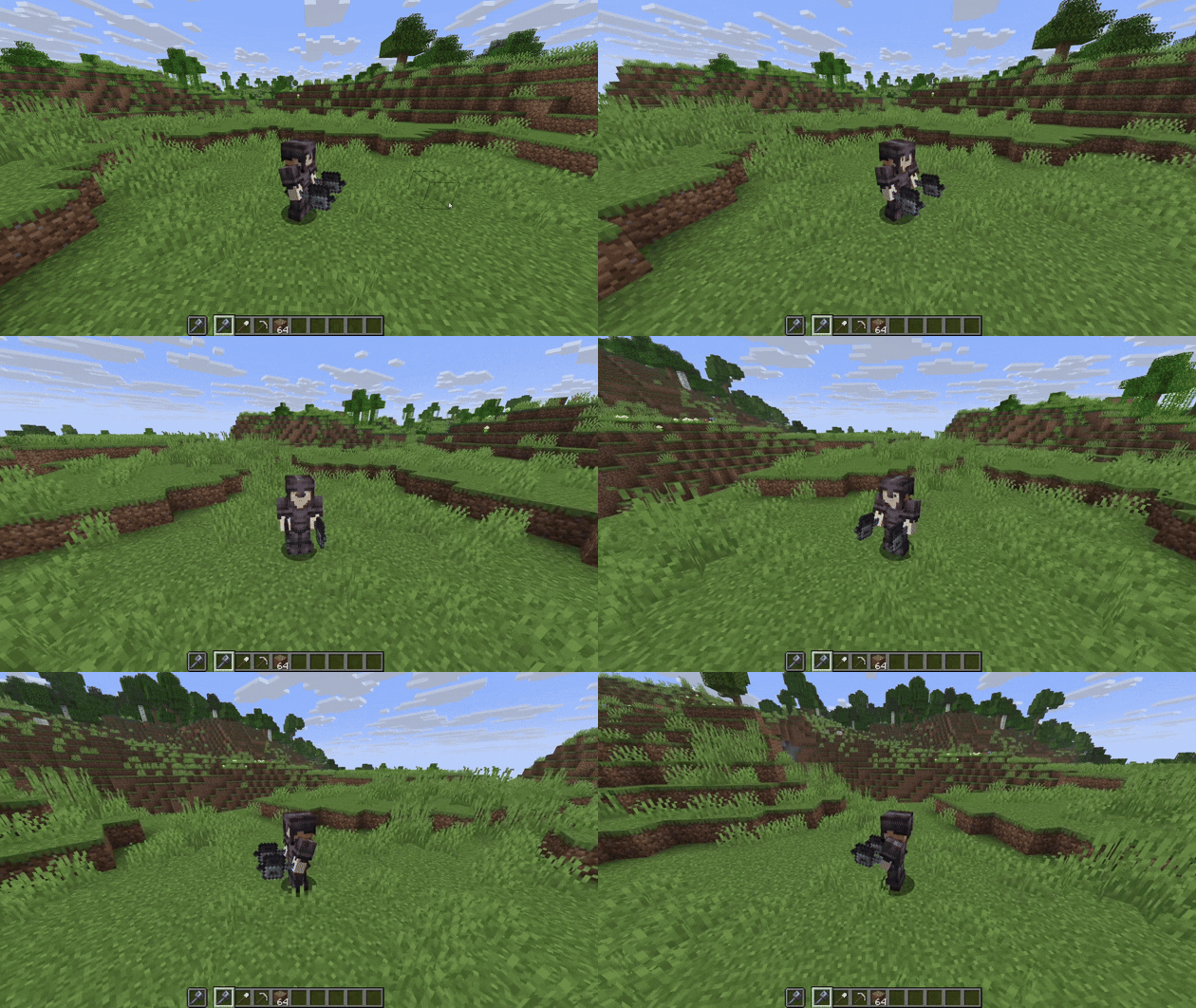
Showcase camera orbit controls.

Showcase of camera zoom.

Showcase of running.

Showcase of breaking blocks.

Showcase of placing blocks.

Settings for keybinds.

👥 Team & Contributors

Kunga
KungaOwner

⚙️ Compatibility

Environment
💻 Client-side
Loaders
fabric
Minecraft Versions
1.21.11

🔗 Links

Modrinth Page