Logo
MINECRAFTBIBLE
Items
Items

All game items

Blocks
Blocks

Building blocks

Mobs
Mobs

Creatures & monsters

Biomes
Biomes

World biomes

Structures
Structures

Generated structures

Recipes
Recipes

Crafting guides

Advancements
Advancements

Achievements

Loot Tables
Loot Tables

Drop rates

Tags
Tags

Item groupings

All Versions
View all data →
Capes
Cape ArchiveNEW

Browse rare Minecon capes, OptiFine capes, and custom capes from players worldwide

Browse

Player Database
Player DatabasePopular

Search any player

Skin Browser
Skin Browser

Browse & download skins

Cape Gallery
Cape GalleryNEW

Minecon & OptiFine capes

Seed Vault
Seed Vault

Curated seeds

Learn

Guides
GuidesNew

Tutorials & tips

Blog
Blog

News & updates

Community

Community Hub
Community HubHub

Posts, discussions & more

All Versions
View community →
Seed Analyzer
Seed Analyzer

World seed analysis

Loot Explorer
Loot Explorer

Drop rates

Crafting Calculator
Crafting Calculator

Material planning

Enchant Calculator
Enchant Calculator

Probability math

Redstone Lab
Redstone Lab

Signal timing

Trading Profit
Trading Profit

Villager ROI

All Versions
View all tools →
Mods
Mods

Browse all mods

Plugins
Plugins

Server plugins

Resource Packs
Resource Packs

Textures & sounds

Shaders
Shaders

Visual enhancements

Datapacks
Datapacks

World logic

Scanner
Mod Intelligence

Scan & analyze any mod

All Versions
View all mods →
Loading...
IntroductionIntroductionVersion HistoryVersion HistoryGuidesGuidesBlog & NewsBlog & News
ItemsItemsBlocksBlocksMobsMobsRecipesRecipesBiomesBiomesStructuresStructuresAdvancementsAdvancementsLoot TablesLoot TablesTagsTags
ModsModsPluginsPluginsResource PacksResource PacksShadersShadersDatapacksDatapacks

MinecraftBible

The Ultimate Wiki

Logo
MINECRAFTBIBLE

The ultimate Minecraft reference. Every item, block, mob, and recipe documented with precision.

Community

  • Skin Browser
  • Cape Gallery
  • Seed Vault
  • Blog
  • Guides

Database

  • Items
  • Blocks
  • Mobs
  • Recipes
  • Biomes
  • Structures

Tools

  • Seed Analyzer
  • Mod Intelligence
  • Crafting Calculator
  • Enchant Calculator

Mods & Packs

  • Mods
  • Plugins
  • Resource Packs
  • Shaders
  • Datapacks

Site & Legal

  • About
  • Authors
  • Editorial Policy
  • Corrections
  • Contact
  • Privacy Policy
  • Terms of Service
  • DMCA
  • Sitemap

© 2026 MinecraftBible. Not affiliated with Mojang or Microsoft.

PrivacyTermsContact
Rope
ModMIT

Rope

Adds a simple climbable rope. One click to place, one shift-click to drop an entire column to the ground.

1.3K
Downloads
12
Followers
3 weeks ago
Updated
📦
13
Versions
decorationgame-mechanicsutilityfabricforgeneoforge
Download Latestv1.0.0View on Modrinth

📖About Rope

JOIN OUR DISCORD

A simple, lightweight mod that adds a craftable climbable rope block. Hang it from any solid surface above you and traverse vertically with ease.

What it does

  • Right-click below a solid block to place a single rope segment.
  • Sneak + Right-click to instantly drop a full column of rope straight down, limited only by the rope in your inventory and free space below.
  • Rope can hang from another rope — extend any column segment by segment.
  • Uses familiar scaffold-like placement and break sounds.

Please report any bugs, errors, or feature suggestions on Discord: https://discord.gg/4XUPywnEyE

How it works

Hold Jump to climb up and crouch to slide down! Unlike ladders, ropes don't need a wall to lean on, and you can walk right through them without getting stuck.

or place by click on another rope

You can manually extend the column by Right-Clicking an existing rope segment to place another one directly below it.

Shift + RMB TO auto-place rope downward

Sneak + Right-Click to instantly drop a full column of rope straight to the ground.

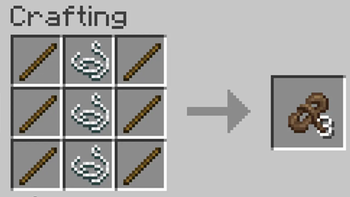
Crafting

Rope craft

Stick | String | Stick

Yields 3 rope per craft

(if you are modpacker - read below)

Misc

Fully translated into 10 languages: English, Russian, Simplified Chinese, Spanish, French, German, Japanese, Brazilian Portuguese, Korean, and Italian.

For Modpack Creators

The mod is intentionally minimal — one item, one block, no worldgen, no entities, no GUIs. Everything is easy to override from the outside without touching the jar.

Changing the Recipe

The recipe is data-driven and can be replaced by any datapack using the same recipe id: rope:rope
Use the same id to replace the default recipe — Minecraft will use your version instead.

Where to put the datapack:

Environment Path
Singleplayer .minecraft/saves//datapacks/
Dedicated server /world/datapacks/

After adding or changing the datapack — restart the world or run /reload.

Which folder structure to use depends on your Minecraft version.

Legacy layout (Forge 1.20.1, Fabric 1.20.1)

your_datapack/
  pack.mcmeta
  data/
    rope/
      recipes/
        rope.json
      advancements/
        recipes/misc/rope.json

Modern layout (NeoForge 1.21.1+, Fabric 1.21.11+)

your_datapack/
  pack.mcmeta
  data/
    rope/
      recipe/
        rope.json
      advancement/
        recipes/misc/rope.json
Ready-to-use Recipe JSON

Legacy data/rope/recipes/rope.json

{
  "type": "minecraft:crafting_shaped",
  "category": "misc",
  "pattern": ["ABA","ABA","ABA"],
  "key": {
    "A": { "item": "minecraft:stick" },
    "B": { "item": "minecraft:string" }
  },
  "result": { "item": "rope:rope", "count": 3 }
}

Modern data/rope/recipe/rope.json

{
  "type": "minecraft:crafting_shaped",
  "category": "misc",
  "pattern": ["ABA","ABA","ABA"],
  "key": {
    "A": { "item": "minecraft:stick" },
    "B": { "item": "minecraft:string" }
  },
  "result": { "count": 3, "id": "rope:rope" }
}

To change ingredients or output, only modify key.A.item, key.B.item, and result.count. For a clean recipe book unlock, also override the advancement file at the matching path (advancements/recipes/misc/rope.json or advancement/recipes/misc/rope.json) and update the ingredient criteria to match your new items.

Changing Translations

Override via a resource pack — no source code needed.

Resource pack path: .minecraft/resourcepacks/ (singleplayer) or include in your modpack override folder.

Translation file path: assets/rope/lang/<locale>.json

Key translation keys:

  • block.rope.rope — block name in the world
  • item.rope.rope — item name in inventory

To simply rename the item, this is all you need:

{
  "block.rope.rope": "Climbing Rope",
  "item.rope.rope": "Climbing Rope"
}

The mod already ships with built-in translations for: en_us, ru_ru, de_de, es_es, fr_fr, it_it, ja_jp, ko_kr, pt_br, zh_cn.

👥 Team & Contributors

Nikrecs
NikrecsOwner

⚙️ Compatibility

Environment
✅ Client & Server
Loaders
fabricforgeneoforge
Minecraft Versions
26.2

🔗 Links

Modrinth Page