Logo
MINECRAFTBIBLE
Items
Items

All game items

Blocks
Blocks

Building blocks

Mobs
Mobs

Creatures & monsters

Biomes
Biomes

World biomes

Structures
Structures

Generated structures

Recipes
Recipes

Crafting guides

Advancements
Advancements

Achievements

Loot Tables
Loot Tables

Drop rates

Tags
Tags

Item groupings

All Versions
View all data →
Capes
Cape ArchiveNEW

Browse rare Minecon capes, OptiFine capes, and custom capes from players worldwide

Browse

Player Database
Player DatabasePopular

Search any player

Skin Browser
Skin Browser

Browse & download skins

Cape Gallery
Cape GalleryNEW

Minecon & OptiFine capes

Seed Vault
Seed Vault

Curated seeds

Learn

Guides
GuidesNew

Tutorials & tips

Blog
Blog

News & updates

Community

Community Hub
Community HubHub

Posts, discussions & more

All Versions
View community →
Seed Analyzer
Seed Analyzer

World seed analysis

Loot Explorer
Loot Explorer

Drop rates

Crafting Calculator
Crafting Calculator

Material planning

Enchant Calculator
Enchant Calculator

Probability math

Redstone Lab
Redstone Lab

Signal timing

Trading Profit
Trading Profit

Villager ROI

All Versions
View all tools →
Mods
Mods

Browse all mods

Plugins
Plugins

Server plugins

Resource Packs
Resource Packs

Textures & sounds

Shaders
Shaders

Visual enhancements

Datapacks
Datapacks

World logic

Scanner
Mod Intelligence

Scan & analyze any mod

All Versions
View all mods →
Loading...
IntroductionIntroductionVersion HistoryVersion HistoryGuidesGuidesBlog & NewsBlog & News
ItemsItemsBlocksBlocksMobsMobsRecipesRecipesBiomesBiomesStructuresStructuresAdvancementsAdvancementsLoot TablesLoot TablesTagsTags
ModsModsPluginsPluginsResource PacksResource PacksShadersShadersDatapacksDatapacks

MinecraftBible

The Ultimate Wiki

Logo
MINECRAFTBIBLE

The ultimate Minecraft reference. Every item, block, mob, and recipe documented with precision.

Community

  • Skin Browser
  • Cape Gallery
  • Seed Vault
  • Blog
  • Guides

Database

  • Items
  • Blocks
  • Mobs
  • Recipes
  • Biomes
  • Structures

Tools

  • Seed Analyzer
  • Mod Intelligence
  • Crafting Calculator
  • Enchant Calculator

Mods & Packs

  • Mods
  • Plugins
  • Resource Packs
  • Shaders
  • Datapacks

Site & Legal

  • About
  • Authors
  • Editorial Policy
  • Corrections
  • Contact
  • Privacy Policy
  • Terms of Service
  • DMCA
  • Sitemap

© 2026 MinecraftBible. Not affiliated with Mojang or Microsoft.

PrivacyTermsContact
Roman Minimap
ModCC0-1.0

Roman Minimap

A high-performance minimap with smooth rotation, true block colors, and advanced terrain mapping. Includes full waypoint and player teleport management, customizable zoom, shading, and keybindings.

942
Downloads
7
Followers
5 months ago
Updated
📦
2
Versions
adventuretransportationutilityfabric
Download Latestv1.0.4+build.310View on Modrinth

📖About Roman Minimap

A precision-crafted minimap built for clarity, performance, and style. Roman Minimap delivers a real-time, smoothly rotating view of your world with true block colors, advanced terrain sampling above and below ground, customizable zoom levels, and complete waypoint and player management—including teleportation, shading modes, brightness and saturation controls, and fully editable keybindings for total control.
Minimap Overview

Includes the following:

  • XYZ Coordinates – Always know your exact position.
  • World Time – Displays the current real-world day and night cycle.
  • Game Time – Track elapsed in-game time with precision.
  • Zoom Controls – Adjustable zoom levels for your preferred viewing distance.
  • Compass Rose Overlay – Navigate effortlessly with clear directional indicators.
  • Player Icons – View other players around you, pinned to the minimap’s edge.
  • Waypoint Icons – Visual markers for important locations, pinned to the map’s outer circle.

Minimap

Overview Map

Overview map via the "N" keybinding (can be changed in options) to show a larger square map of the surrounding area.
Overview Map

Customizable Keybindings

Roman Minimap gives you complete control with editable keybindings, all accessible through the Options → Controls → Keybindings menu.

  • K: Sets a Waypoint
  • M: Rotates minimap Player up / North Up
  • N: Toggle Overview Map on/off
  • I: Tottle other players on/off
  • J: Toggle waypoints on/off
  • H: Dialog popup waypoint manager
  • P: Dialog popup player manager
  • Z: Zoom control for minimap
  • Zoom Levels 1.0, 1.5, 2.0, 3.0
  • Slope shading/Flat shading
  • Teleport confirm/cooldown/sendrequest
  • Brighness of maps
  • Saturation of maps

All settings for keybindings are also configurable in the options/controls/keybindings screen.
Keybindings

Waypoint Manager:

An intuitive dialog that lists all your saved waypoints.
Rename waypoints for better recognition, and double-click any entry to teleport directly to that location. Includes a quick-access Settings button for further customization in the keybindings or settings screen.
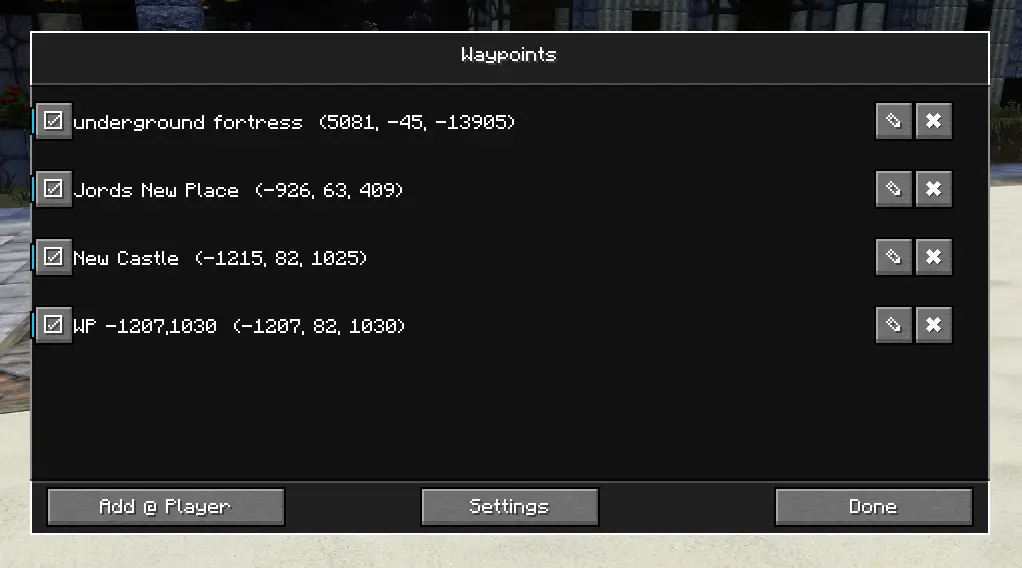
Waypoint Manager

Player Teleport Manager

A streamlined interface for managing player teleportation.
View a list of all online players, then choose to teleport them to you or teleport to their location. Supports both /tp and /tpa commands, depending on your server configuration.
(Note: Functionality may vary by server permissions.)
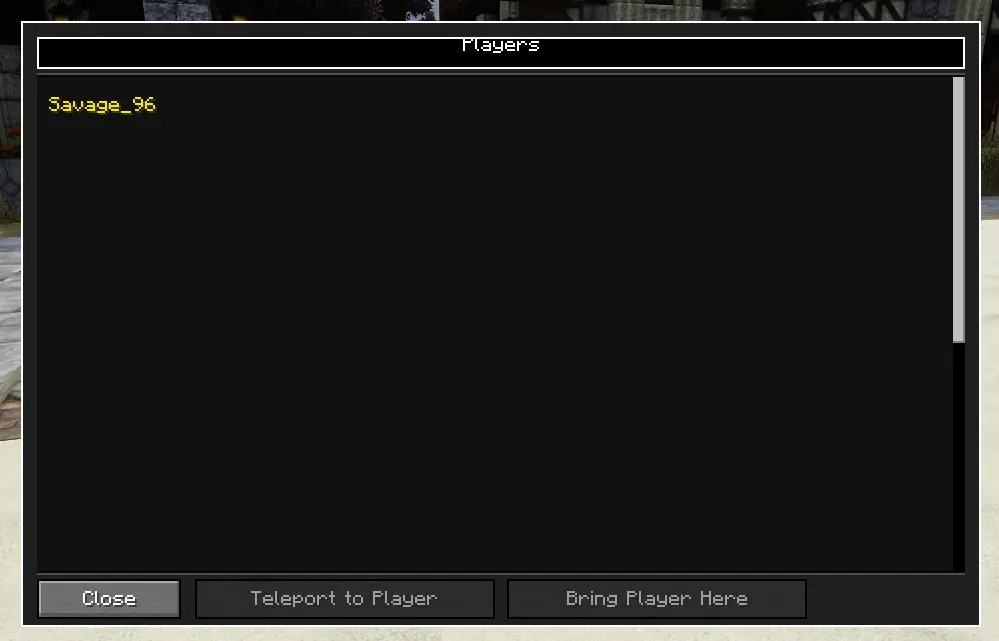
Player Teleport Manager

👥 Team & Contributors

romanjcweaver
romanjcweaverOwner

⚙️ Compatibility

Environment
💻 Client-side
Loaders
fabric
Minecraft Versions
1.21.1

🔗 Links

Modrinth Page