Logo
MINECRAFTBIBLE
Items
Items

All game items

Blocks
Blocks

Building blocks

Mobs
Mobs

Creatures & monsters

Biomes
Biomes

World biomes

Structures
Structures

Generated structures

Recipes
Recipes

Crafting guides

Advancements
Advancements

Achievements

Loot Tables
Loot Tables

Drop rates

Tags
Tags

Item groupings

All Versions
View all data →
Capes
Cape ArchiveNEW

Browse rare Minecon capes, OptiFine capes, and custom capes from players worldwide

Browse

Player Database
Player DatabasePopular

Search any player

Skin Browser
Skin Browser

Browse & download skins

Cape Gallery
Cape GalleryNEW

Minecon & OptiFine capes

Seed Vault
Seed Vault

Curated seeds

Learn

Guides
GuidesNew

Tutorials & tips

Blog
Blog

News & updates

Community

Community Hub
Community HubHub

Posts, discussions & more

All Versions
View community →
Seed Analyzer
Seed Analyzer

World seed analysis

Loot Explorer
Loot Explorer

Drop rates

Crafting Calculator
Crafting Calculator

Material planning

Enchant Calculator
Enchant Calculator

Probability math

Redstone Lab
Redstone Lab

Signal timing

Trading Profit
Trading Profit

Villager ROI

All Versions
View all tools →
Mods
Mods

Browse all mods

Plugins
Plugins

Server plugins

Resource Packs
Resource Packs

Textures & sounds

Shaders
Shaders

Visual enhancements

Datapacks
Datapacks

World logic

Scanner
Mod Intelligence

Scan & analyze any mod

All Versions
View all mods →
Loading...
IntroductionIntroductionVersion HistoryVersion HistoryGuidesGuidesBlog & NewsBlog & News
ItemsItemsBlocksBlocksMobsMobsRecipesRecipesBiomesBiomesStructuresStructuresAdvancementsAdvancementsLoot TablesLoot TablesTagsTags
ModsModsPluginsPluginsResource PacksResource PacksShadersShadersDatapacksDatapacks

MinecraftBible

The Ultimate Wiki

Logo
MINECRAFTBIBLE

The ultimate Minecraft reference. Every item, block, mob, and recipe documented with precision.

Community

  • Skin Browser
  • Cape Gallery
  • Seed Vault
  • Blog
  • Guides

Database

  • Items
  • Blocks
  • Mobs
  • Recipes
  • Biomes
  • Structures

Tools

  • Seed Analyzer
  • Mod Intelligence
  • Crafting Calculator
  • Enchant Calculator

Mods & Packs

  • Mods
  • Plugins
  • Resource Packs
  • Shaders
  • Datapacks

Site & Legal

  • About
  • Authors
  • Editorial Policy
  • Corrections
  • Contact
  • Privacy Policy
  • Terms of Service
  • DMCA
  • Sitemap

© 2026 MinecraftBible. Not affiliated with Mojang or Microsoft.

PrivacyTermsContact
Redstone Manager
ModMIT

Redstone Manager

Control all your redstone switches from one place. Link all the levers and control them from a single block.

1.6K
Downloads
12
Followers
7 months ago
Updated
📦
8
Versions
managementtechnologyutilityneoforge
Download Latestv0.0.8View on Modrinth

📖About Redstone Manager

Redstone Manager

This mods is relatively new and might have some bugs.

Please report issues and feedback on the GitHub.

Manage all your redstone switches from one central command block

Here is a sample image of how the mod is supposed to work, this is still all work in progress, and things are sure to change:
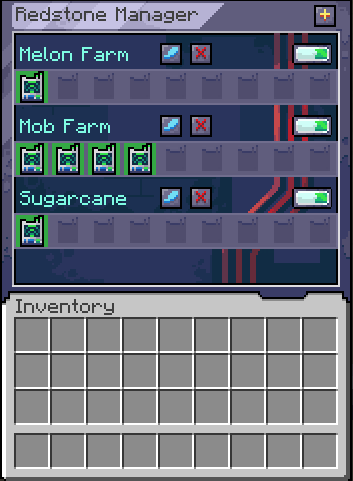
Sample image of how the mod is supposed to work

Using the mod

Start by crafting a Manager and a Linker.

Crouch + right click with the Linker on a Lever to link them.

Open the manager and create your first group by clicking on the plus button.

Place the Linker inside the newly created group.

From within the Manager, you can now toggle that single lever on/off or toggle the entire group.

For modpacks

The linker works on a tag system, where it looks if the block has a tag: redstonemanager:linkable_items.

If the block has that tag, it will allow the link to be created between them.

Afterward it is checking for the powered state of that block to get its state.

For devs

You can add this mod to your project by adding this:

maven {
    name = "Gac Repository"
    url = uri("https://maven.igorilic.dev/releases")
}

And then adding this as a dependency:

implementation "dev.igorilic:redstonemanager:${rm_version}"

Have suggestions?

If you have any suggestions that you think can improve the modpack, open an issue for it and let's have a discussion about it.

Or join the discord server: https://discord.gg/7maXVvt2c4

👥 Team & Contributors

GacBL
GacBLOwner

⚙️ Compatibility

Environment
✅ Client & Server
Loaders
neoforge
Minecraft Versions
1.21.1

🔗 Links

Modrinth Page