Logo
MINECRAFTBIBLE
Items
Items

All game items

Blocks
Blocks

Building blocks

Mobs
Mobs

Creatures & monsters

Biomes
Biomes

World biomes

Structures
Structures

Generated structures

Recipes
Recipes

Crafting guides

Advancements
Advancements

Achievements

Loot Tables
Loot Tables

Drop rates

Tags
Tags

Item groupings

All Versions
View all data →
Capes
Cape ArchiveNEW

Browse rare Minecon capes, OptiFine capes, and custom capes from players worldwide

Browse

Player Database
Player DatabasePopular

Search any player

Skin Browser
Skin Browser

Browse & download skins

Cape Gallery
Cape GalleryNEW

Minecon & OptiFine capes

Seed Vault
Seed Vault

Curated seeds

Learn

Guides
GuidesNew

Tutorials & tips

Blog
Blog

News & updates

Community

Community Hub
Community HubHub

Posts, discussions & more

All Versions
View community →
Seed Analyzer
Seed Analyzer

World seed analysis

Loot Explorer
Loot Explorer

Drop rates

Crafting Calculator
Crafting Calculator

Material planning

Enchant Calculator
Enchant Calculator

Probability math

Redstone Lab
Redstone Lab

Signal timing

Trading Profit
Trading Profit

Villager ROI

All Versions
View all tools →
Mods
Mods

Browse all mods

Plugins
Plugins

Server plugins

Resource Packs
Resource Packs

Textures & sounds

Shaders
Shaders

Visual enhancements

Datapacks
Datapacks

World logic

Scanner
Mod Intelligence

Scan & analyze any mod

All Versions
View all mods →
Loading...
IntroductionIntroductionVersion HistoryVersion HistoryGuidesGuidesBlog & NewsBlog & News
ItemsItemsBlocksBlocksMobsMobsRecipesRecipesBiomesBiomesStructuresStructuresAdvancementsAdvancementsLoot TablesLoot TablesTagsTags
ModsModsPluginsPluginsResource PacksResource PacksShadersShadersDatapacksDatapacks

MinecraftBible

The Ultimate Wiki

Logo
MINECRAFTBIBLE

The ultimate Minecraft reference. Every item, block, mob, and recipe documented with precision.

Community

  • Skin Browser
  • Cape Gallery
  • Seed Vault
  • Blog
  • Guides

Database

  • Items
  • Blocks
  • Mobs
  • Recipes
  • Biomes
  • Structures

Tools

  • Seed Analyzer
  • Mod Intelligence
  • Crafting Calculator
  • Enchant Calculator

Mods & Packs

  • Mods
  • Plugins
  • Resource Packs
  • Shaders
  • Datapacks

Site & Legal

  • About
  • Authors
  • Editorial Policy
  • Corrections
  • Contact
  • Privacy Policy
  • Terms of Service
  • DMCA
  • Sitemap

© 2026 MinecraftBible. Not affiliated with Mojang or Microsoft.

PrivacyTermsContact
Rails Unnerfed
ModGPL-3.0-only

Rails Unnerfed

Modifies rail crafting recipes to make them more fair and up-to-date for modern Minecraft.

75
Downloads
0
Followers
4 months ago
Updated
📦
3
Versions
technologytransportationutilityfabric
Download Latestv1.2.2View on Modrinth

📖About Rails Unnerfed

Rails Unnerfed v1.2.2

Rails in Minecraft are expensive to craft. When combined with the fact that better modes of transportation now exist, they feel disadvantageous to use for anything other than redstone contraptions.

This fabric mod is for those who wish to build vast rail systems while keeping the classic Minecraft aesthetic. It changes crafting recipes and their outputs for rails. However, since the goal is to rebalance rails for modern Minecraft, the recipes aim not to be too overpowered either. In short, this mod makes building large rail networks possible without the need for duping machines.

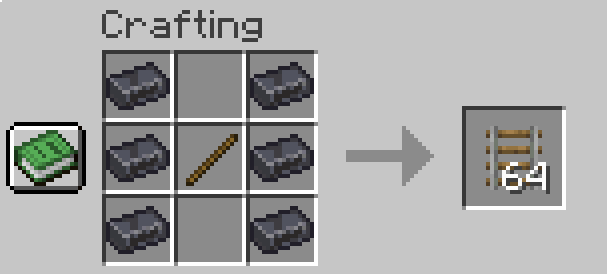
In order to balance recipes, steel ingots have been added. You can get a steel ingot only by blasting iron. This mechanic will eventually be rolled out further, into minecarts, etc.

Crafting Overview

Steel
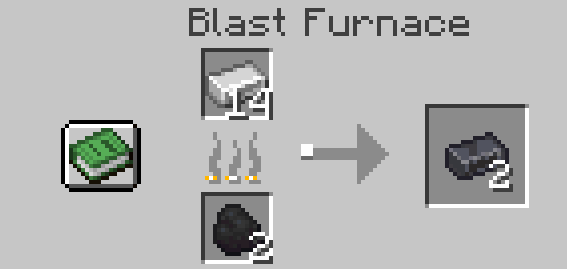
Steel

Rail

rail

Note: All recipes can be found in the Gallery.

Commands

The cartSpeed command allows the player to set the speed at which minecarts travel in their world. The command accepts values from 0.1 to 0.9 blocks per tick, with 0.1 corresponding to 2bps and 0.9 equating to 18bps.

Features & Planned Features

Features

  • New material: Steel Ingot
  • New crafting recipes for all rail types.
  • Activator rail stops furnace carts.
  • Minecarts can now travel up to 18 bps, up from 8 bps.
  • The cartSpeed command allows a player to set game cart speeds from 2 to 18 bps.

Planned Features

  • Steel, Iron, and Copper minecarts (the cheaper, the slower).
  • Stoppable Furnace Cart
  • Signalling (maybe)
  • Improved minecart speeds.

Future Plans

I’m dedicated to maintaining this mod and expanding its scope. Upcoming updates will include:

  • Minecart Tweaks: Adjusted crafting recipes for all minecart types.
  • QoL Improvements: General changes and additions to improve the overall rail experience.
  • Version Parity: Ongoing updates to ensure compatibility with the latest Minecraft releases.

Feel free to leave suggestions. Thank you & enjoy!

👥 Team & Contributors

pawog04
pawog04Owner

⚙️ Compatibility

Environment
✅ Client & Server
Loaders
fabric
Minecraft Versions
1.21.11

🔗 Links

Modrinth Page