Logo
MINECRAFTBIBLE
Items
Items

All game items

Blocks
Blocks

Building blocks

Mobs
Mobs

Creatures & monsters

Biomes
Biomes

World biomes

Structures
Structures

Generated structures

Recipes
Recipes

Crafting guides

Advancements
Advancements

Achievements

Loot Tables
Loot Tables

Drop rates

Tags
Tags

Item groupings

All Versions
View all data →
Capes
Cape ArchiveNEW

Browse rare Minecon capes, OptiFine capes, and custom capes from players worldwide

Browse

Player Database
Player DatabasePopular

Search any player

Skin Browser
Skin Browser

Browse & download skins

Cape Gallery
Cape GalleryNEW

Minecon & OptiFine capes

Seed Vault
Seed Vault

Curated seeds

Learn

Guides
GuidesNew

Tutorials & tips

Blog
Blog

News & updates

Community

Community Hub
Community HubHub

Posts, discussions & more

All Versions
View community →
Seed Analyzer
Seed Analyzer

World seed analysis

Loot Explorer
Loot Explorer

Drop rates

Crafting Calculator
Crafting Calculator

Material planning

Enchant Calculator
Enchant Calculator

Probability math

Redstone Lab
Redstone Lab

Signal timing

Trading Profit
Trading Profit

Villager ROI

All Versions
View all tools →
Mods
Mods

Browse all mods

Plugins
Plugins

Server plugins

Resource Packs
Resource Packs

Textures & sounds

Shaders
Shaders

Visual enhancements

Datapacks
Datapacks

World logic

Scanner
Mod Intelligence

Scan & analyze any mod

All Versions
View all mods →
Loading...
IntroductionIntroductionVersion HistoryVersion HistoryGuidesGuidesBlog & NewsBlog & News
ItemsItemsBlocksBlocksMobsMobsRecipesRecipesBiomesBiomesStructuresStructuresAdvancementsAdvancementsLoot TablesLoot TablesTagsTags
ModsModsPluginsPluginsResource PacksResource PacksShadersShadersDatapacksDatapacks

MinecraftBible

The Ultimate Wiki

Logo
MINECRAFTBIBLE

The ultimate Minecraft reference. Every item, block, mob, and recipe documented with precision.

Community

  • Player Database
  • Skin Browser
  • Cape Gallery
  • Community Hub
  • Seed Vault

Database

  • Items
  • Blocks
  • Mobs
  • Recipes
  • Biomes
  • Structures

Tools

  • Seed Analyzer
  • Mod Intelligence
  • Crafting Calculator
  • Enchant Calculator

Mods & Packs

  • Mods
  • Plugins
  • Resource Packs
  • Shaders
  • Datapacks

© 2026 MinecraftBible. Not affiliated with Mojang or Microsoft.

PrivacyTermsContact
Pylons
ModLicenseRef-All-Rights-Reserved

Pylons

Just another magic block mod

119.4K
Downloads
11
Followers
5 months ago
Updated
📦
16
Versions
magicutilityforgeneoforge
Download Latestv5.4.2View on Modrinth

📖About Pylons

Currently adds the following blocks.

Expulsion Pylon:

Intended for use on servers, this block allows you to expel other players from the chunk it's placed in.
You can whitelist players with a Player Filter - OPs are always whitelisted.
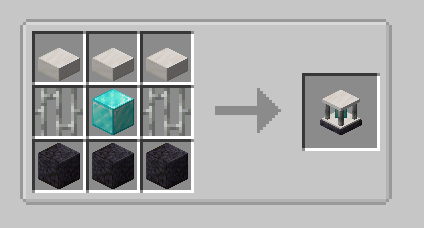
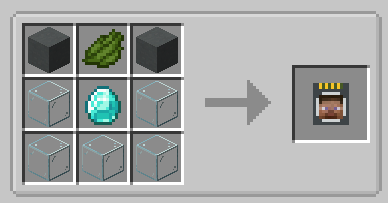
Expulsion Pylon Recipe

Player Filter Recipe

Infusion Pylon:

Allows you to apply effects to yourself from any distance (may require chunkloading) with activated Potion Filters.
Potion Filters can be activated by applying an effect to yourself (from a potion, for example) and then right-clicking the Potion Filter.
The minimum effect duration that can be extracted is 60 seconds by default.
This will extract all remaining duration from the player and apply it to the Filter.
To fully activate it, you will need a total of 1 hour of duration, the equivalent of 7.5 vanilla extended potions.

If you have multiple cards containing the same effect, you can combine them. Place one card in each hand, and right click.
The duration from the off hand card will be added to the card in your main hand.
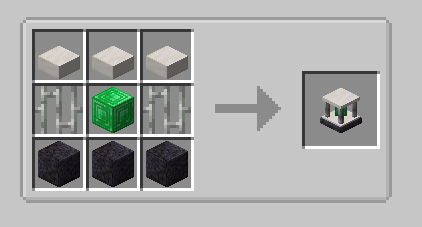
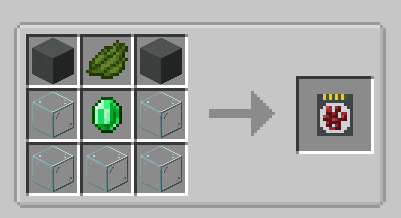
Infusion Pylon Recipe

Potion Filter Recipe

Harvester Pylon:

Harvests crops in a configurable radius (from 3x3 to 9x9) around the pylon and outputs to an inventory above.
Place the pylon inside the water block of the farm:
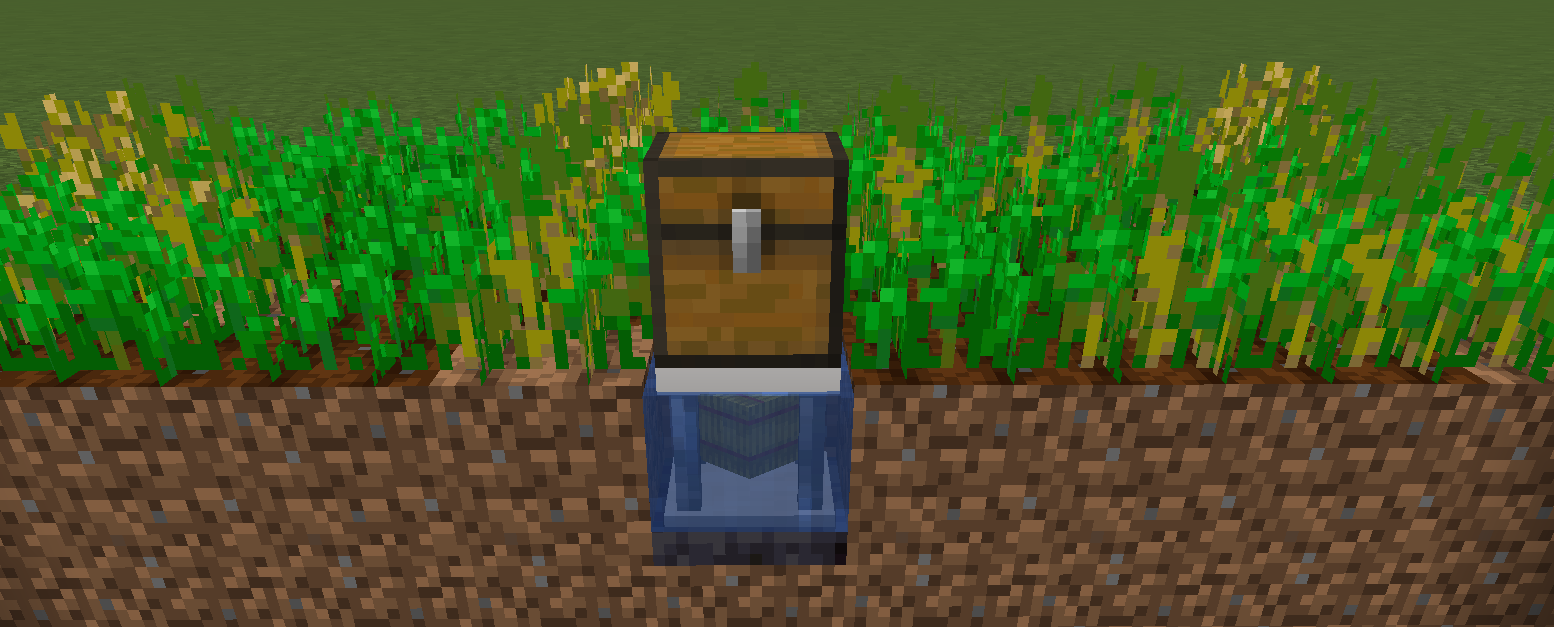
Harvester Placement

By default, the pylon requires a hoe in the pylon inventory, and will consume 1 durability per crop harvest. There is a config option to disable this.
Unbreakable hoes, such as Mystical Agriculture's Supremium Hoe, can be used.
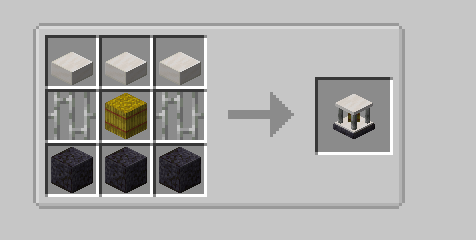
Harvester Pylon Recipe

Interdiction Pylon

Prevents all spawns of specified mobs within the selected chunk range (1x1 to 5x5).
Right click on a mob with a Mob Filter, then add the filter to the pylon to block that mob.
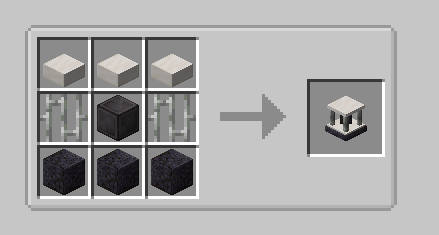
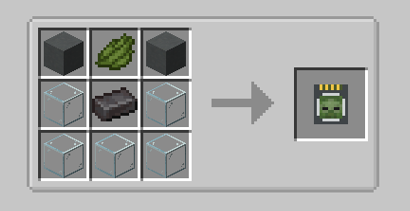
Interdiction Pylon Recipe

Mob Filter Recipe

👥 Team & Contributors

M
MutantGumdropOwner

⚙️ Compatibility

Environment
✅ Client & Server
Loaders
forgeneoforge
Minecraft Versions
1.21.1

🔗 Links

Modrinth Page