Logo
MINECRAFTBIBLE
Items
Items

All game items

Blocks
Blocks

Building blocks

Mobs
Mobs

Creatures & monsters

Biomes
Biomes

World biomes

Structures
Structures

Generated structures

Recipes
Recipes

Crafting guides

Advancements
Advancements

Achievements

Loot Tables
Loot Tables

Drop rates

Tags
Tags

Item groupings

All Versions
View all data →
Capes
Cape ArchiveNEW

Browse rare Minecon capes, OptiFine capes, and custom capes from players worldwide

Browse

Player Database
Player DatabasePopular

Search any player

Skin Browser
Skin Browser

Browse & download skins

Cape Gallery
Cape GalleryNEW

Minecon & OptiFine capes

Seed Vault
Seed Vault

Curated seeds

Learn

Guides
GuidesNew

Tutorials & tips

Blog
Blog

News & updates

Community

Community Hub
Community HubHub

Posts, discussions & more

All Versions
View community →
Seed Analyzer
Seed Analyzer

World seed analysis

Loot Explorer
Loot Explorer

Drop rates

Crafting Calculator
Crafting Calculator

Material planning

Enchant Calculator
Enchant Calculator

Probability math

Redstone Lab
Redstone Lab

Signal timing

Trading Profit
Trading Profit

Villager ROI

All Versions
View all tools →
Mods
Mods

Browse all mods

Plugins
Plugins

Server plugins

Resource Packs
Resource Packs

Textures & sounds

Shaders
Shaders

Visual enhancements

Datapacks
Datapacks

World logic

Scanner
Mod Intelligence

Scan & analyze any mod

All Versions
View all mods →
Loading...
IntroductionIntroductionVersion HistoryVersion HistoryGuidesGuidesBlog & NewsBlog & News
ItemsItemsBlocksBlocksMobsMobsRecipesRecipesBiomesBiomesStructuresStructuresAdvancementsAdvancementsLoot TablesLoot TablesTagsTags
ModsModsPluginsPluginsResource PacksResource PacksShadersShadersDatapacksDatapacks

MinecraftBible

The Ultimate Wiki

Logo
MINECRAFTBIBLE

The ultimate Minecraft reference. Every item, block, mob, and recipe documented with precision.

Community

  • Skin Browser
  • Cape Gallery
  • Seed Vault
  • Blog
  • Guides

Database

  • Items
  • Blocks
  • Mobs
  • Recipes
  • Biomes
  • Structures

Tools

  • Seed Analyzer
  • Mod Intelligence
  • Crafting Calculator
  • Enchant Calculator

Mods & Packs

  • Mods
  • Plugins
  • Resource Packs
  • Shaders
  • Datapacks

Site & Legal

  • About
  • Authors
  • Editorial Policy
  • Corrections
  • Contact
  • Privacy Policy
  • Terms of Service
  • DMCA
  • Sitemap

© 2026 MinecraftBible. Not affiliated with Mojang or Microsoft.

PrivacyTermsContact
PVP Arena
ModMIT

PVP Arena

Arena that will help you hone your skills in pvp

3.5K
Downloads
16
Followers
5 months ago
Updated
📦
6
Versions
equipmentminigamesocialdatapackfabricforgeneoforgequilt
Download Latestv1.0.2View on Modrinth

📖About PVP Arena

Buy Me a Coffee at ko-fi.com

Description

An arena that will help you hone your PvP skills with a large number of settings that will help simulate real battles. Train with friends and become better!
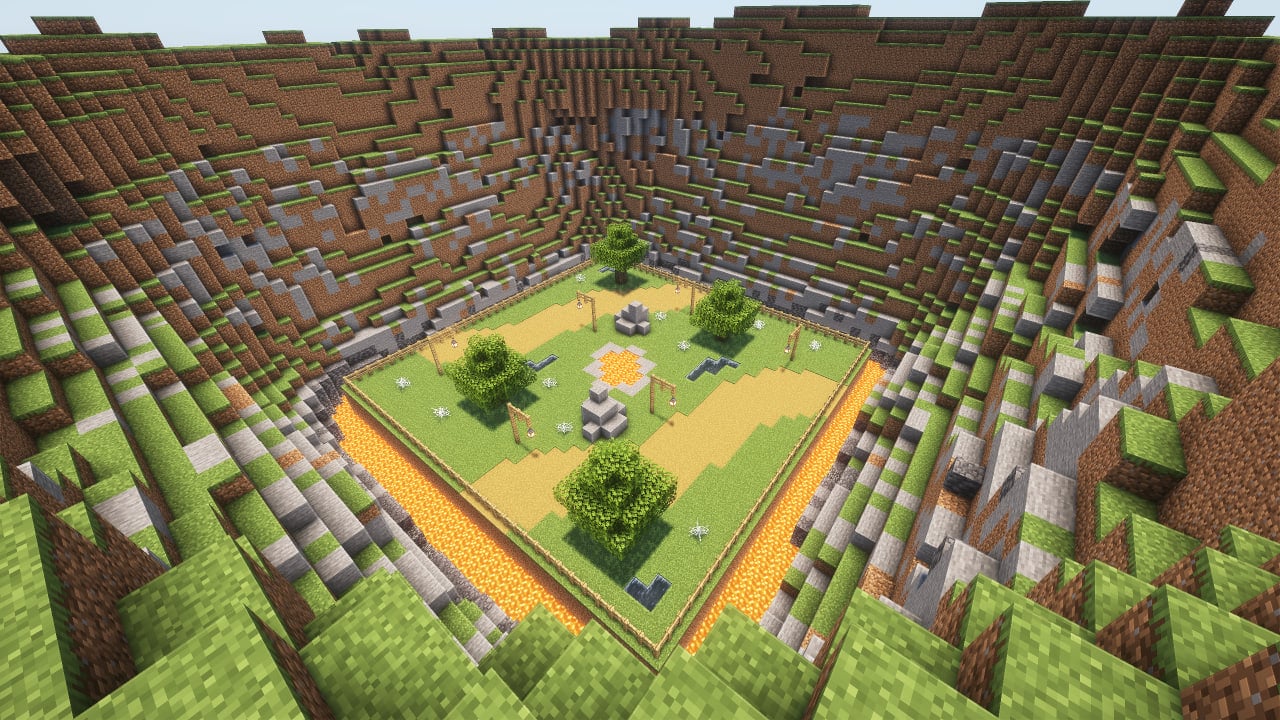
preview

How to use

It is advisable to create a new world first, because the arena can damage the current world. Do this at your own risk. If you are going to use the mod in an existing world, you must re-enter the world before using it.

The game is designed for 2, 3 or 4 players.

To place the arena in the world, you need to enter the command below and place the frame where you want to place the arena. After that, particles will show where the arena will be located and the settings screen. To confirm, you need to place the frame inside the frame you placed earlier.

/trigger bizcub.pvp_arena.give

On the settings screen, you can select the arena, sets of weapons, armor, food, additional equipment and potions. After choosing, click the "Start" button.

After that, the players will be taken to the capsules and have a few seconds to prepare for battle. When the timer runs out, the players will be on the battlefield and will fight until the time runs out. The one who deals more damage wins.

After the game ends, the players will be teleported to the beginning and can start the game over.

Additional rules

Those who did not survive until the end of the battle will watch the game from the platform above the arena, and after the game ends, they will be teleported along with everyone else to the settings menu.

The space between the arena and the decorations deals damage if a player flies out of the arena and gets into this area.

Arenas

Each arena has its own unique feature.

  • Plains: obstacles in the arena in the form of lava, water and cobwebs.
  • Ice: ice and loose snow, which can easily be confused with ordinary snow.
  • Fire: once a minute, fire appears from the ground for a while.
  • Honey: In this arena, in addition to honey blocks that slow down the player, angry bees will appear, which will also hinder players.
  • Water: water that slows down movement.
  • Poison: slime blocks that slow down players, and also help to fly higher, and poison potions that are dropped on players from above.
  • Skulk: the battle in the arena will take place in complete darkness, in which you need to navigate by sound.

Dependencies

  • Fabric loader requires Fabric API

👥 Team & Contributors

BizCub
BizCubOwner

⚙️ Compatibility

Environment
🖥️ Server-side
Loaders
datapackfabricforgeneoforgequilt
Minecraft Versions
1.21.51.21.61.21.71.21.81.21.91.21.101.21.11

🔗 Links

Modrinth Page