Logo
MINECRAFTBIBLE
Items
Items

All game items

Blocks
Blocks

Building blocks

Mobs
Mobs

Creatures & monsters

Biomes
Biomes

World biomes

Structures
Structures

Generated structures

Recipes
Recipes

Crafting guides

Advancements
Advancements

Achievements

Loot Tables
Loot Tables

Drop rates

Tags
Tags

Item groupings

All Versions
View all data →
Capes
Cape ArchiveNEW

Browse rare Minecon capes, OptiFine capes, and custom capes from players worldwide

Browse

Player Database
Player DatabasePopular

Search any player

Skin Browser
Skin Browser

Browse & download skins

Cape Gallery
Cape GalleryNEW

Minecon & OptiFine capes

Seed Vault
Seed Vault

Curated seeds

Learn

Guides
GuidesNew

Tutorials & tips

Blog
Blog

News & updates

Community

Community Hub
Community HubHub

Posts, discussions & more

All Versions
View community →
Seed Analyzer
Seed Analyzer

World seed analysis

Loot Explorer
Loot Explorer

Drop rates

Crafting Calculator
Crafting Calculator

Material planning

Enchant Calculator
Enchant Calculator

Probability math

Redstone Lab
Redstone Lab

Signal timing

Trading Profit
Trading Profit

Villager ROI

All Versions
View all tools →
Mods
Mods

Browse all mods

Plugins
Plugins

Server plugins

Resource Packs
Resource Packs

Textures & sounds

Shaders
Shaders

Visual enhancements

Datapacks
Datapacks

World logic

Scanner
Mod Intelligence

Scan & analyze any mod

All Versions
View all mods →
Loading...
IntroductionIntroductionVersion HistoryVersion HistoryGuidesGuidesBlog & NewsBlog & News
ItemsItemsBlocksBlocksMobsMobsRecipesRecipesBiomesBiomesStructuresStructuresAdvancementsAdvancementsLoot TablesLoot TablesTagsTags
ModsModsPluginsPluginsResource PacksResource PacksShadersShadersDatapacksDatapacks

MinecraftBible

The Ultimate Wiki

Logo
MINECRAFTBIBLE

The ultimate Minecraft reference. Every item, block, mob, and recipe documented with precision.

Community

  • Skin Browser
  • Cape Gallery
  • Seed Vault
  • Blog
  • Guides

Database

  • Items
  • Blocks
  • Mobs
  • Recipes
  • Biomes
  • Structures

Tools

  • Seed Analyzer
  • Mod Intelligence
  • Crafting Calculator
  • Enchant Calculator

Mods & Packs

  • Mods
  • Plugins
  • Resource Packs
  • Shaders
  • Datapacks

Site & Legal

  • About
  • Authors
  • Editorial Policy
  • Corrections
  • Contact
  • Privacy Policy
  • Terms of Service
  • DMCA
  • Sitemap

© 2026 MinecraftBible. Not affiliated with Mojang or Microsoft.

PrivacyTermsContact
Potion Slimes
ModMIT

Potion Slimes

Brew potions into slimes that will fight for you and inherit or inflict the potion they were brewed with.

105
Downloads
2
Followers
6 months ago
Updated
📦
1
Versions
game-mechanicsmagicmobsforgeneoforge
Download Latestv1.0.0-1.20.1View on Modrinth

📖About Potion Slimes

Potion Slimes

This mod adds the ability to brew Potions into slimes that will fight for you, and inherit or inflict the effects of the potion they were brewed with.
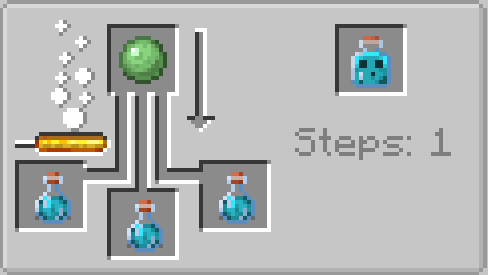
The recipe for a slime potion, which consists of a slime ball being brewed with up to three potions.

Slime Potions

A slime potion can be brewed by placing up to three potions of any regular type (not including splash or lingering potions) in a brewing stand with a Slime Ball. Upon being used, a slime potion will be thrown a short distance, or placed on the block you're looking at if crouching. Upon impacting the ground or an entity, the potion will break, releasing the slime trapped within. If the slime was brewed from a potion that contained positive effects, like Swiftness or Strength, the slime will apply that effect to itself. If the slime was brewed from a potion that contained negative effects, like Slowness or Weakness, the slime will instead inflict that effect on entities it damages. The Heal and Harm effects are unique, boosting the max health and attack damage of the created slime.

Potion Slimes will be tamed by the player that threw the slime potion, and they will defend you like a pet. Additionally, if the potion hit an entity, the slimes will immediately begin targetting the same entity, so long as it isn't you or one of your allies. Upon taking sufficient damage, a basic Potion Slime will split into four smaller slimes with the same effect, but less health and attack damage.

A Potion Slime will only last as long as the potion it was brewed from would have lasted, so they will despawn after a while. For potions that normally contain instant effects, like Healing and Harming, they will last for 25 seconds.

The recipe for a large slime potion, consisting of up to three slime potions and one slime block in a brewing stand.

Large Slime Potions

By further brewing a slime potion with a Slime Block, you can create a Large Slime Potion, which will spawn a larger slime that has more health and deals slightly more damage. Upon taking sufficient damage, a Large Potion Slime will split into two regular Potion Slimes, which can split again into four small Potion Slimes.

Have a question, feedback, or suggestion? Join my discord server!

👥 Team & Contributors

tonyandthetrashelementals
tonyandthetrashelementalsOwner

⚙️ Compatibility

Environment
✅ Client & Server
Loaders
forgeneoforge
Minecraft Versions
1.20.1

🔗 Links

Modrinth Page