Logo
MINECRAFTBIBLE
Items
Items

All game items

Blocks
Blocks

Building blocks

Mobs
Mobs

Creatures & monsters

Biomes
Biomes

World biomes

Structures
Structures

Generated structures

Recipes
Recipes

Crafting guides

Advancements
Advancements

Achievements

Loot Tables
Loot Tables

Drop rates

Tags
Tags

Item groupings

All Versions
View all data →
Capes
Cape ArchiveNEW

Browse rare Minecon capes, OptiFine capes, and custom capes from players worldwide

Browse

Player Database
Player DatabasePopular

Search any player

Skin Browser
Skin Browser

Browse & download skins

Cape Gallery
Cape GalleryNEW

Minecon & OptiFine capes

Seed Vault
Seed Vault

Curated seeds

Learn

Guides
GuidesNew

Tutorials & tips

Blog
Blog

News & updates

Community

Community Hub
Community HubHub

Posts, discussions & more

All Versions
View community →
Seed Analyzer
Seed Analyzer

World seed analysis

Loot Explorer
Loot Explorer

Drop rates

Crafting Calculator
Crafting Calculator

Material planning

Enchant Calculator
Enchant Calculator

Probability math

Redstone Lab
Redstone Lab

Signal timing

Trading Profit
Trading Profit

Villager ROI

All Versions
View all tools →
Mods
Mods

Browse all mods

Plugins
Plugins

Server plugins

Resource Packs
Resource Packs

Textures & sounds

Shaders
Shaders

Visual enhancements

Datapacks
Datapacks

World logic

Scanner
Mod Intelligence

Scan & analyze any mod

All Versions
View all mods →
Loading...
IntroductionIntroductionVersion HistoryVersion HistoryGuidesGuidesBlog & NewsBlog & News
ItemsItemsBlocksBlocksMobsMobsRecipesRecipesBiomesBiomesStructuresStructuresAdvancementsAdvancementsLoot TablesLoot TablesTagsTags
ModsModsPluginsPluginsResource PacksResource PacksShadersShadersDatapacksDatapacks

MinecraftBible

The Ultimate Wiki

Logo
MINECRAFTBIBLE

The ultimate Minecraft reference. Every item, block, mob, and recipe documented with precision.

Community

  • Skin Browser
  • Cape Gallery
  • Seed Vault
  • Blog
  • Guides

Database

  • Items
  • Blocks
  • Mobs
  • Recipes
  • Biomes
  • Structures

Tools

  • Seed Analyzer
  • Mod Intelligence
  • Crafting Calculator
  • Enchant Calculator

Mods & Packs

  • Mods
  • Plugins
  • Resource Packs
  • Shaders
  • Datapacks

Site & Legal

  • About
  • Authors
  • Editorial Policy
  • Corrections
  • Contact
  • Privacy Policy
  • Terms of Service
  • DMCA
  • Sitemap

© 2026 MinecraftBible. Not affiliated with Mojang or Microsoft.

PrivacyTermsContact
Portal Linking Compass
ModMIT

Portal Linking Compass

Introduces a compass that displays precise coordinates for constructing a corresponding portal in the other dimension.

19.1K
Downloads
69
Followers
4 months ago
Updated
📦
24
Versions
equipmentgame-mechanicsutilityfabricforgequilt
Download Latestv1.0.3+mc1.21.11View on Modrinth

📖About Portal Linking Compass

Portal Linking Compass

Description:

Introduces a compass that displays precise coordinates for constructing a corresponding portal in the other dimension to link them up perfectly.

The mod must be installed on both client and server to be able to function properly.
Available on Fabric, Quilt and Forge:

  • Modrinth
  • CurseForge

Why this mod was created:

The mod was originally created because I wanted to try and play the game without coordinates (reducedDebugInfo gamerule set to true).

Almost everything in-game can be done without coordinates. Maps, compasses and lodestones (albeit a little expensive) are great tools for locating places.

However, a few things aren't possible without coordinates. Such as:

  • Linking nether portals.
  • Finding the coordinates to manipulate and generate an end gateway in the middle of the void.
  • A bunch more things I haven't thought of.

This mod tackles at least the first problem and allows players to build proper nether hubs.
I thought I may as well publish the mod for other people like me.

How to install:

  • If you're on Fabric, make sure you have Fabric API installed.
  • If you're on Quilt, make sure you have QFAPI installed.
  • Download JAR and put in your mods folder.

How to use:

Step 1:

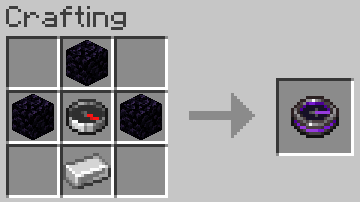
Craft a portal linking compass using a crafting table.
The recipe is unlocked after picking up a compass, and will become visible in the recipe book.
It requires:

  • 3 obsidian
  • 1 compass
  • 1 iron ingot
Crafting Recipe

Note: The crafting recipe of this compass for Minecraft versions 1.21.4 and prior used netherite ingots instead of iron ingots, since this mod can be used as an alternative to vanilla lodestones (In those versions, lodestones require netherite ingots to be crafted). Mojang updated the recipe of lodestones and replaced netherite ingots with iron ingots in the Minecraft 1.21.5 release, so I did the same for the recipe of this compass.

Step 2:

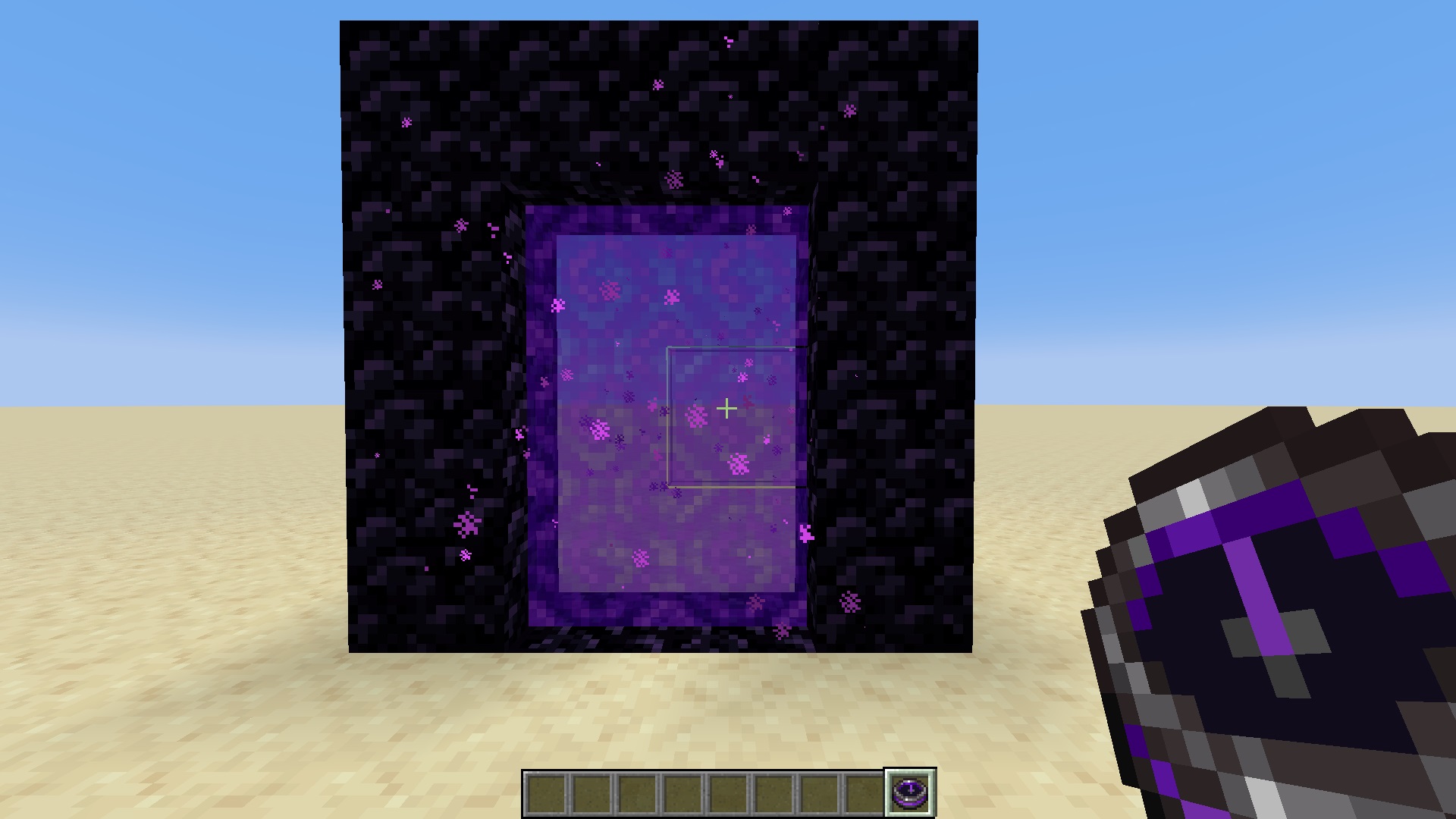
  • Right-click a nether portal block with the compass.

    Right-click Portal with compass
  • The compass should now point to nether portal block.

  • Go to the nether, the compass should point to the exact coordinates where you can build the portal to link them up perfectly.

  • This also works vice-versa. That is, original portal in the nether ➔ find coordinates in the overworld.

  • If the original portal is destroyed, the compass will start spinning randomly.
Affiliate

Click here to support my projects!

👥 Team & Contributors

Maxoduke
MaxodukeOwner

⚙️ Compatibility

Environment
✅ Client & Server
Loaders
fabricforgequilt
Minecraft Versions
1.21.11

🔗 Links

Modrinth Page