PerfectMessages
Perfect! Unimprovable! Ideal! Messages for minecraft.
📖About PerfectMessages
Perfect Messages (PM) — Convenient Message Management in Minecraft
Are you tired of /title? Want to make colorful notifications that stay in a message log, send cinematic dialogues, or create immersive NPC conversations?
With Perfect Messages (PM), you can do it all — easily and beautifully. Discord Channel visit the mod’s project page.
Features
🚀 Pop-Up Messages
Display smooth, fading notifications with customizable text, colors, and duration.
Supports all Minecraft color codes and HEX formatting.🎨 HEX Color Support
Use any custom color via:&#RRGGBBExample:
&#FF5733Hello!🔢 Dynamic Placeholders
%player_name%— Player’s name%player_health%— Current health%player_xp%— XP level%item_in_hand%— Item in main hand
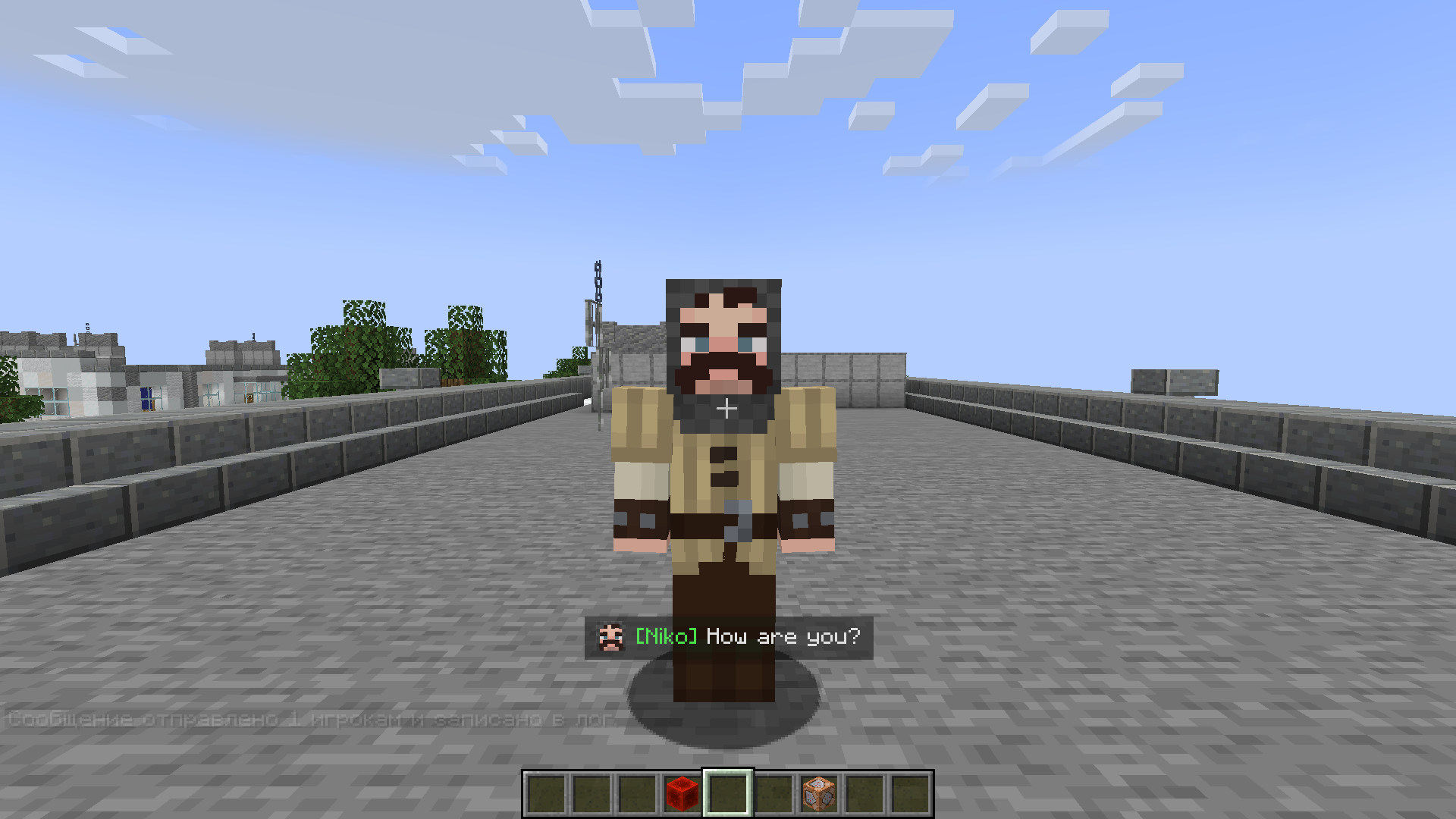
🖼️ Image Support
Add icons or portraits to messages:/perfectmessage @a "pic.png Hello, %player_name%!" 5 trueAll images are stored in
mods/pm/images/(created automatically).
Images appear at the start of messages and align properly with multiline text.📝 Message Log
View all previous messages in a smooth, scrollable message window.
Perfect for quests, story mods, or chat-style dialogues.🔍 Commands
/perfectmessage— Send a custom message with adjustable duration and optional logging/clearmessages— Clear all messages from the log
Example:
/perfectmessage @a "b50d4Welcome, %player_name%!" 10 true⌨️ Customizable Key Bindings
Open or close the message log directly from in-game (default key:N).
The key can be changed in Options → Controls → PM: Toggle Message Log.🪄 Text Effects
&k— Obfuscated (glitched) text&r— Reset formatting**text**— Shaking text effect
How to Use
Send a Message
/perfectmessage @a "&#FF5733Hello, %player_name%!"Add an Image
/perfectmessage @a "pic.png &aYou found a treasure!" 5 trueOpen the Message Log
Press N (or your chosen key) to view past messages.Clear the Log
/clearmessages
Configuration
You can adjust:
- Whether logging is enabled
- Fade duration and transparency
- Maximum stored messages
- Visual effects like shaking or gradients
The config file is automatically created in your Forge config directory.
Installation
- Install Forge (Minecraft 1.19.2 or 1.20.1).
- Place the mod file into the
modsfolder. - Launch Minecraft — the folder
mods/pm/images/will be created automatically. - Configure your controls and enjoy stylish messages!
Compatibility
- Minecraft Versions: 1.19.2, 1.20.1
- Mod Loader: Forge
- Languages: English, Russian
For Modpack Creators
Perfect Messages is ideal for cinematic storytelling, quest systems, or interactive cutscenes.
You can easily script dialogue sequences using command blocks, scripts, or datapacks.
💬 Example: NPC Dialogue Chain
/perfectmessage @a "npc.png &#ffc107Villager: &rHello, traveler!" 5 true
/perfectmessage @a "npc.png &#ffffffVillager: &rThe forest ahead is dangerous..." 5 true
/perfectmessage @a "npc.png &#ff0000Villager: &rBeware of the shadows!" 5 true
🪄 Example: Quest Reward Message
/perfectmessage @a "chest.png �ff00You received 50 gold and a new sword!" 5 true
🧙 Tip
Combine it with mods like KubeJS, Custom NPCs, or Quest Frameworks to create immersive stories with timed, animated dialogue.
Support & Feedback
If you encounter any issues or want to share ideas, join our Discord Channel or visit the mod’s project page.
Perfect Messages — Your Messages, Your Story.
Create cinematic notifications, immersive storytelling, and expressive communication in Minecraft with ease.