Logo
MINECRAFTBIBLE
Items
Items

All game items

Blocks
Blocks

Building blocks

Mobs
Mobs

Creatures & monsters

Biomes
Biomes

World biomes

Structures
Structures

Generated structures

Recipes
Recipes

Crafting guides

Advancements
Advancements

Achievements

Loot Tables
Loot Tables

Drop rates

Tags
Tags

Item groupings

All Versions
View all data →
Capes
Cape ArchiveNEW

Browse rare Minecon capes, OptiFine capes, and custom capes from players worldwide

Browse

Player Database
Player DatabasePopular

Search any player

Skin Browser
Skin Browser

Browse & download skins

Cape Gallery
Cape GalleryNEW

Minecon & OptiFine capes

Seed Vault
Seed Vault

Curated seeds

Learn

Guides
GuidesNew

Tutorials & tips

Blog
Blog

News & updates

Community

Community Hub
Community HubHub

Posts, discussions & more

All Versions
View community →
Seed Analyzer
Seed Analyzer

World seed analysis

Loot Explorer
Loot Explorer

Drop rates

Crafting Calculator
Crafting Calculator

Material planning

Enchant Calculator
Enchant Calculator

Probability math

Redstone Lab
Redstone Lab

Signal timing

Trading Profit
Trading Profit

Villager ROI

All Versions
View all tools →
Mods
Mods

Browse all mods

Plugins
Plugins

Server plugins

Resource Packs
Resource Packs

Textures & sounds

Shaders
Shaders

Visual enhancements

Datapacks
Datapacks

World logic

Scanner
Mod Intelligence

Scan & analyze any mod

All Versions
View all mods →
Loading...
IntroductionIntroductionVersion HistoryVersion HistoryGuidesGuidesBlog & NewsBlog & News
ItemsItemsBlocksBlocksMobsMobsRecipesRecipesBiomesBiomesStructuresStructuresAdvancementsAdvancementsLoot TablesLoot TablesTagsTags
ModsModsPluginsPluginsResource PacksResource PacksShadersShadersDatapacksDatapacks

MinecraftBible

The Ultimate Wiki

Logo
MINECRAFTBIBLE

The ultimate Minecraft reference. Every item, block, mob, and recipe documented with precision.

Community

  • Player Database
  • Skin Browser
  • Cape Gallery
  • Community Hub
  • Seed Vault

Database

  • Items
  • Blocks
  • Mobs
  • Recipes
  • Biomes
  • Structures

Tools

  • Seed Analyzer
  • Mod Intelligence
  • Crafting Calculator
  • Enchant Calculator

Mods & Packs

  • Mods
  • Plugins
  • Resource Packs
  • Shaders
  • Datapacks

© 2026 MinecraftBible. Not affiliated with Mojang or Microsoft.

PrivacyTermsContact
Particle Core
ModMIT

Particle Core

Particle optimizations: Culling, rendering optimizations, configurable particle-type-specific spawn reduction, and potion particle disabling. Compatible with Sodium, improves performance over Sodium alone.

6.6M
Downloads
1,078
Followers
2 months ago
Updated
📦
30
Versions
game-mechanicsoptimizationutilityfabricforgeneoforgequilt
Download Latestv0.3.2+1.21.11View on Modrinth

📖About Particle Core

Main Banner. The Words Particle Core over an expanse of bubble particles.

Particle Core focuses on one thing: Optimizing particles. Vanilla Minecraft is quite inefficient with particles in a variety of ways. Particle Core aims to improve this.

What Does It Do?

Culling

The biggest performance improvement overall, Particle Core doesn't render particles you can't see. Makes sense! Only about a 12th of the lightbox is visible at standard FOVs, why render the 11/12 of particles you can't even see?

Rendering Optimizations

Particles that are rendered are optimized. Vertex transformations and lightmap polling are optimized. Vertex optimizations defer to Sodium.

By-Type Reduction or Disabling

Three methods are provided to either completely disable or reduce spawning of specific particle types. Any particle you can add via the /particle command is eligible.

  1. A particle_type tag. Add particle types to particle_core:excluded_particles to completely disable those particle types. Server Owners: this will disable those particles for every client that joins the server, use with caution!
  2. Config-based by-type reduction map. In the particle core config (see below), a user can add mappings of particle type identifier to chance double.
  3. Turn of Potion Particles entirely. If you find potion particles on your screen annoying, head over to the config and turn them off!

Unlike invis-particle resource packs, this actually prevents the particles from spawning at all, improving performance.

Tweaking Vanilla settings

Two config options are provided that can fine-tune the standard vanilla options of ALL, DECREASED, and MINIMAL. One is effectively a dial between ALL and DECREASED, the second a dial between DECREASED and MINIMAL. If you simply want to tweak particle spawning a bit, for example if your computer runs fine with DECREASED but you personally don't like how many particles are still on screen, you can dial DECREASED back without going all the way to MINIMAL.

Bisect Hosting Banner

Config

Particle Core provides a config covering every feature added. locate the config in the standard .mincraft config folder. Config name is particle_core_config_v[x].json, where [x] is the current version number.

The config has a comprehensive "comment" section at the top of the file. Please read it for guidance on config usage.

turnOffPotionParticles

To some, potion particles are extremely annoying. Use this setting to turn them off.

reduceParticlesAllChance

A dial to tweak particle spawning between the ALL and DECREASED Minecraft setting.

reduceParticlesDecreasedChance

A dial to tweak particle spawning between the DECREASED and MINIMAL Minecraft setting.

disableParticles

Completely disable all client-side particle spawning.

reduceParticlesByType

Map to reduce specific particle spawning.

  • key: identifier of the particle type, ex. minecraft:smoke.
  • value: double between 0.0 and 1.0. 0.0 will completely disable the particle, 1.0 is normal spawning. Anything in between will be that fractional chance a particle succeeds at spawning.

disableOptimizations

If any feature in Particle Core is causing a conflict or it is simply undesired, every feature can be individually disabled by adding it's string key to this list. See comment for instructions.

Before

Without Particle Core, world rendering is at 41% of CPU time, with renderParticles the lions share of that at 25% of CPU time.

Screenshot of a Spark Profile showing world rendering at 41% CPU time

After

With Particle Core, rendering is now at only 16% of CPU time, particle rendering basically a non-item.

Screenshot of a second Spark Profile showing world rendering at 16% CPU time

With Sodium

Improves performance over Sodium by itself. Top section of the screenshot with Particle Core, the bottom section is without it. About 5% CPU time improvement, or 50% relative improvement.
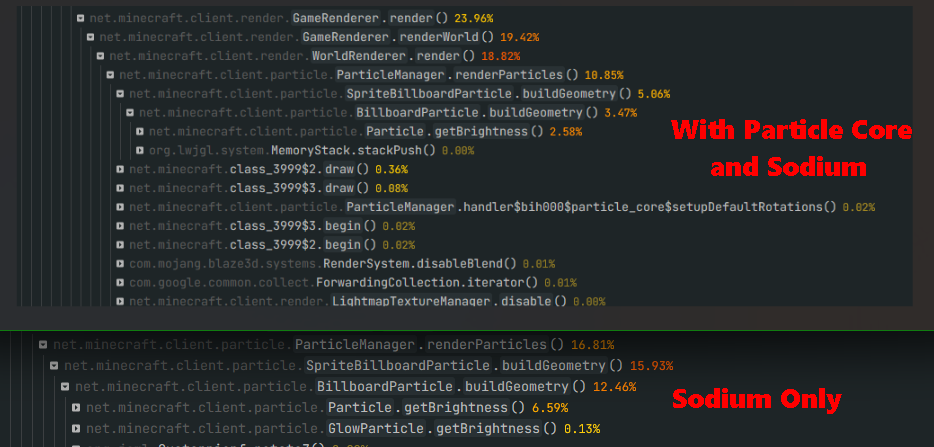
Screenshot of two spark profiles overlaid. The top shows particle rendering at 11%, the bottom shows it at 17%

👥 Team & Contributors

fzzyhmstrs
fzzyhmstrsOwner

⚙️ Compatibility

Environment
💻 Client-side
Loaders
fabricforgeneoforgequilt
Minecraft Versions
1.21.11

🔗 Links

Modrinth Page