OtterLib
A cool new simple library mod that everyone can use!
📖About OtterLib
A simple library mod for minecraft, made mostly to develop my mods easier, but can be used by anyone!
Currently supported loaders: Fabric, Spigot, & Paper
Use in your projects! 👍️
Want to use OtterLib in your project? You can add it as a dependency in your build.gradle file:
repositories {
    maven {
        name "oth3rMavenSnapshots"
        url "https://maven.oth3r.one/snapshots"
    }
}
Implementing on each loader, where ${project.otterlib_version} is the current version of OtterLib for the loader (e.g. 0.2.0.0+1.21.6, 0.2.0.0+1.20-1.21.6)
// fabric
modImplementation "one.oth3r:otterlib:${project.otterlib_version}-fabric"
// spigot
implementation "one.oth3r:otterlib:${project.otterlib_version}-spigot"
// paper
implementation "one.oth3r:otterlib:${project.otterlib_version}-paper"
Visit the maven repository to see more indepth information about the library, including the latest versions.
Features
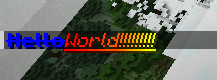
💬 Simple Chat Builder
sample usage:
player.sendMessage(new CTxT("Hello").color(Color.BLUE).bold(true).strikethrough(true)
    .append(new CTxT("World!!!!!!!!!").rainbow(new Rainbow(true)).underline(true).italic(true)).b());
in game example:
📜 Custom Language Reader
OtterLib provides a custom language reader that allows you to easily have server-side localization on all supported loaders. There is also support for a secondary location for locales for easy player overrides.
🗃️ Robust file saving and loading
Adds an interface that enables easy config file creation with support for saving, loading, and updating versions easily.
updating an old entry from the json to the new version:
@Override
public void update(JsonElement jsonElement) {
    JsonObject file = jsonElement.getAsJsonObject();
    if (file.get("version").getAsDouble() == 1.0) {
        this.version = 1.1;
        this.test = file.get("test-bool").getAsBoolean();
    }
}
⚙️ Custom config screen
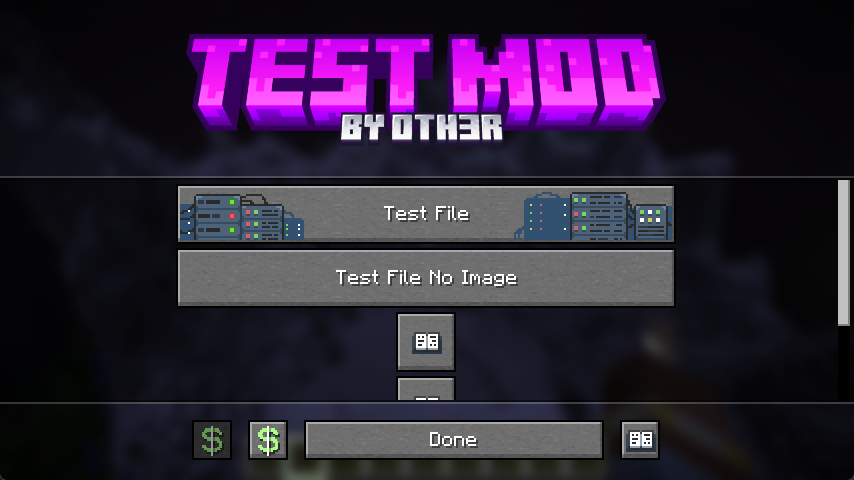
OtterLib offers a custom config screen that can be cuztomized to offer a way to edit multiple config files, link to social media, or even open different screens.
creating the screen:
client.setScreen(new ConfigScreen(client.currentScreen, Text.of("test"),
    new CustomImage(Identifier.of(FabricTest.MOD_ID, "textures/gui/banner.png"),240, 60),
    // the list of buttons to be displayed in the middle
    List.of(
            SimpleButton.Templates.fileEditor(new CTxT("Test File"), FabricTest.testFile, new CustomImage(Identifier.of(FabricTest.MOD_ID, "button/server_button"),246,26)).build(),
            SimpleButton.Templates.fileEditor(new CTxT("Test File No Image"), FabricTest.testFile).build(),
            SimpleButton.Templates.wiki(new CTxT("Help")).openLink("https://oth3r.one").size(30,30).build(),
            SimpleButton.Templates.wiki(new CTxT("Help")).openLink("https://oth3r.one").size(30,30).build(),
            SimpleButton.Templates.warning(new CTxT("Help")).openLink("https://oth3r.one").size(150,15).hideText(false).build()
    ),
    // the bottom buttons can be customized!
    List.of(
            new SimpleButton.Builder(new CTxT("Donate"))
                    .miniIcon(new CustomImage(Identifier.of(Assets.ID, "icon/donate"),15,15)).build(),
            SimpleButton.Templates.donate(new CTxT("Donate")).openLink(URI.create("https://ko-fi.com/oth3r")).build(),
            SimpleButton.Templates.done(new CTxT("Done")).build(),
            SimpleButton.Templates.wiki(new CTxT("Wiki")).openLink("https://oth3r.one").build()
    )));
main config screen in game:
file editor in game: (individual entry editor is planned, this is just a simple placeholder)