Logo
MINECRAFTBIBLE
Items
Items

All game items

Blocks
Blocks

Building blocks

Mobs
Mobs

Creatures & monsters

Biomes
Biomes

World biomes

Structures
Structures

Generated structures

Recipes
Recipes

Crafting guides

Advancements
Advancements

Achievements

Loot Tables
Loot Tables

Drop rates

Tags
Tags

Item groupings

All Versions
View all data →
Capes
Cape ArchiveNEW

Browse rare Minecon capes, OptiFine capes, and custom capes from players worldwide

Browse

Player Database
Player DatabasePopular

Search any player

Skin Browser
Skin Browser

Browse & download skins

Cape Gallery
Cape GalleryNEW

Minecon & OptiFine capes

Seed Vault
Seed Vault

Curated seeds

Learn

Guides
GuidesNew

Tutorials & tips

Blog
Blog

News & updates

Community

Community Hub
Community HubHub

Posts, discussions & more

All Versions
View community →
Seed Analyzer
Seed Analyzer

World seed analysis

Loot Explorer
Loot Explorer

Drop rates

Crafting Calculator
Crafting Calculator

Material planning

Enchant Calculator
Enchant Calculator

Probability math

Redstone Lab
Redstone Lab

Signal timing

Trading Profit
Trading Profit

Villager ROI

All Versions
View all tools →
Mods
Mods

Browse all mods

Plugins
Plugins

Server plugins

Resource Packs
Resource Packs

Textures & sounds

Shaders
Shaders

Visual enhancements

Datapacks
Datapacks

World logic

Scanner
Mod Intelligence

Scan & analyze any mod

All Versions
View all mods →
Loading...
IntroductionIntroductionVersion HistoryVersion HistoryGuidesGuidesBlog & NewsBlog & News
ItemsItemsBlocksBlocksMobsMobsRecipesRecipesBiomesBiomesStructuresStructuresAdvancementsAdvancementsLoot TablesLoot TablesTagsTags
ModsModsPluginsPluginsResource PacksResource PacksShadersShadersDatapacksDatapacks

MinecraftBible

The Ultimate Wiki

Logo
MINECRAFTBIBLE

The ultimate Minecraft reference. Every item, block, mob, and recipe documented with precision.

Community

  • Skin Browser
  • Cape Gallery
  • Seed Vault
  • Blog
  • Guides

Database

  • Items
  • Blocks
  • Mobs
  • Recipes
  • Biomes
  • Structures

Tools

  • Seed Analyzer
  • Mod Intelligence
  • Crafting Calculator
  • Enchant Calculator

Mods & Packs

  • Mods
  • Plugins
  • Resource Packs
  • Shaders
  • Datapacks

Site & Legal

  • About
  • Authors
  • Editorial Policy
  • Corrections
  • Contact
  • Privacy Policy
  • Terms of Service
  • DMCA
  • Sitemap

© 2026 MinecraftBible. Not affiliated with Mojang or Microsoft.

PrivacyTermsContact
Orbital Railgun Enhanced
ModMIT

Orbital Railgun Enhanced

Destroy your enemies with an orbital strike, but with sounds and more features!

10.7K
Downloads
7
Followers
5 months ago
Updated
📦
10
Versions
cursedequipmentgame-mechanicsfabric
Download Latestv1.3.5View on Modrinth

📖About Orbital Railgun Enhanced

Orbital Railgun Enhanced

Preview

Can't see the embed? Click here to watch on YouTube

This Video was made by HyIsNoob, but as it has nearly the same stuff as this mod, I just used his!

This is a fork of the Orbital Railgun mod by Mishkis that adds sounds and other useful features!

⚠️ Photosensitivity Warning: This mod uses a lot of shader effects, fast-moving lights, and chromatic aberration. Viewer discretion is advised.

Supported Minecraft Versions

Version Status
1.20 - 1.20.1 ✅ Supported
1.20.2 ✅ Supported
1.20.3 - 1.20.4 ✅ Supported
1.20.6 ✅ Supported

An unofficial Forge version can be found here.

Description

If you've ever wanted to destroy large swathes of land in an instant while having no regard for the local fauna and wildlife present, then our new invention of the Orbital Railgun may interest you. By harnessing the power of a star, you are able to communicate directly to our rapid-response railgun satellite, allowing for quick and easy access to absolute destruction. Simply aim your Orbital Railgun and fire, and within half a minute you will have caused an ecological disaster, but at least the area is clear now!

Note: it WILL destroy bedrock.

Usage
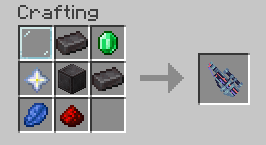
Crafting Recipe

Once you've crafted the Orbital Railgun, hold right click to aim and then left click to fire.

Configuration

Access the config screen through Mod Menu (if installed) to customize:

  • Volume Settings: Adjust the volume for each sound (scope, shoot, equip) from 0.0 to 1.0
  • Enable/Disable Sounds: Toggle individual sound effects on or off

Configuration is stored in config/orbital-railgun-enhanced.json5 in your Minecraft directory.

Installation

Requirements

  • Fabric Loader
  • Fabric API
  • GeckoLib

Steps

  1. Download the correct JAR for your Minecraft version from Releases
  2. Place the JAR file in your mods folder
  3. Make sure all required dependencies are also installed
  4. Launch Minecraft with the Fabric Loader profile

Note: This mod includes server and client functionality. Server-side installation is required if not in Singleplayer!

Issues or Ideas

If you found any issues/bugs or have some ideas for this mod, head to the issue tracker and create a new issue.

We also welcome code contributions! Please see our Contributing Guide for more information on how to contribute.

Credits

  • Original mod: Orbital Railgun by Mishkis
  • Owner of this Mod: KingIronMan2011
  • SFX Maker: HyIsNoob
  • Source code license: MIT (see LICENSE)

👥 Team & Contributors

KingIronMan2011
KingIronMan2011Owner
HyIsNoob
HyIsNoob
Contributor (Sounds)

⚙️ Compatibility

Environment
✅ Client & Server
Loaders
fabric
Minecraft Versions
1.201.20.11.20.21.20.31.20.4

🔗 Links

Modrinth Page