Logo
MINECRAFTBIBLE
Items
Items

All game items

Blocks
Blocks

Building blocks

Mobs
Mobs

Creatures & monsters

Biomes
Biomes

World biomes

Structures
Structures

Generated structures

Recipes
Recipes

Crafting guides

Advancements
Advancements

Achievements

Loot Tables
Loot Tables

Drop rates

Tags
Tags

Item groupings

All Versions
View all data →
Capes
Cape ArchiveNEW

Browse rare Minecon capes, OptiFine capes, and custom capes from players worldwide

Browse

Player Database
Player DatabasePopular

Search any player

Skin Browser
Skin Browser

Browse & download skins

Cape Gallery
Cape GalleryNEW

Minecon & OptiFine capes

Seed Vault
Seed Vault

Curated seeds

Learn

Guides
GuidesNew

Tutorials & tips

Blog
Blog

News & updates

Community

Community Hub
Community HubHub

Posts, discussions & more

All Versions
View community →
Seed Analyzer
Seed Analyzer

World seed analysis

Loot Explorer
Loot Explorer

Drop rates

Crafting Calculator
Crafting Calculator

Material planning

Enchant Calculator
Enchant Calculator

Probability math

Redstone Lab
Redstone Lab

Signal timing

Trading Profit
Trading Profit

Villager ROI

All Versions
View all tools →
Mods
Mods

Browse all mods

Plugins
Plugins

Server plugins

Resource Packs
Resource Packs

Textures & sounds

Shaders
Shaders

Visual enhancements

Datapacks
Datapacks

World logic

Scanner
Mod Intelligence

Scan & analyze any mod

All Versions
View all mods →
Loading...
IntroductionIntroductionVersion HistoryVersion HistoryGuidesGuidesBlog & NewsBlog & News
ItemsItemsBlocksBlocksMobsMobsRecipesRecipesBiomesBiomesStructuresStructuresAdvancementsAdvancementsLoot TablesLoot TablesTagsTags
ModsModsPluginsPluginsResource PacksResource PacksShadersShadersDatapacksDatapacks

MinecraftBible

The Ultimate Wiki

Logo
MINECRAFTBIBLE

The ultimate Minecraft reference. Every item, block, mob, and recipe documented with precision.

Community

  • Player Database
  • Skin Browser
  • Cape Gallery
  • Community Hub
  • Seed Vault

Database

  • Items
  • Blocks
  • Mobs
  • Recipes
  • Biomes
  • Structures

Tools

  • Seed Analyzer
  • Mod Intelligence
  • Crafting Calculator
  • Enchant Calculator

Mods & Packs

  • Mods
  • Plugins
  • Resource Packs
  • Shaders
  • Datapacks

© 2026 MinecraftBible. Not affiliated with Mojang or Microsoft.

PrivacyTermsContact
One Enough Block
ModGPL-3.0-only

One Enough Block

Easily specify replacing one block with another.

24.3K
Downloads
8
Followers
3 months ago
Updated
📦
8
Versions
utilityworldgenforgeneoforge
Download Latestv1.1.3View on Modrinth

📖About One Enough Block

One Enough Block

Does your modpack have three kinds of orange trees or four kinds of silver ore?
Or do you just want to wipe out useless naturally generated ores like copper?

With One Enough Block, you can conveniently specify which blocks should be replaced with others — easily, flexibly, and powerfully.


Main Features

Load Method 1: via configuration file.
Reload using the /reload command.

Path: config/OEB/example.json

[
  {
    "match": [
      "manametalmod:ManaTreeLog",
      "#minecraft:logs"
    ],
    "result": "minecraft:redstone_block"
  },
  {
    "match": ["#minecraft:logs"],
    "result": "minecraft:redstone_block"
  }
]

Load Method 2: via datapack (available since v1.1.0).
Requires OEI as a dependency — note that the structure has changed!

Path: data/oeb/replacements/example.json

[
  {
    "matchBlock": ["#minecraft:logs"],
    "resultBlock": "minecraft:redstone_block"
  }
]

Simply list the block IDs you want to replace in the "match" array, and specify the target block under "result".
The replacement will automatically take effect in-game.

Supports tag-based matching, allowing you to replace all blocks under a tag at once.
Even fluids can be replaced!

Note: Since version 1.1.0, an in-game replacement rule editor is built in!
Press CTRL + R by default to open the UI and enjoy a brain-free, zero-code editing experience.(Switch Function -> Page OEB)


Use Cases

Block replacement occurs when creating worlds or loading new chunks, making it ideal for modifying naturally generated blocks such as ores, plants, or structure blocks.

Replacement also applies to any block placement — when a player places a block, it will be immediately replaced if it matches a rule.

Additionally, existing blocks in the world can be replaced retroactively.
This feature is disabled by default, but can be enabled in the config file.


Future Plans

None for now.
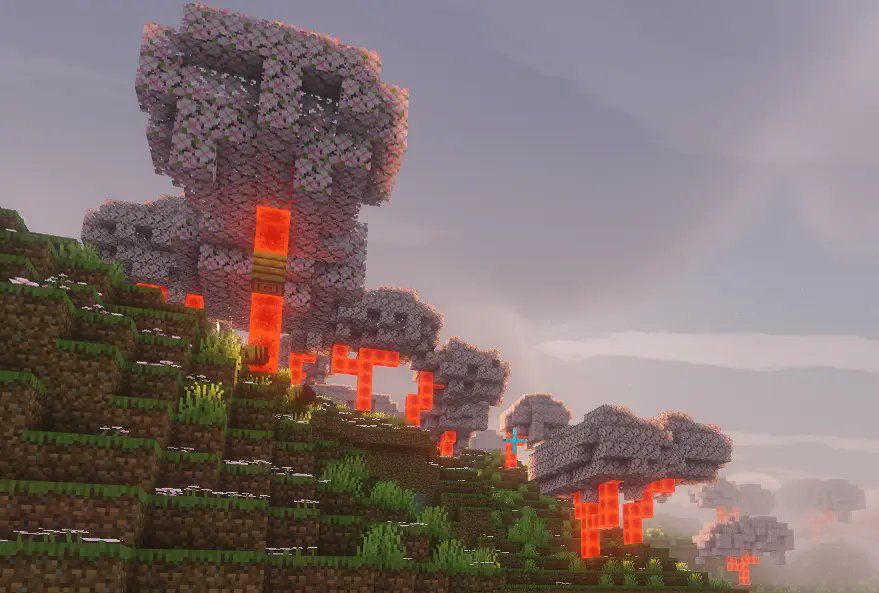

logs -> reastone block

👥 Team & Contributors

MerrySnow
MerrySnowOwner
Flechazo098
Flechazo098
Member
yiran1457
yiran1457
Member

⚙️ Compatibility

Environment
✅ Client & Server
Loaders
forgeneoforge
Minecraft Versions
1.20.1

🔗 Links

Modrinth Page