Logo
MINECRAFTBIBLE
Items
Items

All game items

Blocks
Blocks

Building blocks

Mobs
Mobs

Creatures & monsters

Biomes
Biomes

World biomes

Structures
Structures

Generated structures

Recipes
Recipes

Crafting guides

Advancements
Advancements

Achievements

Loot Tables
Loot Tables

Drop rates

Tags
Tags

Item groupings

All Versions
View all data →
Capes
Cape ArchiveNEW

Browse rare Minecon capes, OptiFine capes, and custom capes from players worldwide

Browse

Player Database
Player DatabasePopular

Search any player

Skin Browser
Skin Browser

Browse & download skins

Cape Gallery
Cape GalleryNEW

Minecon & OptiFine capes

Seed Vault
Seed Vault

Curated seeds

Learn

Guides
GuidesNew

Tutorials & tips

Blog
Blog

News & updates

Community

Community Hub
Community HubHub

Posts, discussions & more

All Versions
View community →
Seed Analyzer
Seed Analyzer

World seed analysis

Loot Explorer
Loot Explorer

Drop rates

Crafting Calculator
Crafting Calculator

Material planning

Enchant Calculator
Enchant Calculator

Probability math

Redstone Lab
Redstone Lab

Signal timing

Trading Profit
Trading Profit

Villager ROI

All Versions
View all tools →
Mods
Mods

Browse all mods

Plugins
Plugins

Server plugins

Resource Packs
Resource Packs

Textures & sounds

Shaders
Shaders

Visual enhancements

Datapacks
Datapacks

World logic

Scanner
Mod Intelligence

Scan & analyze any mod

All Versions
View all mods →
Loading...
IntroductionIntroductionVersion HistoryVersion HistoryGuidesGuidesBlog & NewsBlog & News
ItemsItemsBlocksBlocksMobsMobsRecipesRecipesBiomesBiomesStructuresStructuresAdvancementsAdvancementsLoot TablesLoot TablesTagsTags
ModsModsPluginsPluginsResource PacksResource PacksShadersShadersDatapacksDatapacks

MinecraftBible

The Ultimate Wiki

Logo
MINECRAFTBIBLE

The ultimate Minecraft reference. Every item, block, mob, and recipe documented with precision.

Community

  • Skin Browser
  • Cape Gallery
  • Seed Vault
  • Blog
  • Guides

Database

  • Items
  • Blocks
  • Mobs
  • Recipes
  • Biomes
  • Structures

Tools

  • Seed Analyzer
  • Mod Intelligence
  • Crafting Calculator
  • Enchant Calculator

Mods & Packs

  • Mods
  • Plugins
  • Resource Packs
  • Shaders
  • Datapacks

Site & Legal

  • About
  • Authors
  • Editorial Policy
  • Corrections
  • Contact
  • Privacy Policy
  • Terms of Service
  • DMCA
  • Sitemap

© 2026 MinecraftBible. Not affiliated with Mojang or Microsoft.

PrivacyTermsContact
NoTextureRotations
ModApache-2.0

NoTextureRotations

Prevent Block Texture Rotations

31.0K
Downloads
27
Followers
5 months ago
Updated
📦
16
Versions
decorationgame-mechanicsutilityfabric
Download Latestv1.0.4+1.21.11View on Modrinth

📖About NoTextureRotations

A Fabric mod to prevent coordinate exploits based on texture rotation and position offsets. Or if you prefer how it looks!

Compatible with Vanilla MC, Sodium, and custom texture/resource packs

How the mod works

This mod can either:

  1. Disable block texture rotations and offsets
  2. Replace the random function with a secure implementation, which will retain the normal visual feel of the game

Configuration

There are two ways to configure the mod in-game:

  1. Install YetAnotherConfigLib and ModMenu
  2. Install Sodium. A page for NoTextureRotation settings will be added to the Video Settings.

The configuration file is located at: .minecraft/config/no-texture-rotations.json

What's the exploit?

Many blocks like grass, dirt, and stone have variations that rotate or change their textures slightly.

Texture variants are not inherently bad, they make the game visually more interesting as they prevent blocks from looking "same-y" when many are next to each other.
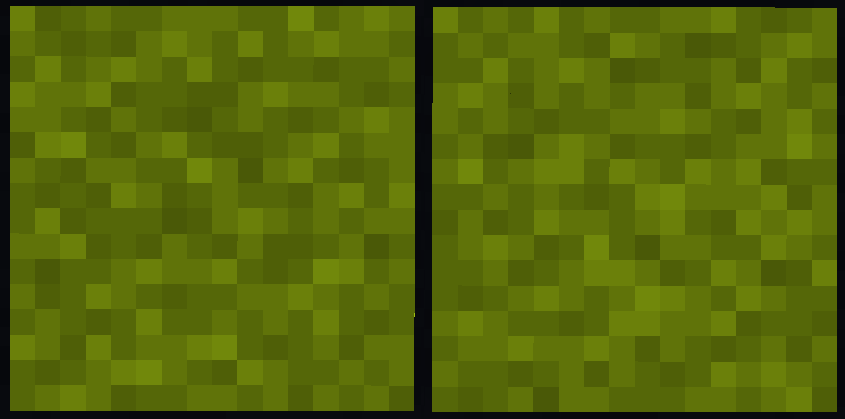
Example

The problem is that the "random" number used to select the variant is seeded by the block's position in-game. No world seed is required.

Offsets works similarly, some blocks like flowers offset their position from the center of the block with a "random" offset.

Any screenshots or videos that show examples of these blocks are susceptible to an attacker cracking the block coordinates.

On anarchy servers, this can be particularly powerful - leading to bases with images or videos shared being found.

This is not a new discovery, and the method has been known since at least before 2018 and is still regularly used today
in reversing panorma seeds. Example: https://youtu.be/gE1dMNCyofs?t=57

There are multiple public tools to perform this:

  • https://github.com/19MisterX98/TextureRotations
  • https://github.com/coolmann24/TextureFinderJava

👥 Team & Contributors

rfresh2
rfresh2Owner

⚙️ Compatibility

Environment
💻 Client-side
Loaders
fabric
Minecraft Versions
1.21.11

🔗 Links

Modrinth Page