Logo
MINECRAFTBIBLE
Items
Items

All game items

Blocks
Blocks

Building blocks

Mobs
Mobs

Creatures & monsters

Biomes
Biomes

World biomes

Structures
Structures

Generated structures

Recipes
Recipes

Crafting guides

Advancements
Advancements

Achievements

Loot Tables
Loot Tables

Drop rates

Tags
Tags

Item groupings

All Versions
View all data →
Capes
Cape ArchiveNEW

Browse rare Minecon capes, OptiFine capes, and custom capes from players worldwide

Browse

Player Database
Player DatabasePopular

Search any player

Skin Browser
Skin Browser

Browse & download skins

Cape Gallery
Cape GalleryNEW

Minecon & OptiFine capes

Seed Vault
Seed Vault

Curated seeds

Learn

Guides
GuidesNew

Tutorials & tips

Blog
Blog

News & updates

Community

Community Hub
Community HubHub

Posts, discussions & more

All Versions
View community →
Seed Analyzer
Seed Analyzer

World seed analysis

Loot Explorer
Loot Explorer

Drop rates

Crafting Calculator
Crafting Calculator

Material planning

Enchant Calculator
Enchant Calculator

Probability math

Redstone Lab
Redstone Lab

Signal timing

Trading Profit
Trading Profit

Villager ROI

All Versions
View all tools →
Mods
Mods

Browse all mods

Plugins
Plugins

Server plugins

Resource Packs
Resource Packs

Textures & sounds

Shaders
Shaders

Visual enhancements

Datapacks
Datapacks

World logic

Scanner
Mod Intelligence

Scan & analyze any mod

All Versions
View all mods →
Loading...
IntroductionIntroductionVersion HistoryVersion HistoryGuidesGuidesBlog & NewsBlog & News
ItemsItemsBlocksBlocksMobsMobsRecipesRecipesBiomesBiomesStructuresStructuresAdvancementsAdvancementsLoot TablesLoot TablesTagsTags
ModsModsPluginsPluginsResource PacksResource PacksShadersShadersDatapacksDatapacks

MinecraftBible

The Ultimate Wiki

Logo
MINECRAFTBIBLE

The ultimate Minecraft reference. Every item, block, mob, and recipe documented with precision.

Community

  • Skin Browser
  • Cape Gallery
  • Seed Vault
  • Blog
  • Guides

Database

  • Items
  • Blocks
  • Mobs
  • Recipes
  • Biomes
  • Structures

Tools

  • Seed Analyzer
  • Mod Intelligence
  • Crafting Calculator
  • Enchant Calculator

Mods & Packs

  • Mods
  • Plugins
  • Resource Packs
  • Shaders
  • Datapacks

Site & Legal

  • About
  • Authors
  • Editorial Policy
  • Corrections
  • Contact
  • Privacy Policy
  • Terms of Service
  • DMCA
  • Sitemap

© 2026 MinecraftBible. Not affiliated with Mojang or Microsoft.

PrivacyTermsContact
My Little Plushie
ModLicenseRef-All-Rights-Reserved

My Little Plushie

Adds plushies based on "My Little Pony: Friendship is Magic".

2.7K
Downloads
12
Followers
3 months ago
Updated
📦
10
Versions
adventuredecorationequipmentfabric
Download Latestv0.8.0+mc1.21.1+fabricView on Modrinth

📖About My Little Plushie

A room with a red double-bed at the center is surrounded by plushies, from left to right: Rainbow Dash, Rarity, Twilight Sparkle, Pinkie Pie, Applejack, and Fluttershy. Above is a large, pink "MY LITTLE PLUSHIE" logo.

✨ The Gift of Friendship ✨

The My Little Plushie mod adds a multitude of candy-colored pony plushies based on the "My Little Pony: Friendship is Magic" series.

🎊 Currently Available Plushies

Main Plushies
  • Twilight Sparkle
  • Rainbow Dash
  • Pinkie Pie
  • Rarity
  • Applejack
  • Fluttershy
  • Princess Celestia
  • Princess Luna
  • Nightmare Moon
  • Starlight Glimmer
  • Trixie Lulamoon
  • The Great and Powerful Trixie
  • Apple Bloom
  • Sweetie Belle
  • Scootaloo
  • Princess Cadance
  • Shining Armor
  • Princess Flurry Heart
  • Queen Chrysalis
Supporting Plushies
  • Big McIntosh
  • Granny Smith
  • Cheerilee
  • Mayor Mare
  • Zecora
  • Mr. Carrot Cake
  • Mrs. Cup Cake
Background Plushies
  • Nurse Redheart
  • Bon Bon
  • Lyra Heartstrings
  • Rose
  • Daisy
  • Lily Valley
  • Derpy
  • Derpy Express
  • Festive Derpy
  • Berry Punch
  • Octavia Melody
  • Vinyl Scratch
  • DJ Pon-3

A huge collection of the available plushies in the mod organized in rows.

💖 Plushie Features

Decoration & Properties

The main purpose of Plushies are for decorating and collecting. However, they also have special properties when placed in your world.

In-World Properties
  • Earth Ponies help bees pollinate
  • Pegasi prevent fall damage
  • Unicorns and Alicorns can boost enchanting tables like bookshelves

Hugs & Effects

Hugging your plushie will give special effects. This can be helpful while you are exploring your world or on an adventure!

Hug Effects (Configurable)

All Plushies give a "Friendship" effect which is similar to Regeneration

  • Earth Ponies: Strength
  • Pegasi: Slow Falling
  • Unicorns: Absorption
  • Alicorns: Strength, Slow Falling, Absorption, Glowing
  • Zebras: Regeneration, Health Boost; Removes Poison, Weakness, Slowness
  • Changelings: Invisibility, Slow Falling

Repairing Plushies

Combining two of the same plushies will repair it like any other tool. Anvils allows the use of any kind of wool.
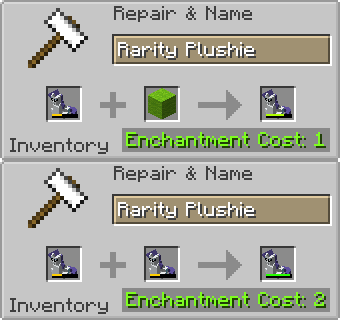
An anvil repair recipe with a damaged Rarity Plushie as the first item. The repair ingredient cycles between a damaged Rarity Plushie and Lime Green Wool.

🎁 Gift Boxes & Getting Plushies

Obtain and open Gift Boxes to get plushies. Opening a gift box will give a random plushie.

All plushies have an equal chance to drop from a Gift Box.

Exploration

By exploring structures you can find Gift Boxes in loot chests. Gift Boxes generate in dungeons, strongholds, end cities, ancient cities, pillager outposts, and woodland mansions.

Crafting & Plushie Recycling

You can craft your own Gift Box instead of finding them in structures. You can also recycle four extra plushies of any kind into a Gift Box.

On the left is the Gift Box crafting recipe which showcases a 3x3 crafting grid with a dropper in the center surrounded by eight amethyst shards. On the right is a shapeless crafting recipe where four plushies of any kind are crafted together to be recycled into a new Gift Box.

🔧 Configuration

Configure the mod by editing the config/mylittleplushie-config.properties file.

  • Enable/Disable hug effects
  • Adjust hug effect duration and power
  • Adjust plushie durability

If the config changes in future versions, you may need to delete the config to allow the mod to generate a new config file the next time you start the game.

You can also do this to reset the config if necessary.

🎆 Other Notes

Thank You for checking out my mod!

Shoutout to the other Pony Content Mods:

  • Mine Little Pony
  • Unicopia
  • Ponified

👥 Team & Contributors

RareMiyagi
RareMiyagiOwner

⚙️ Compatibility

Environment
✅ Client & Server
Loaders
fabric
Minecraft Versions
1.21.1

🔗 Links

Modrinth Page